EXERCISE MONITOR INSTRUCTION MANUAL
■KDY FUNCTIONS:
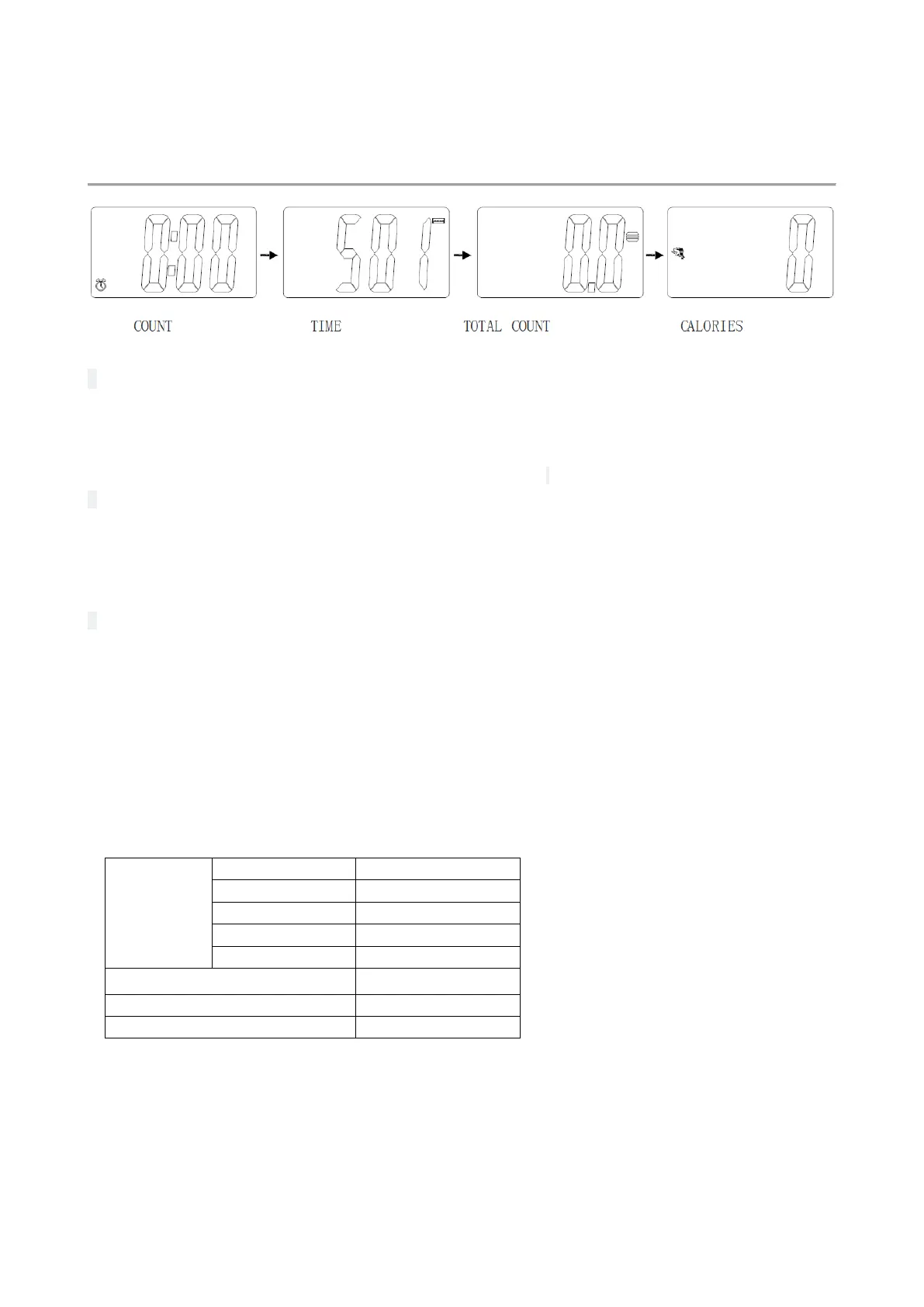
Pressing the MODE key to select and lock on a function for following sequence:
SCAN→ COUNT→ TIME→ TOTAL COUNT→ CALORIES
Pressing and hold the MODE key with 3 seconds to reset the value to zero(without TOTAL COUNT).
Only when the battery is replaced, the total number will be cleared;
■SLEEP MODE:
The system turns on when the MODE key is depressed or when the system sensed a signal input from
the sensor.
The system turns off automatically when the sensor has no signal input or no key are pressed for
approximately 4 minutes.
■FUNCTIONS:
SCAN : Display changes according to the next diagram every 6 seconds.
COUNT: The current count will be displayed when starting exercise.
TIME: The total working times will be displayed when starting exercise.
TOTAL COUNT: The total count which this function is refers to from battery capacity period runs.
CALORIES: The calorie burned will be displayed when starting exercise.
Specification



 To Previous Page