05 Software Download and Installation on PC
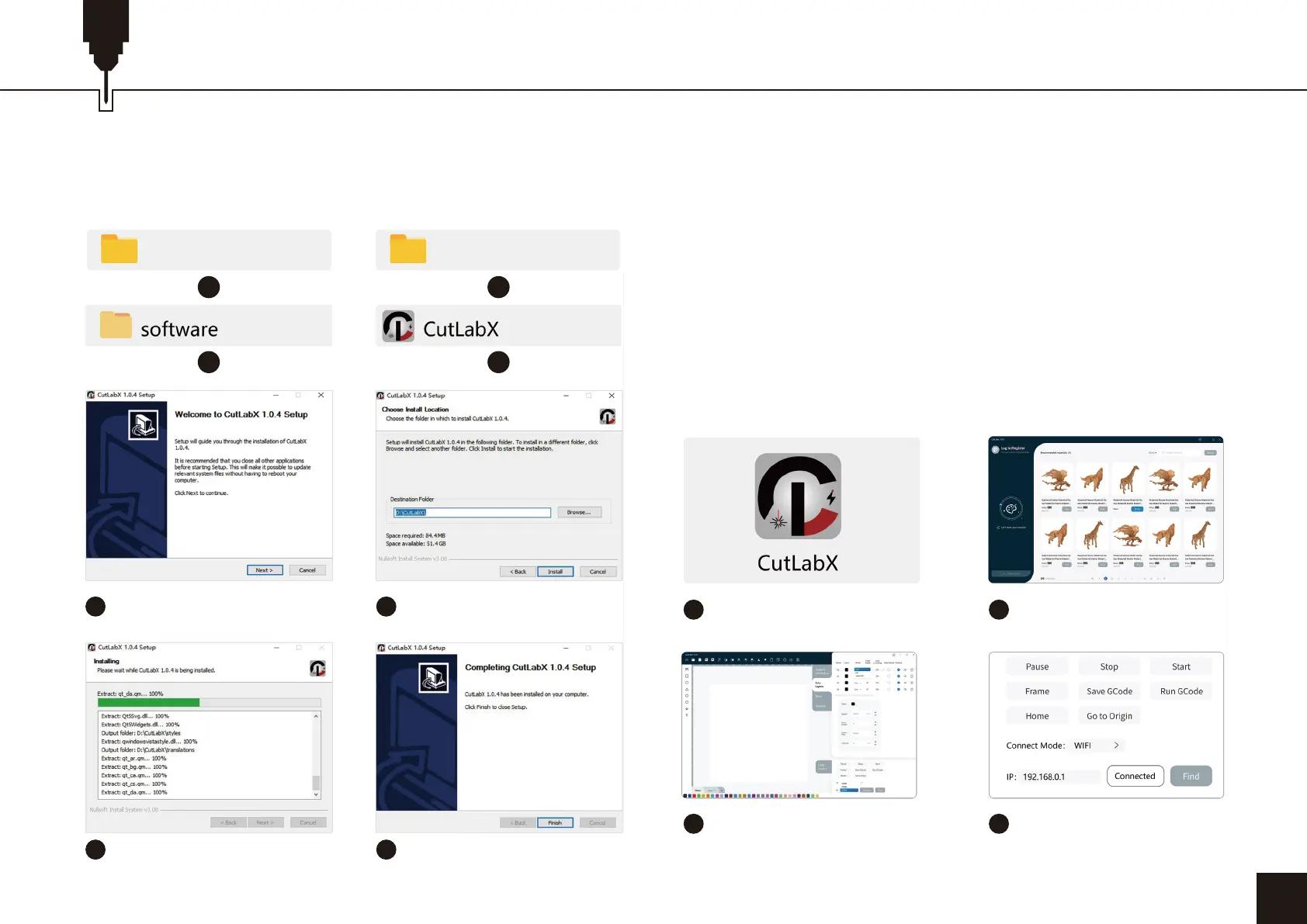
3. Path to Install Software:
Double-click the TF card data file/Windows/Software/CutLabX/
and follow the prompts to complete the installation.
Tip:
CutlabX installation processes, such as pop-up antivirus soft-ware
or housekeeper prompts the risk, please choose to allow the
program all operations, CutlabX file is a Win system installation
package if it is misjudged as a suspicious file, that is, the successful
completion of the software installation!
4. Online Operation:
Double-click on the software icon - enter the home page, click
on the beginning of the creation - select the appropriate com
and connect - connected to the machine successfully!
23
1 2
3 4
5
Double-click CutLabX
installation
6
Select the installation
location and click “Install”
1
Double click the
software icon
2
Go to the home page
and click to start creating
3
Choose the appropriate
port and connect
4
Shows that the connection
is successful
7
Installation process
8
The installation is complete
07_So�ware_Cutlabx Windows


 To Next Page
 Loading...