21
Vapodest 45s
5 Turn on apparatus and operation
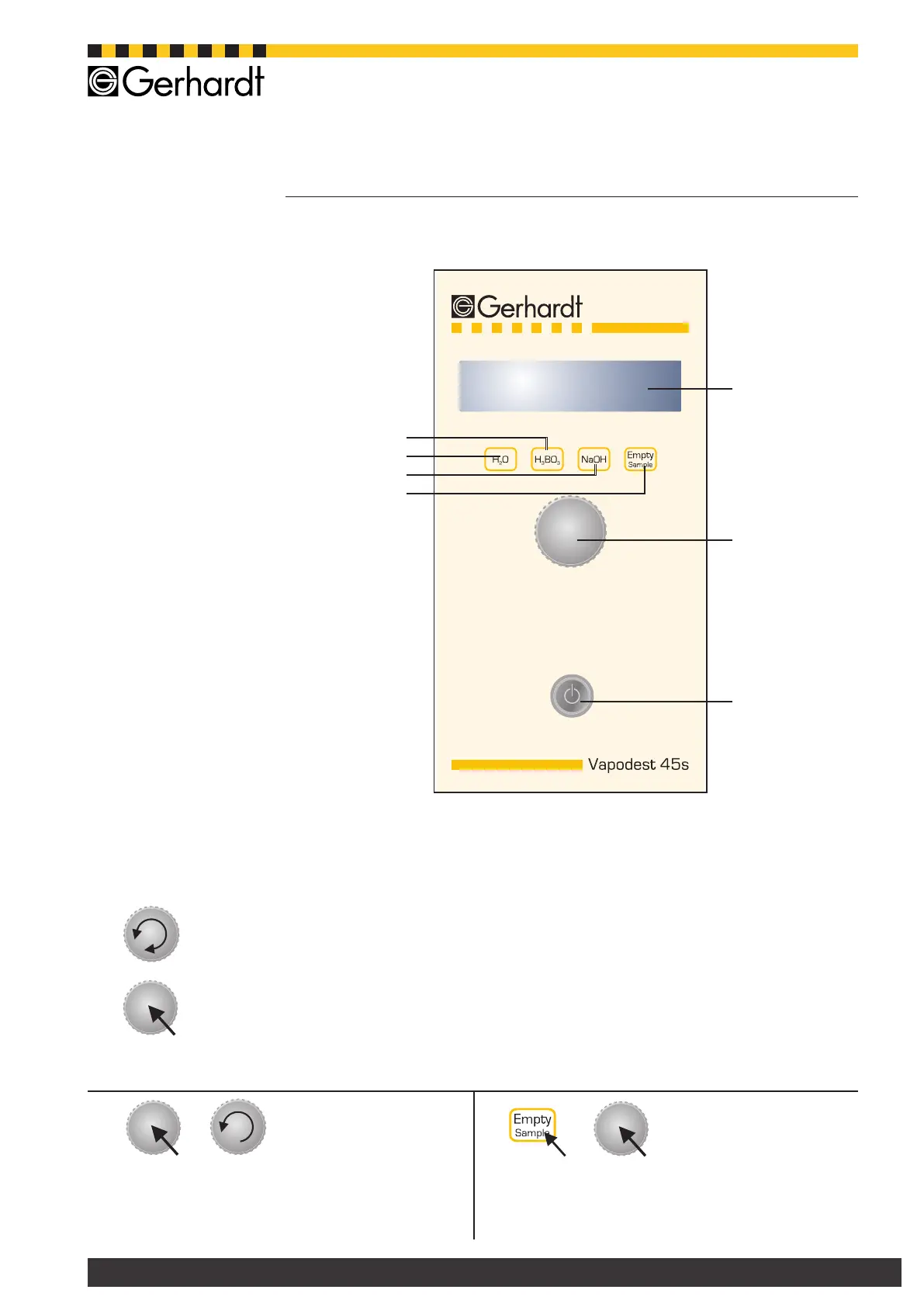
5.2. Control panel Vapodest
Fig. 6.1:
Operator panel
Vapodest 45s
4
6
1
2
3
5
1. Display
Shows the current status of the instrument
2. Operator button
Turn the operator button =
select menu or increase
respectively lower the amount
Press the operator button =
conrmselection
Keep the push button pressed and turn it back in
counter clockwise direction = back to main menu
(exit function)
3. Mains switch
Turn instrument on or off
4. Key "Empty Sample"
Manual suction sample tube
5. Key "NaOH"
Manual addition NaOH
6. Key "H
2
O"
Manual addition H
2
O
7. Key "H
3
BO
3
"
Manual addition H
3
BO
3
Press key ‘Empty Sample’ and push button simulta-
neously = manual suction of receiver (only for Vap
45s version with external titrator)
+
7
+



 To Next Page