3)Minute position indicator ashes, press until the indicator displays 20, then press clock button to
conrm.
4. Function Setting
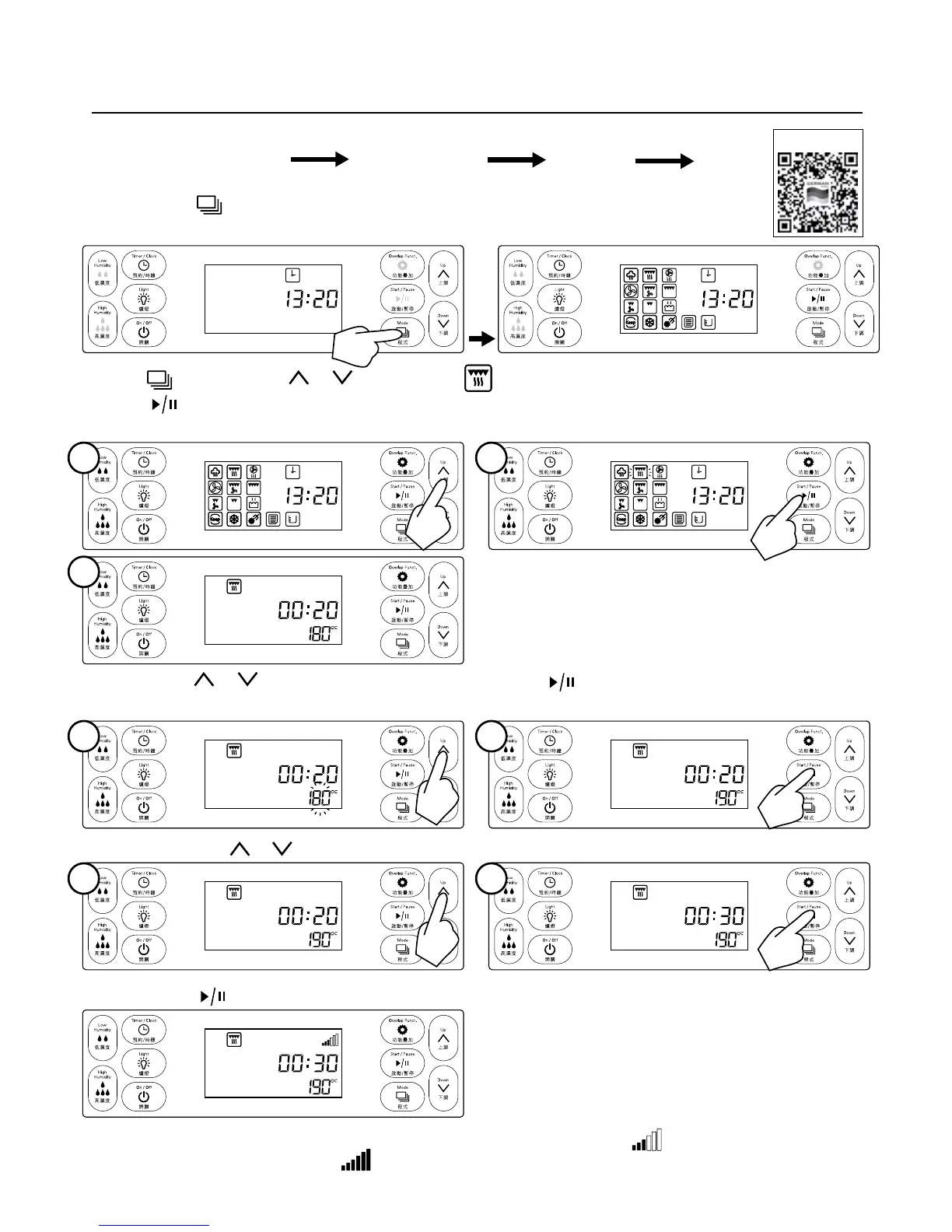
Procedure: Function setting Temperature setting Time setting Conrm
E.g. Set steam grill mode at 190°C for 30 minutes
Step1: Press Mode button under standby mode, and turn to icon selecting interface.
Step 3: Then press
or to set cooking time;
Step 4: Press
start/pause button to conrm, cooking mode starts.
Display: After the appliance starts working, working status indicator shows:
When the appliance reaches
set temperature, indicator shows:
Press Mode button or or button, choose top steam grill mode, the chosen icon ashes,
press start/pause button to conrm, and then set cooking temperature. LCD screen shows the default
temperature with temperature indicator ashes:
Operating Instruction
Step2: Press or button to set cooking temperature, press start/pause button to conrm, then set
the cooking temperature: LCD screen shows default time and ash.
1
1
1
2
2
2
3
Video Tutorial


 To Next Page