P.10 P.11
Operating InstructionsOperating Instructions
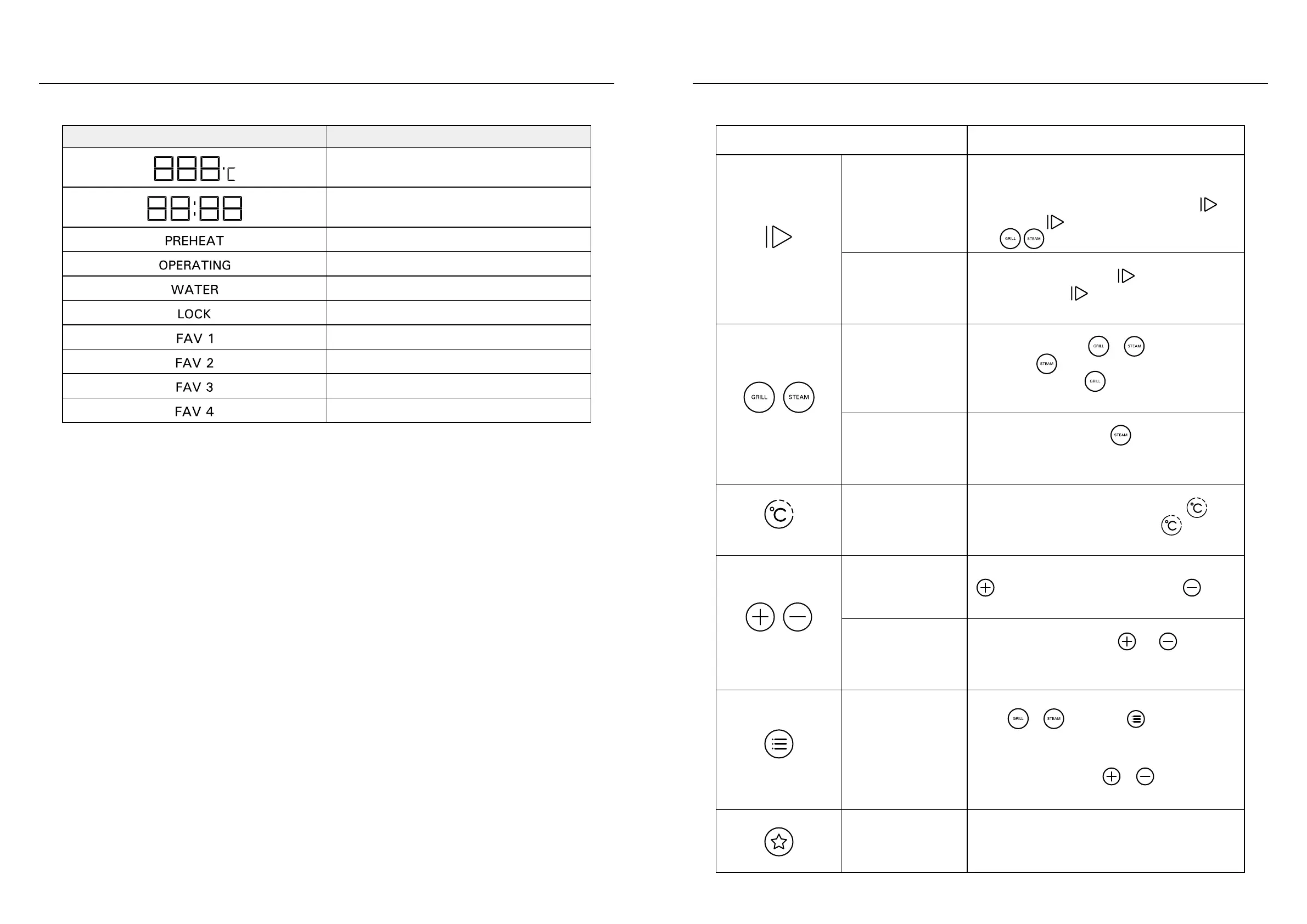
ICON FUNCTION
Sleep Mode/Standby
Mode
When product is not in operation, or when product is
paused, if product does not receive any command in 5
minutes, it will automatically enter Sleep Mode, will
light up; press to enter into Standby Mode, at this
time will light up.
Start/Pause/Cancel
During cooking process, press
to pause or restart
cooking. Long-press 3 seconds will cancel cooking
and return the product to Standby Mode.
Steam Function/Grill
Function
In Standby Mode, press
or to select desired
mode; press repeatedly to cycle among the 3
steam functions; press repeatedly to cycle among
the 8 Grill functions.
Steam Clean Function
In Standby Mode, long-press
3 seconds to enter
into Steam Clean Function. Default cleaning time is 25
minutes.
Temperature/Time
After selecting cooking mode, user can press
once
to adjust cooking temperature, or press twice to
adjust cooking time.
Up/Down
When adjusting cooking temperature or time, press
to increase temperature or time, press to
decrease temperature or time.
Child Lock
During cooking process, press
and
simultaneously for 3 seconds to engage or cancel Child
Lock Function.
Preset Recipe Function
Press
or , then press to enter into
Preset Steam Recipes (S1-S28) or Preset Grill Recipes
(P1-P40) (for details, please refer to Preset Recipes
Menu on P.16). Then press or to select desired
recipe code.
Favourite
Save Customized Cooking Settings / select previously
saved Customized Cooking Settings (for details, see
P.14 Save Customized Cooking Settings)
ICON FUNCTIONS
Temperature Display
Time Display
Preheating
Operating
Low Water Tank
Child Lock
Saving Location 1
Saving Location 2
Saving Location 3
Saving Location 4
LED DISPLAY ICONS CONTROL KEYS


 To Next Page