P.12 P.13
Operating Instructions
1. Enter into Standby Mode
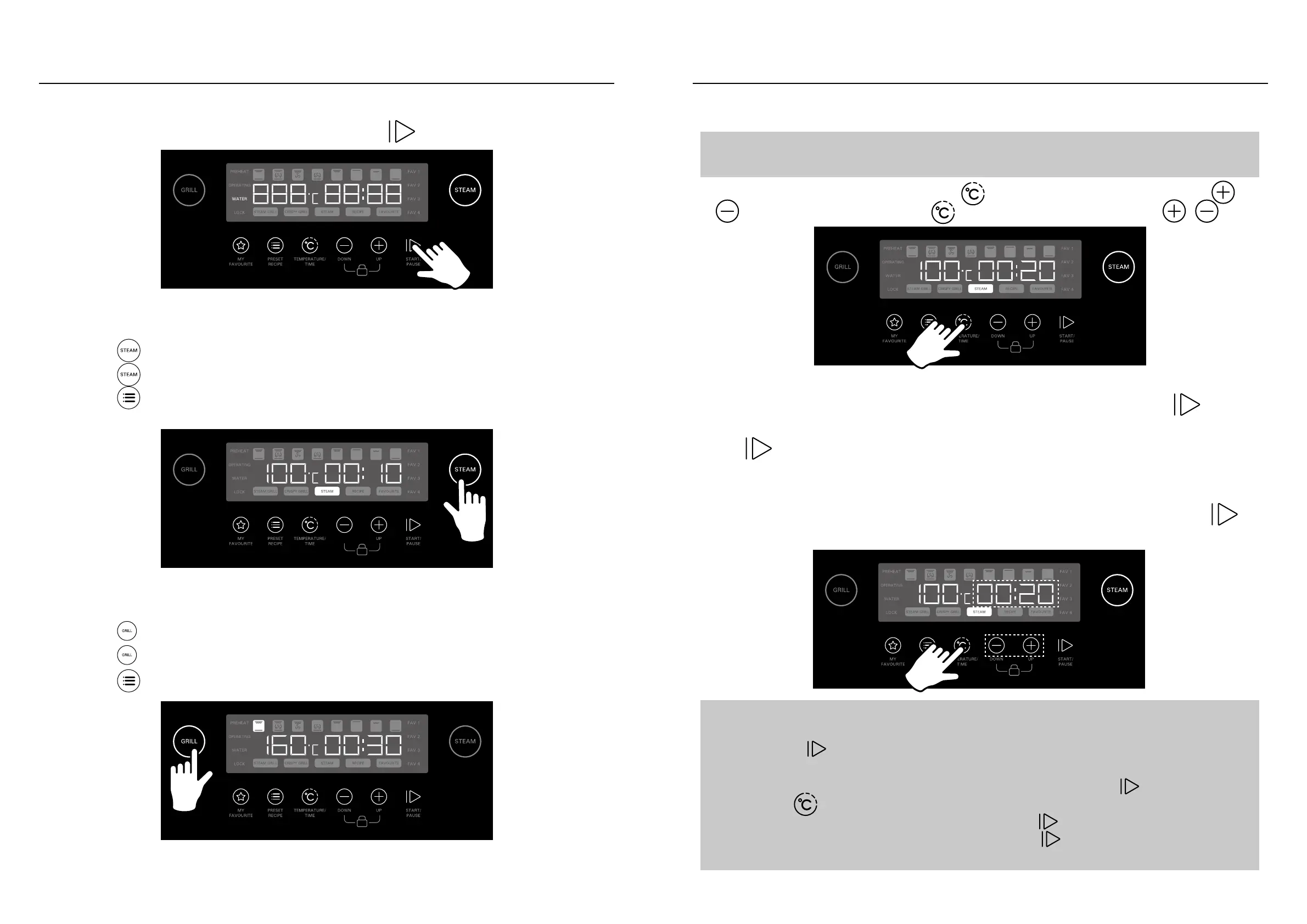
When the product is connected to the power source, press to enter into Standby Mode.
2.1. Steam Function & Preset Steam Recipes
• Press
to select Steam Function, then:
• Press
repeatedly to cycle among the 3 Steam modes; or
• Press
to select Preset Steam Recipes S1-S28 (for details, see P.16 Preset Recipes.)
2.2. Grill Function & Preset Grill Recipes
• Press
to select Grill/Bake Function, then:
• Press
repeatedly to cycle among the 8 Grill modes; or
• Press
to select Preset Grill Recipes P1-P40 (for details, see P.16 Preset Recipes.)
Operating Instructions
3. Set Temperature & Time
Note:
If using Preset Recipe Function, skip this step and proceed directly to Step 4.
After selecting desired cooking mode, press
to enter into Temperature Setting, press
to adjust temperature, then press to enter into Time Setting, and press to
adjust time.
Note:
• If food item is placed in oven before preheating the oven, after oven reaches preheat temperature,
directly press
to start cooking. Alternatively, oven will automatically start cooking after 1 min-
ute.
• During cooking, if user wishes to adjust temperature or cooking time, press
to pause cooking,
then press
to adjust temperature and time (see Step 3).
• During cooking, if user wishes to open the oven door, press
to pause cooking first.
• During cooking, if user wishes to cancel cooking, long-press
3 seconds and product will stop
cooking and return to Standby Mode.
4. Start Cooking
After setting temperature and time, or after selecting desired Preset Recipe, press
to start
cooking. The oven will start to preheat. After reaching preheat temperature, buzzer will buzz,
and
icon will flash:
• If using Steam Function, open oven door and place in food item. Close oven door, cooking-
will automatically commence.
• If using Grill Function, open oven door and place in food item. Close oven door, press
to commence cooking.


 To Next Page