20
SMART SOS USER MANUAL
8. THE SOS FUNCTION
→
→
→
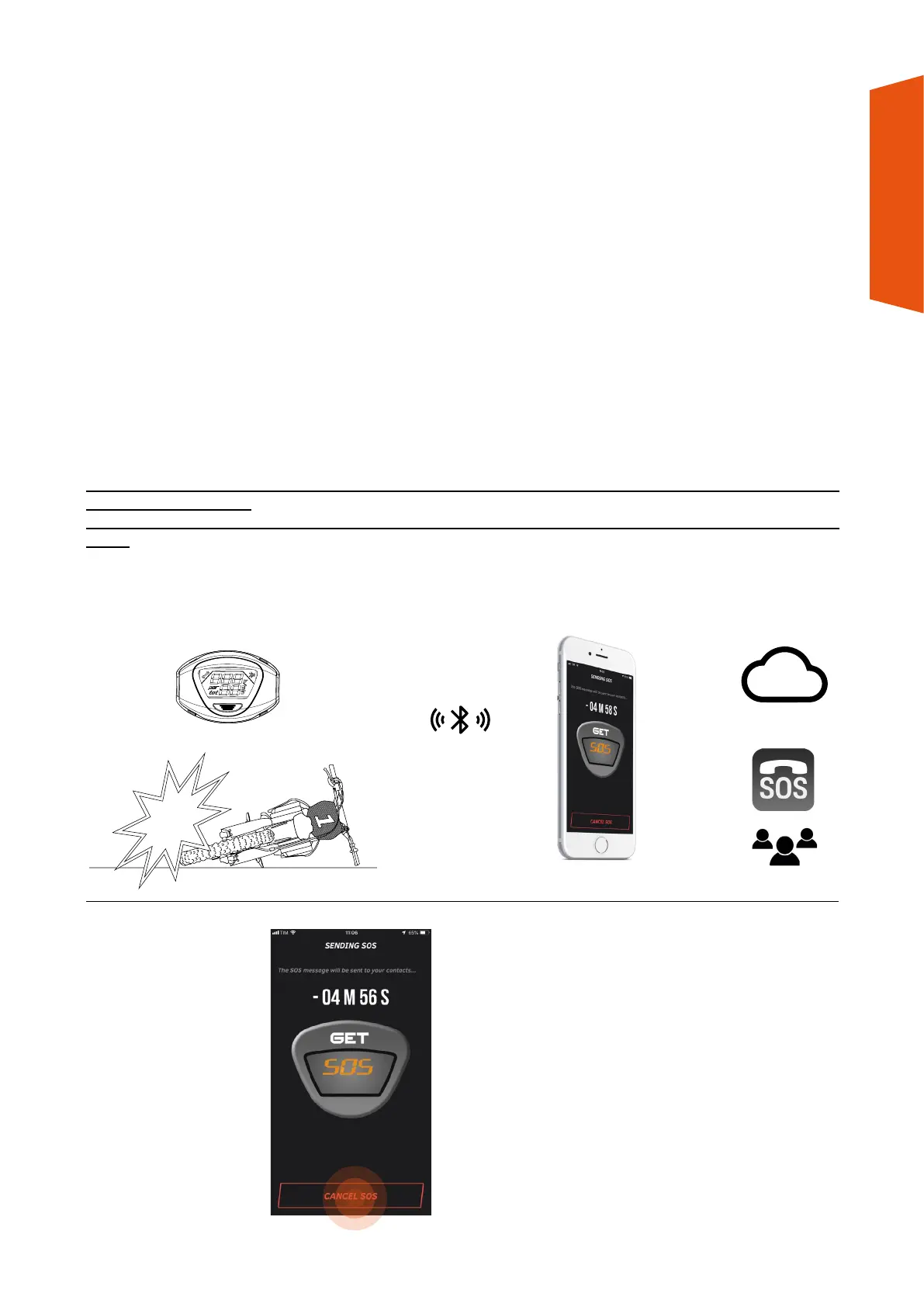
In the event of a false
alarm, you can stop sending
within 5 minutes
by pressing the CANCEL
SOS button on the GET
SMART SOS app.
The GET SMART SOS app allows you to set up the sending of texts and/or emails to certain phone numbers/
email addresses in the event of a fall.
The message sent contains the GPS coordinates of where the event occurred: enable the GET SMART SOS app
when accessing the GPS position to use the service properly.
Messages and e-mails will be sent in the event of a fall, provided that the device connected to the app has been
correctly calibrated (see chapter 5 point 11). To use the SOS function, you must configure the recipients of the
texts and/or emails via the GET SMART SOS app.
THE SOS FUNCTION REQUIRES THE DEVICE ON THE BIKE TO BE CONNECTED TO THE GET SMART SOS APP
(see chapter 6, point 1).
THE GET SMART SOS APP MUST BE OPEN (OR RUNNING IN BACKGROUND) FOR THE SOS FUNCTION TO BE
USED.
In the event of a fall, the GET SMART SOS app, after one minute, will send you a series of notifications that the
SOS alarm has been activated and, after 5 minutes, all recipients will receive SOS alerts.


 To Next Page