The ROMs has to have the suffix .bin or .rom, as in mykernal.bin, mybasic.bin, mychar.bin.
1. Browse to your Kernal ROM image and press Enter.
2. Choose Flash as Orig. Kernal ROM.
3. Browse to your Basic ROM image and press Enter.
4. Choose Flash as Orig. Basic ROM.
5. Browse to your Character ROM image and press Enter.
6. Choose Flash as Orig. Character ROM.
7. Push F5 and choose Reboot C64.
Real SID on Board revisions 1.1, 1.2 and 1.2a
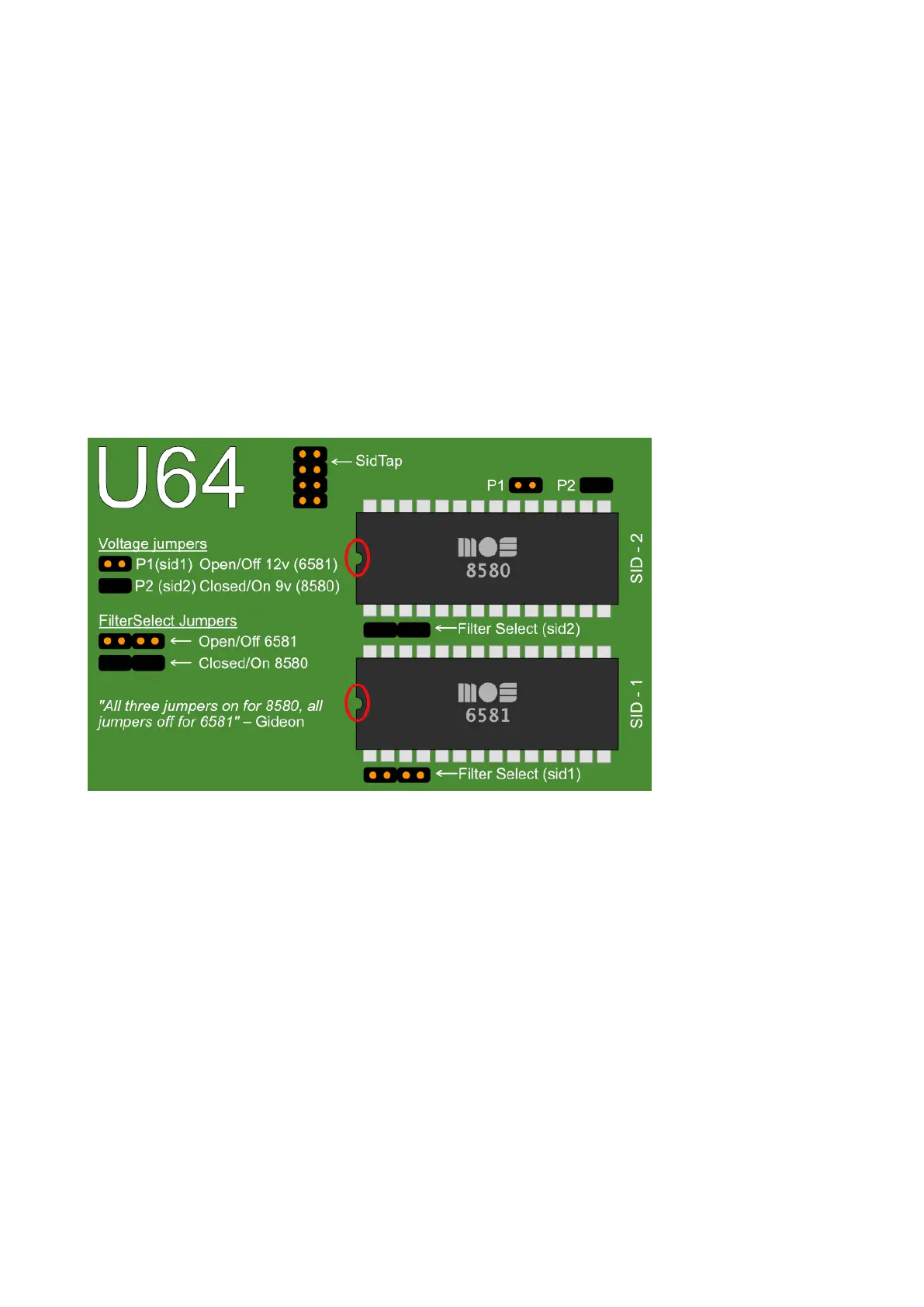
If you’re installing real SID chips, you have to set the jumpers accordingly. If you don’t have or
don’t want to install SID chips you can use the built in ‘UltiSID’.
Voltage Jumpers:
P1: SID 1 Voltage
P2: SID 2 Voltage
On/Closed: 9V (8580)
Off/Open: 12V (6581)
Filter Select Jumpers:
On/Closed: 8580
Off/Open: 6581
In Firmware revisions before V1.22, it is required to set your SID types in the Ultimate-II+ menu:
Short press on power button
F2
U64 specific settings
Set your types at
SID in socket 1
and
SID in socket 2



 To Next Page