
 Need help?
Do you have a question about the GIGA-BYTE TECHNOLOGY A520 AORUS ELITE and is the answer not in the manual?
Safety guidelines before installing hardware components to prevent damage.
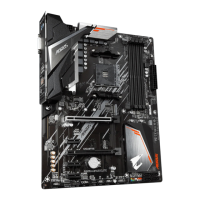
Detailed specifications of motherboard components like CPU, memory, and ports.
Step-by-step guide for correctly installing the CPU into the socket.
Instructions for installing RAM modules, including dual channel configuration.
Guidelines for safely installing expansion cards into available slots.
Identification and purpose of external ports on the motherboard's back panel.
Overview of internal motherboard headers and their functions for system connections.
Initial screen displayed when the computer boots, showing system information.
Overview of the BIOS main menu, navigation, and available modes.
How to set and use the Favorites feature for quick access to BIOS options.
Settings for CPU overclocking, memory tuning, and performance adjustments.
Configuration options for power management, I/O ports, and system behavior.
Displays system information and allows language, date, and time settings.
Configuration of system boot order, boot devices, and boot-related features.
Options for saving or discarding BIOS changes and loading default settings.
Guide for setting up RAID arrays on the motherboard's SATA controllers.
Steps to install essential motherboard drivers using the provided disc.
 General
| Form Factor | ATX |
|---|---|
| Socket | AM4 |
| Chipset | AMD A520 |
| Memory Slots | 4 |
| Max Memory Capacity | 128 GB |
| PCIe x16 | 1 |
| PCIe x1 | 2 |
| Storage | 6 x SATA 6Gb/s |
| USB Ports | Rear: 4 x USB 3.2 Gen 1, 2 x USB 2.0; Front: 2 x USB 3.2 Gen 1, 2 x USB 2.0 |
| LAN | Realtek GbE LAN |
| RAID Support | RAID 0, RAID 1, RAID 10 |
| M.2 Slots | 1 x M.2 slot (PCIe 3.0 x4) |
| Memory Speed | 4733(O.C.) / 4600(O.C.) / 4400(O.C.) / 4000(O.C.) / 3600(O.C.) / 3333(O.C.) /3200 / 2933 / 2667 / 2400 / 2133 MHz |








 To Next Page