
 Need help?
Do you have a question about the GIGA-BYTE TECHNOLOGY B660 AORUS MASTER and is the answer not in the manual?
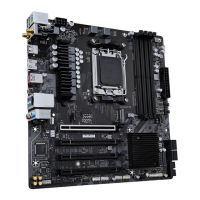
Diagram of the motherboard's components and connectors.
Essential safety guidelines and procedures before installing hardware.
Detailed technical specifications of the motherboard's components.
Step-by-step guide for installing the CPU and its cooler.
Visual guide to CPU orientation and socket alignment.
Step-by-step instructions for installing the CPU.
Steps for installing the CPU cooler and connecting the fan.
Instructions for installing RAM modules and configuring dual-channel memory.
Procedure for installing expansion cards into PCIe slots.
Description of the motherboard's rear I/O ports.
Lists and diagrams internal motherboard connectors.
Key assignments for BIOS and utilities.
Access BIOS Setup or Q-Flash utility.
Select boot device without entering BIOS Setup.
Access Q-Flash utility directly.
Steps for installing the operating system, including RAID setup.
Guide to installing drivers and GIGABYTE applications via APP Center.
Instructions for setting up RAID arrays.
FCC compliance information for the device.
Guidelines for antenna usage and RF exposure.
Warning about using wireless devices near explosives.
Caution regarding aircraft use of wireless devices.
Industry Canada compliance statement.
Caution for using IEEE 802.11a wireless LAN indoors.
CE compliance information for the EU.
Statement regarding RoHS compliance.
Statement regarding WEEE directive compliance.
Explanation of the WEEE symbol.
Information on product recycling.
Wireless statement for Korea.
Wireless statement for Japan.
Overview of wireless module country certifications.
Country-specific approvals for the AX201NGW wireless module.
Country-specific approvals for the AX200NGW wireless module.
Country-specific approvals for the AX211NGW wireless module.
Link to GIGABYTE's online support portal.
 General
| Form Factor | ATX |
|---|---|
| CPU Socket | LGA 1700 |
| Chipset | Intel B660 |
| Memory Type | DDR5 |
| Memory Slots | 4 |
| Maximum Memory | 128 GB |
| Bluetooth | Bluetooth 5.2 |
| Audio | Realtek ALC1220-VB CODEC |
| Memory Support | DDR5 6000(O.C.) / 5800(O.C.) / 5600(O.C.) / 5400(O.C.) / 5200(O.C.) / 4800 MHz |
| PCIe x1 Slots | 2 |
| Storage Interfaces | 3 x M.2 Socket (Key M) 4 x SATA 6Gb/s |
| LAN | 2.5 GbE |
| Wi-Fi | Intel Wi-Fi 6E |
| USB Ports (Rear) | 1x USB 3.2 Gen2x2 Type-C, 3x USB 3.2 Gen2, 4x USB 3.2 Gen1, 2x USB 2.0 |
| RGB Headers | 2x ARGB, 2x RGB |









 To Next Page