
 Need help?
Do you have a question about the GIGA-BYTE TECHNOLOGY GA-B250M-DS3H and is the answer not in the manual?
Guidelines for safely handling and installing motherboard components to prevent damage.
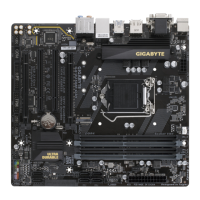
Details the technical specifications of the motherboard, including CPU, memory, and expansion slots.
Step-by-step instructions for correctly installing the Central Processing Unit (CPU) onto the motherboard socket.
Instructions for installing RAM modules, including dual channel configuration details.
Guidance on how to install expansion cards into the motherboard's available slots.
Identifies and describes the connectors located on the motherboard's rear I/O panel.
Details the various internal headers and connectors found on the motherboard for system components.
Description of the initial logo screen displayed during the computer boot process.
Manual Intelligent Tweaker section for advanced system tuning and overclocking.
Provides system information, including motherboard model, BIOS version, and date.
Covers various BIOS settings related to boot configuration, security, and boot order priorities.
Configuration options for onboard devices such as LAN, audio, USB, and serial/parallel ports.
Settings related to the motherboard's chipset, including graphics, audio, and timing controls.
Controls for power management features, including AC BACK, wake-up events, and system power states.
Options for saving BIOS changes, loading defaults, and exiting the BIOS setup utility.
Instructions on how to install motherboard drivers and software using the provided driver disk.
Information regarding regulatory compliance, environmental directives, and safety notices.
Contact information for GIGABYTE customer support and website resources.
 General
| Form Factor | Micro ATX |
|---|---|
| Socket | LGA 1151 |
| Chipset | Intel B250 |
| Memory Type | DDR4 |
| Max Memory Supported | 64GB |
| Memory Standard | DDR4 2400/2133 MHz |
| SATA 6Gb/s Ports | 6 |
| M.2 Slots | 1 |
| PCI Express x16 Slots | 1 |
| PCI Express x1 Slots | 2 |
| USB 2.0 Ports | 6 (2 on back panel, 4 via internal headers) |
| Audio | Realtek ALC887 codec |
| LAN | Realtek GbE LAN |
| Integrated Graphics | Yes |
| Memory Slots | 4 x DIMM |
| RAID Support | Yes (RAID 0, RAID 1, RAID 5, and RAID 10) |





 To Next Page