
 Need help?
Do you have a question about the GIGA-BYTE TECHNOLOGY GA-X99-Phoenix SLI and is the answer not in the manual?
Details essential safety and handling procedures to prevent damage during hardware installation.
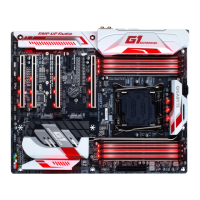
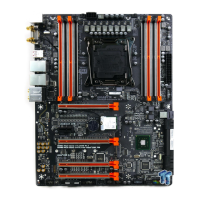
Lists key technical specifications for the motherboard components and features.
Provides instructions for installing the CPU and its associated cooler.
Guides on how to install memory modules into the motherboard's DIMM slots.
Instructions for installing expansion cards like graphics cards into PCI Express slots.
Details system requirements and steps for setting up multi-GPU configurations.
Identifies and describes all external ports and connectors on the motherboard's rear panel.
Details the various internal headers and connectors on the motherboard for system components.
Describes the initial GIGABYTE logo screen and function keys displayed during boot.
Explains the layout and navigation of the BIOS Classic Setup mode.
Details the Motherboard Intelligent Tweaker (M.I.T.) section for system performance tuning.
Provides system information, language selection, and time settings within the BIOS.
Covers BIOS boot options, security settings, and fast boot configurations.
Manages onboard devices like PCIe slots, LAN, and audio LEDs.
Configuration options for the PCH SATA controllers.
Settings related to platform power management and system power-on options.
Options for saving BIOS changes, loading defaults, and exiting the setup.
Instructions for installing SATA drives and configuring SATA controller modes.
Guides on installing Windows with SATA RAID/AHCI drivers and required system software.
Explains how to install drivers and software using the GIGABYTE driver disk.
Details available GIGABYTE applications and free software for installation.
Provides information about drivers and contact details for GIGABYTE support.
Describes GIGABYTE's tools for updating the motherboard's BIOS.
Overview of GIGABYTE App Center for managing system apps, drivers, and BIOS.
Provides easy access to frequently used apps and sets the default Windows screen.
Covers configuring audio jacks for input and output.
Provides guidance for diagnosing and resolving system startup issues.
Contains compliance information, environmental directives, and safety notices.
 General
| Socket | LGA 2011-3 |
|---|---|
| Chipset | Intel X99 |
| Form Factor | ATX |
| Memory Slots | 8 |
| Max Memory | 128 GB |
| Audio | Realtek ALC1150 |
| Memory Speed | 2133 MHz |
| PCI Express x16 | 3 |
| PCI Express x1 | 2 |
| USB 3.0 | 6 |
| USB 2.0 | 8 x USB 2.0 (4 on back panel, 4 via internal headers) |
| SATA 6Gb/s | 10 |
| M.2 | 1 |
| LAN | 1 x Gigabit LAN |
| RAID Support | RAID 0, RAID 1, RAID 5, RAID 10 |





 To Next Page