This document is the user manual for the GIGABYTE GA-B250-HD3P motherboard, Rev. 1001. It provides detailed information on hardware installation, BIOS setup, and regulatory statements.
Function Description
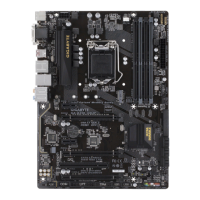
The GIGABYTE GA-B250-HD3P is a motherboard designed to support 7th and 6th generation Intel® Core™ i7/i5/i3, Pentium®, and Celeron® processors in the LGA1151 package. It offers a robust platform for building desktop computer systems, integrating various essential components and providing extensive connectivity options. The motherboard supports dual-channel DDR4 memory, multiple expansion slots for graphics cards and other peripherals, and various storage interfaces. It also includes integrated graphics, high-definition audio, and Gigabit Ethernet LAN. The BIOS setup allows for comprehensive configuration of system parameters, including overclocking, power management, and boot options.
Important Technical Specifications
CPU:
- Supports 7th and 6th generation Intel® Core™ i7/i5/i3, Pentium®, Celeron® processors (LGA1151 package).
- L3 cache varies with CPU.
Chipset:
- Intel® B250 Express Chipset.
Memory:
- 4 x DDR4 DIMM sockets supporting up to 64 GB of system memory.
- Dual channel memory architecture.
- Supports DDR4 2400/2133 MHz memory modules.
- Supports ECC Un-buffered DIMM 1Rx8/2Rx8 memory modules (operating in non-ECC mode).
- Supports non-ECC Un-buffered DIMM 1Rx8/2Rx8/1Rx16 memory modules.
- Supports Extreme Memory Profile (XMP) memory modules.
- Note: 2400 MHz or XMP memory requires a 7th generation processor.
Onboard Graphics:
- Integrated Graphics Processor - Intel® HD Graphics support.
- 1 x D-Sub port (max. resolution 1920x1200@60 Hz).
- 1 x DVI-D port (max. resolution 1920x1200@60 Hz, does not support D-Sub connection by adapter).
- 1 x HDMI port (max. resolution 4096x2160@24 Hz, HDMI 1.4 version).
- Supports up to 3 displays simultaneously.
- Maximum shared memory of 1 GB.
Audio:
- Realtek® ALC892 codec.
- High Definition Audio.
- 2/4/5.1/7.1-channel support.
- S/PDIF Out support.
LAN:
- Intel® GbE LAN chip (10/100/1000 Mbit).
Expansion Slots:
- 1 x PCI Express x16 slot, running at x16 (PCIEX16) – recommended for single graphics card.
- 2 x PCI Express x16 slots, running at x4 (PCIEX4_1, PCIEX4_2).
- PCIEX4_1 shares bandwidth with SATA Express and PCIEX1_2.
- PCIEX4_2 shares bandwidth with M.2 connector.
- 2 x PCI Express x1 slots.
- 1 x PCI slot.
- All PCI Express slots conform to PCI Express 3.0 standard.
Multi-Graphics Technology:
- Supports AMD Quad-GPU CrossFireX™ and 2-Way AMD CrossFire™ technologies (PCIEX16, PCIEX4_1).
Storage Interface:
- 1 x M.2 connector (Socket 3, M key, type 2242/2260/2280/22110 SATA and PCIe x4/x2 SSD support).
- 1 x SATA Express connector (not compatible with regular SATA devices).
- 6 x SATA 6Gb/s connectors.
USB:
- Chipset+ASMedia® USB 3.1 Gen 2 Controller:
- 1 x USB Type-C™ port on back panel (USB 3.1 Gen 2 support).
- 1 x USB 3.1 Gen 2 Type-A port (red) on back panel.
- Chipset:
- 6 x USB 3.1 Gen 1 ports (4 on back panel, 2 via internal headers).
- 6 x USB 2.0/1.1 ports (2 on back panel, 4 via internal headers).
Internal Connectors:
- 24-pin ATX main power connector.
- 8-pin ATX 12V power connector.
- M.2 Socket 3 connector.
- SATA Express connector.
- 6 x SATA 6Gb/s connectors.
- CPU fan header.
- 3 x system fan headers.
- Front panel header.
- Front panel audio header.
- S/PDIF Out header.
- USB 3.1 Gen 1 header.
- 2 x USB 2.0/1.1 headers.
- Trusted Platform Module (TPM) header.
- Serial port header.
- Parallel port header.
- Clear CMOS jumper.
Back Panel Connectors:
- PS/2 keyboard/mouse port.
- D-Sub port.
- DVI-D port.
- HDMI port.
- USB Type-C™ port (USB 3.1 Gen 2 support).
- USB 3.1 Gen 2 Type-A port (red).
- 4 x USB 3.1 Gen 1 ports.
- 2 x USB 2.0/1.1 ports.
- RJ-45 port.
- 6 x audio jacks (Center/Subwoofer, Rear, Side, Line In, Line Out, Mic In).
I/O Controller:
- ITE® I/O Controller Chip.
Hardware Monitor:
- Voltage detection.
- Temperature detection.
- Fan speed detection.
- Overheating warning.
- Fan fail warning.
- Fan speed control (depends on cooler installed).
BIOS:
- 2 x 64 Mbit flash.
- Licensed AMI UEFI BIOS.
- DualBIOS™ support.
- PnP 1.0a, DMI 2.7, WfM 2.0, SM BIOS 2.7, ACPI 5.0.
Unique Features:
- APP Center support (3D OSD, @BIOS, Ambient LED, AutoGreen, BIOS Setup, Color Temperature, Cloud Station, EasyTune, Fast Boot, Game Boost, ON/OFF Charge, Platform Power Management, Smart Backup, Smart Keyboard, Smart TimeLock, System Information Viewer, USB Blocker, V-Tuner).
- 3TB+ Unlock support.
- Q-Flash support.
- Xpress Install support.
Bundled Software:
- Norton® Internet Security (OEM version).
- Intel® Optane™ Memory Ready.
- cFosSpeed.
Operating System Support:
- Windows 10/8.1 64-bit.
- Windows 7 32-bit/64-bit (requires "Windows USB Installation Tool" for Windows 7 installation).
Form Factor:
- ATX Form Factor; 30.5cm x 22.5cm.
Usage Features
- Easy Installation: The manual provides clear, step-by-step instructions for installing the CPU, memory, and expansion cards, including precautions against electrostatic discharge (ESD).
- Dual Channel Memory: Supports dual-channel memory configuration for enhanced performance, with specific guidelines for optimal setup.
- Comprehensive BIOS Setup: Features a user-friendly BIOS interface (Classic Setup and Easy Mode) for configuring various system settings, including CPU clock ratios, memory timings, voltage controls, and power management.
- Smart Fan 5: Advanced fan control settings allow users to monitor temperatures and adjust fan speeds for optimal cooling and noise reduction, with options for Normal, Silent, Manual, and Full Speed modes.
- Fast Boot: Option to shorten the OS boot process for quicker system startup.
- Boot Override: Allows immediate booting from a selected device without changing the permanent boot order.
- Secure Boot: Enables or disables Secure Boot and configures related settings for enhanced system security.
- Multi-Display Support: Integrated graphics support up to three displays simultaneously via D-Sub, DVI-D, and HDMI ports.
- High-Speed Connectivity: Includes USB 3.1 Gen 2 Type-C and Type-A ports for fast data transfer, as well as Gigabit Ethernet for reliable network connections.
- M.2 SSD Support: Dedicated M.2 connector for high-speed SATA and PCIe SSDs, with detailed installation instructions.
- Status LEDs: CPU/DRAM/VGA/BOOT status LEDs provide quick visual diagnostics during system power-on.
Maintenance Features
- BIOS Update Utilities: GIGABYTE Q-Flash and @BIOS utilities facilitate easy and safe BIOS updates, though caution is advised due to potential risks.
- Clear CMOS Jumper: A dedicated jumper allows users to clear BIOS configurations and reset CMOS values to factory defaults, useful for troubleshooting system instability.
- Battery Replacement: Instructions for replacing the CMOS battery to maintain BIOS settings and system time, with warnings about proper orientation and disposal.
- Driver Installation: "Xpress Install" utility on the motherboard driver disk automatically scans and installs recommended drivers and software for the operating system.
- Regulatory Compliance: Adheres to RoHS and WEEE directives, promoting environmentally responsible manufacturing and disposal of electronic waste. Packaging materials are recyclable and reusable.
- Online Support: GIGABYTE's website provides access to product details, CPU/memory/SSD support lists, utility downloads, and eSupport for technical and non-technical inquiries.
- Motherboard Revision Identification: Users are advised to check the motherboard revision number (e.g., "REV: 1.0") before updating BIOS, drivers, or seeking technical support to ensure compatibility.

 Need help?
 General





 To Next Page