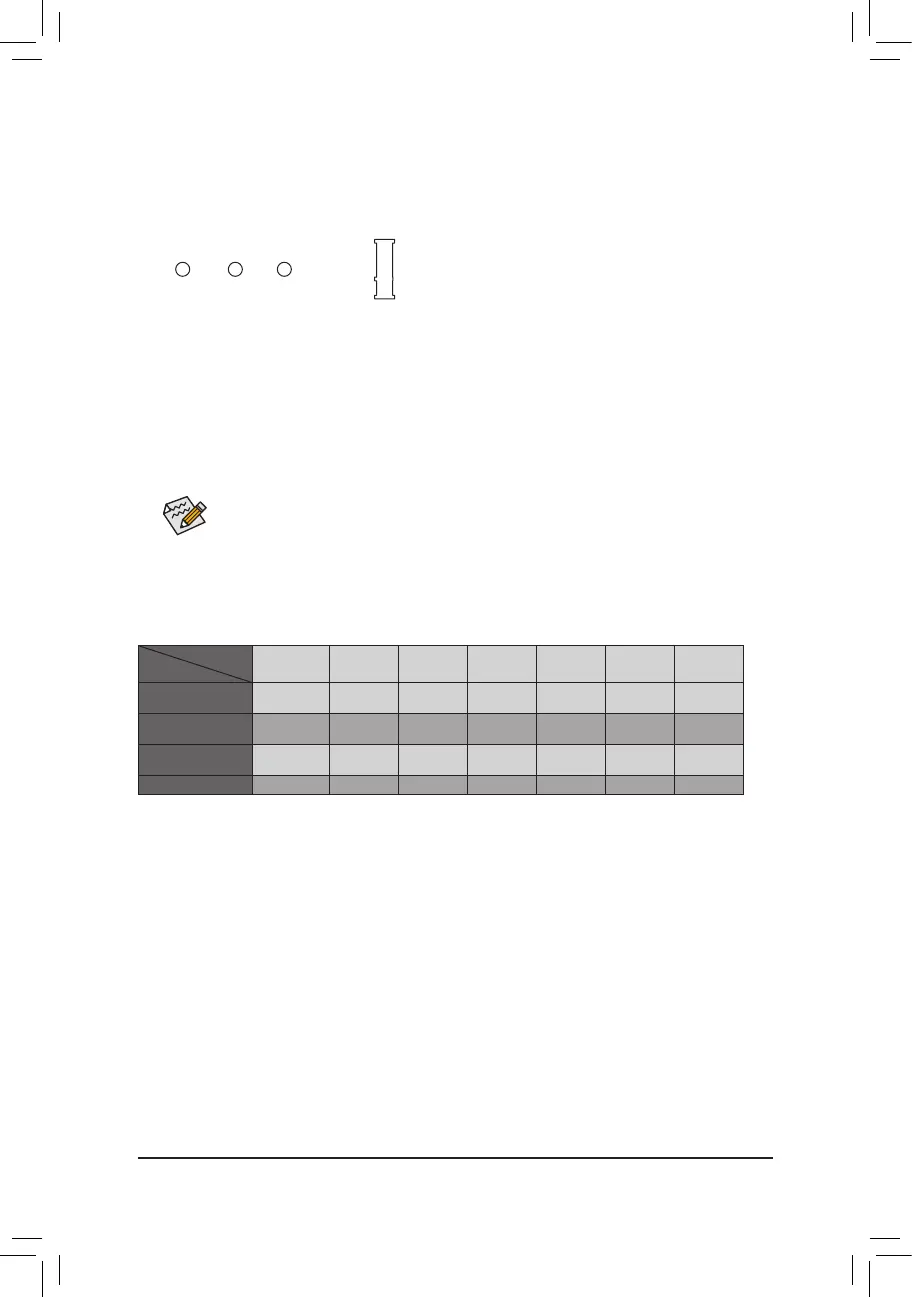
Select the proper hole for the M.2 SSD to be installed and refasten the screw and nut.
7) M.2 (M.2 Socket 3 Connector)
TheM.2connectorsupportsM.2SATASSDsandM.2PCIeSSDs.ItcansupportSATARAIDconguration
through the Intel
®
Chipset. Please note that an M.2 PCIe SSD cannot be used to create a RAID set with SATA
drive(s).RefertoChapter3,"ConguringaRAIDSet,"forinstructionsonconguringaRAIDarray.
Follow the steps below to correctly install an M.2 SSD in the M.2 connector.
Step 1:
Use a screw driver to unfasten the screw and nut from the motherboard. Locate the proper mounting hole
fortheM.2SSDtobeinstalledandthenscrewthenutrst.
Step 2:
Slide the M.2 SSD into the connector at an angle.
Step 3:
Press the M.2 SSD down and then secure it with the screw.
F_USB30
F_U
B_
F_ F_
_
B
BS_
B
SB_
B
_S
S_
_
B
_U
_
B
S
123
123
123
123
1
1
1
1
BSS
S
_S
SSU
1 2 3
S3
BSSS
U
__ 3
F_USB3F
S _
S _
S _
SF
B_
B_
F
_0
S
S
_0F
_F
_
_
__B
U
S _S
_
USB0_B
B_
80 60 42
The PCI slots share bandwidth with the M.2 and SATA Express connectors. Whether the SATA
Express connector can be used is dependent on the type of M.2 SSD being installed. Please refer
to the table below:
SATA Express SATA3_0 SATA3_1 SATA3_2 SATA3_3 SATA3_4 SATA3_5
M.2 SATA SSD
Installed
a a a a a a
r
M.2 PCIe x4 SSD
Installed
(Note)
r
a a a a a a
M.2 PCIe x2 SSD
Installed
r
a a a a a a
No M.2 SSD Installed
a a a a a a a
a: Available,r: Not Available
Connector
Type of
SSD Installed
(Note) The M.2 PCIe x4 SSD will run at x2 speed if a PCI slot is populated.
- 15 -




 To Next Page