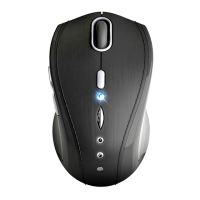
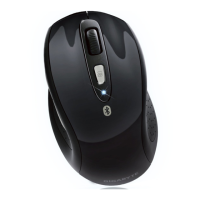
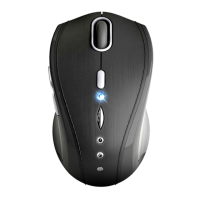
This document describes the GIGABYTE™ GM-M7800 Elegant Vogue Wireless Mouse, a sophisticated input device designed for enhanced productivity and comfort. It leverages advanced wireless technology and a stylish design to provide a superior user experience.
Function Description
The GM-M7800 is a 2.4GHz wireless laser mouse, offering high tracking speed and sensitivity. This state-of-the-art technology allows the mouse to track reliably even on challenging surfaces such as polished or wood-grain finishes, making it versatile for various work environments. The wireless connectivity provides an effective working distance of up to 10 meters, offering freedom of movement and reducing cable clutter.
A key feature of this mouse is its dual-way transmission technology, which enables automatic communication between the mouse and its USB Nano transceiver. This auto-link mode simplifies setup: users only need to ensure the mouse's power switch is on, and the mouse and receiver will automatically establish a connection, mapping cursor movement to mouse actions. In cases where the communication channel is not well-connected, a manual mode is available. Users can employ a software connection tool to re-establish a new channel ID between the mouse and receiver. This software can be found on an included diskette or downloaded from the GIGABYTE website.
The mouse is designed with plug-and-play functionality, meaning it can operate without requiring a driver installation. However, to fully utilize certain advanced features, such as the 4-Way Scrolling function, an optional software driver is provided. This driver can be installed from the included CD or downloaded from the vendor's website. If other mouse drivers are present on the system, it is recommended to uninstall them first to prevent conflicts.
Usage Features
The GM-M7800 offers a range of features designed to enhance usability and comfort:
- Wireless Connectivity: Operates on a 2.4GHz frequency, providing a stable and responsive connection up to 10 meters.
- Laser Tracking: Utilizes laser technology for precise and high-speed tracking on various surfaces.
- USB Nano Transceiver: A compact receiver that minimizes protrusion from the USB port, making it ideal for laptops and portable use.
- 4-Way Scrolling: Beyond standard vertical scrolling, the mouse supports horizontal scrolling. Users can roll the wheel up or down for vertical movement, and hold the wheel to the left or right for horizontal scrolling. This feature requires the optional driver installation for full functionality, particularly in applications like Word, Excel, and PowerPoint within Windows VISTA.
- DPI Adjustment: An adjustable DPI button allows users to switch between 800 and 1600 DPI settings, catering to different sensitivity preferences and tasks. The LED on the wheel bar will flash when the DPI setting is successfully changed.
- Internet Forward & Backward Buttons: Conveniently placed buttons on the side of the mouse allow for quick navigation in web browsers and other applications, enhancing productivity.
- Ergonomic Design: The mouse boasts a stylish and modern shape with a comfort grip, ensuring comfortable use during extended periods.
- Battery Indicator: A low power indicator, typically a red LED on the scroll wheel, alerts users when the batteries need to be replaced.
- Power On/Off Switch: A dedicated switch on the bottom of the mouse allows users to conserve battery power during periods of non-use.
- Smart Power Management: The mouse incorporates a strong power-saving management system. When the mouse enters sleeping mode, a click of any button is required to wake it up, further extending battery life.
Maintenance Features
Maintaining the GM-M7800 primarily involves battery management and troubleshooting common connectivity issues:
- Battery Replacement: The mouse uses two AAA batteries. To replace them, remove the battery compartment cover on the bottom case, fit the new batteries according to the indicated diagram, and close the cover. It is crucial to ensure correct battery placement, as a wrong placement can cause batteries to overheat. The low power indicator (red LED on the scroll wheel) signals when new batteries are needed.
- Troubleshooting Connectivity:
- Receiver Connection: Ensure the USB Nano transceiver is correctly connected to a USB port on the computer.
- Interference: For optimal performance, position the receiver away from other electrical devices such as the computer, monitor, or external storage drives, which can cause interference.
- Communication Setup: Verify that the communication between the receiver and the mouse is properly established, referring to the "Communication: The mouse & the receiver" section of the manual.
- Channel Reset: If communication issues persist, use the software connection tool (available on the included diskette or GIGABYTE website) to re-connect the mouse and receiver and reset to a new channel ID.
- System Conflicts: In rare cases, other system devices might conflict with the mouse. Users should confirm and adjust IRQ/address settings of conflicting devices if necessary.
- Surface Compatibility: Ensure the mouse is not being used on glossy or highly reflective surfaces, as these can interfere with laser tracking.
- Battery Use Reminders:
- Promptly remove and dispose of worn-out batteries.
- Keep all batteries (used or new) out of reach of children.
- Regularly check batteries and replace them if the mouse is not used for a long time.
- Never dispose of batteries in fire, as they may explode.
- Always replace all batteries at the same time; mixing old and new batteries or different types (e.g., alkaline with zinc carbon) can reduce performance and cause leakage or rupture.
- Avoid mixing different types of batteries (e.g., NiMH, NiCd, alkaline) in the mouse.
- Remove batteries from the device if it will not be used for an extended period.
- Replace batteries when their performance substantially decreases.
By following these guidelines, users can ensure the longevity and optimal performance of their GIGABYTE GM-M7800 Elegant Vogue Wireless Mouse.

 Need help?
 General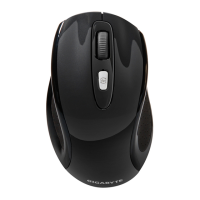



 To Next Page