- 10 -
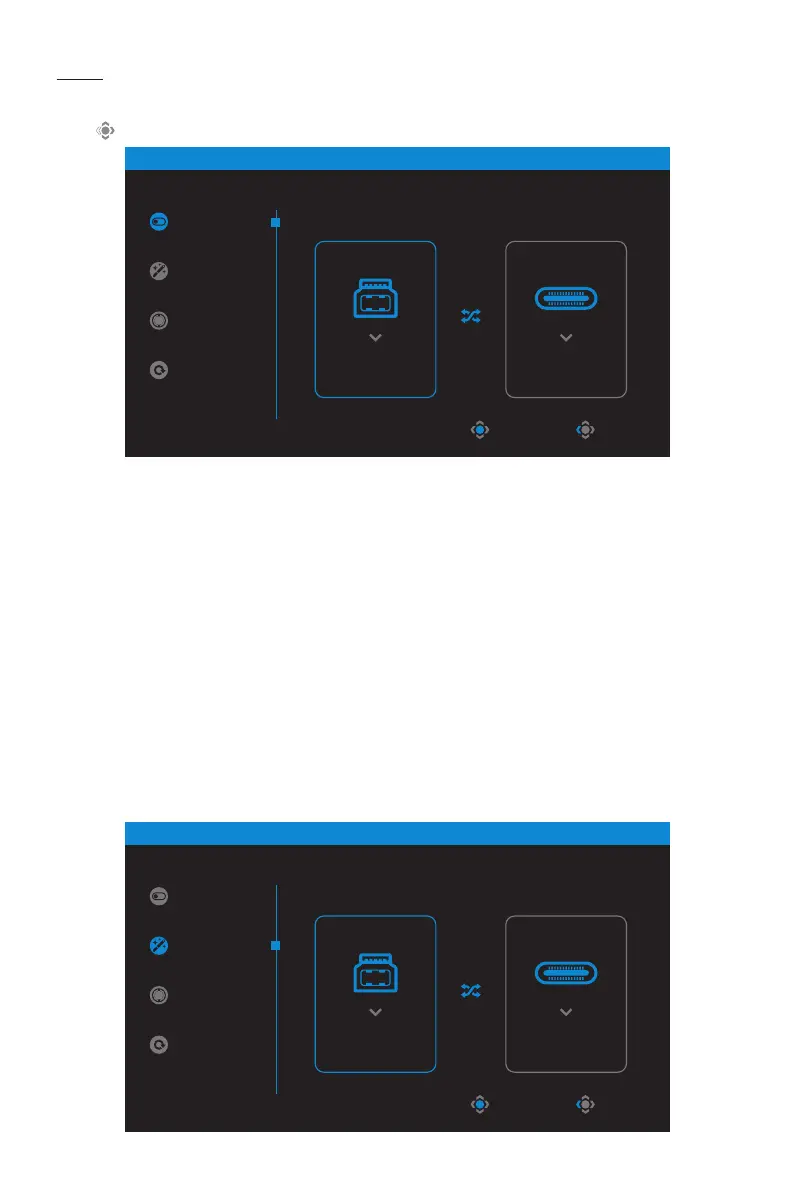
KVM
• When the Main menu appears on the screen, move the Control button left
( ) to enter the KVM menu.
• KVMSwitch: Switch the input source that has been assigned to USB-B or
Type-C connection in the KVMWizard settings.
When there are several input signals connected to the device, a message box
will appear on the screen once the system detected USB Type-C input signal.
To switch to USB Type-C input source, simply press the KVM button or the
Control button.
However, when there is no input signal from currently selected input source,
the system will return to the previous connected input source.
Note: This option will be disabled if the KVM button function is disabled
(KVMOFF).
• KVMWizard: Configure the KVM related settings.
Set the input source to be bound with USB Type-B connection first, and then
following with USB Type-C connection.
KVM
Control 1
HDMI 1
Control 2
Type-C
STATUS
KVM Switch
KVM Wizard
KVM ON
KVM Reset
ExitSelect
KVM
Control 1
Type-C
Control 2
Type-C
STATUS
KVM Switch
KVM Wizard
KVM ON
KVM Reset
ExitSelect



 To Next Page