EasyManua.ls Logo

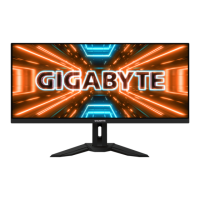
Gigabyte M34WQ - User Manual

Gigabyte M34WQ
52 pages
Print Icon
To Next Page IconTo Next Page
Loading...
M34WQ

Questions and Answers

Summary

INTRODUCTION

Unpacking

Step-by-step guide on how to open the packaging and remove the monitor.

GETTING STARTED

Installing the Stand Base

Instructions on how to assemble and attach the monitor stand base.

Adjusting the Viewing Angle

Instructions for tilting the monitor screen to achieve an optimal viewing angle.

Making Connections

Guide to connecting various cables like HDMI, DP, USB, and power to the monitor.

USING THE DEVICE

Turning the Power On;Off

Instructions on how to power the monitor on and off using the control button.

OPERATIONS

KVM

Details on using the KVM switch feature for managing multiple computers.

Configure the Device Settings

Guide to accessing and modifying various monitor settings through the OSD menu.

Picture Settings

Adjusting image quality, including brightness, contrast, and picture modes.

APPENDICES

Troubleshooting

Common problems and their solutions for the monitor.

SAFETY INFORMATION

Summary

INTRODUCTION

Unpacking

Step-by-step guide on how to open the packaging and remove the monitor.

GETTING STARTED

Installing the Stand Base

Instructions on how to assemble and attach the monitor stand base.

Adjusting the Viewing Angle

Instructions for tilting the monitor screen to achieve an optimal viewing angle.

Making Connections

Guide to connecting various cables like HDMI, DP, USB, and power to the monitor.

USING THE DEVICE

Turning the Power On;Off

Instructions on how to power the monitor on and off using the control button.

OPERATIONS

KVM

Details on using the KVM switch feature for managing multiple computers.

Configure the Device Settings

Guide to accessing and modifying various monitor settings through the OSD menu.

Picture Settings

Adjusting image quality, including brightness, contrast, and picture modes.

APPENDICES

Troubleshooting

Common problems and their solutions for the monitor.

SAFETY INFORMATION

Gigabyte M34WQ Specifications

General IconGeneral
Color depth8 bit
Pixel pitch0.2325 x 0.2325 mm
Screen shapeFlat
Backlight typeEdge LED
Display diagonal34 \
Anti-glare screenYes
Display technologyLCD
Viewable size, vertical334.8 mm
sRGB coverage (typical)117 %
Contrast ratio (typical)1000:1
Display number of colors-
Viewable size, horizontal799.8 mm
Display brightness (typical)400 cd/m²
Supported graphics resolutions3440 x 1440
High Dynamic Range (HDR) technologyHigh Dynamic Range (HDR) 400
RMS rated power3 W
Number of speakers2
Product colorBlack
Market positioningGaming
DisplayPort version1.4
Headphone connectivity3.5 mm
Tilt angle range-5 - 20 °
Cable lock slot typeKensington
Panel mounting interface100 x 100 mm
AC input voltage100 - 240 V
AC input frequency50 - 60 Hz
Energy efficiency scaleA to G
Power consumption (max)127 W
Power consumption (off)0.3 W
Power consumption (typical)- W
Power consumption (PowerSave)0.5 W
Cables includedDisplayPort, HDMI, USB
Package typeBox
Package depth198 mm
Package width1060 mm
Package height527 mm
Package weight13470 g
Harmonized System (HS) code85285210
Weight and Dimensions IconWeight and Dimensions
Depth (with stand)244.3 mm
Width (with stand)817.7 mm
Height (with stand)548.8 mm
Weight (with stand)10220 g
Depth (without stand)67.5 mm
Height (without stand)368.7 mm
Weight (without stand)7050 g

Related product manuals