- 12 -
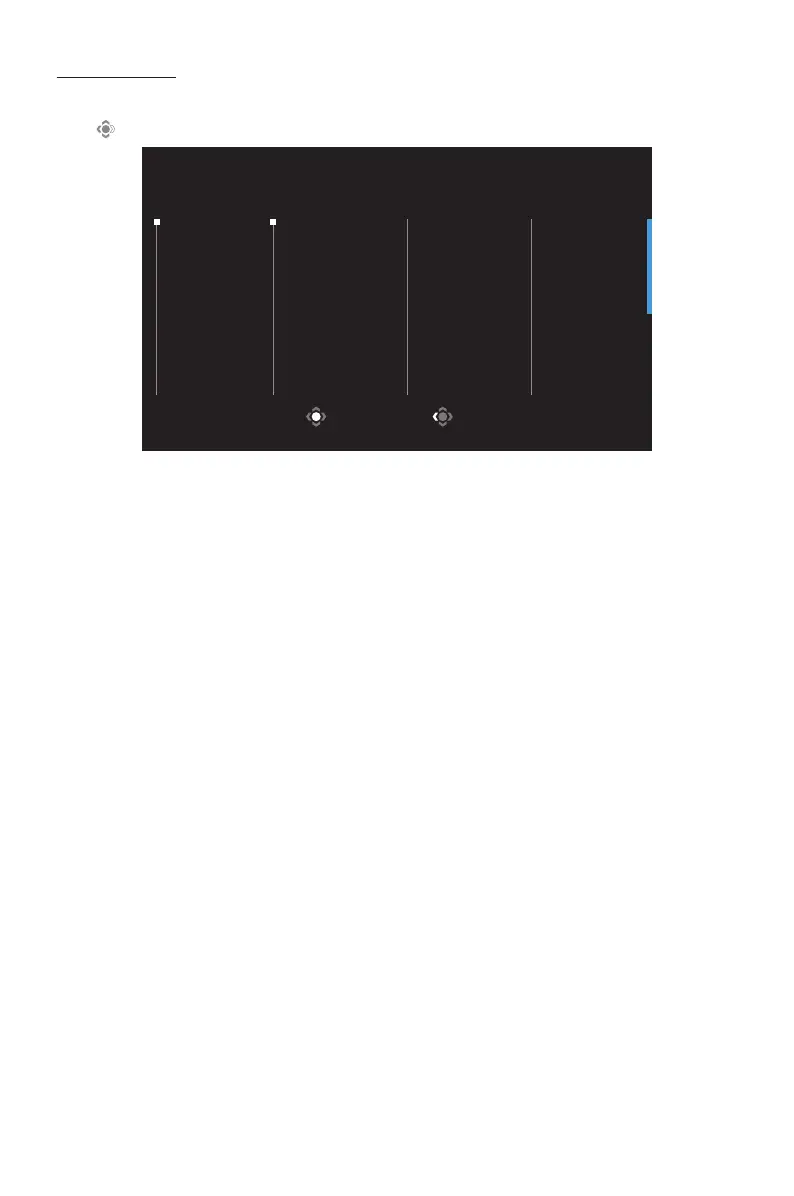
• GAMEINFO: Configure the FPS (First Person Shooting) game related settings.
√ Select GamingTimer to select countdown timer mode. To disable this
function, set the setting to OFF.
√ Select GamingCounter or RefreshRate to enable/disable the gaming
counter or real-time refresh rate setting.
√ Select InfoLocation to specify the location of the information to be
shown on the screen.
• Crosshair: Select the type of crosshair to assist with aiming.
• EagleEye: Enable/Disable a window which can enlarge a specific area of the
screen and adjust related settings.
• Dashboard: Enable/Disable the system information of PC shown on the
screen.
Note: Official software installation and a USB connection between the monitor and
the PC are required.
• DisplayAlignment: Show the alignment lines to help multiple monitor
settings.
GameAssist
• When the Main menu appears on the screen, move the Control button right
( ) to enter the GameAssist menu.
GAME INFO
Crosshair
Eagle Eye
Dashboard
Display
Alignment
Gaming Timer
Gaming Counter
Refresh Rate
Info Location
ExitSelect
Game Assist



 To Next Page