•••••••••••••••••••••••
Note: You need to set screen display resolution to right
resolution 1280x768 or 1024x600 (depends on your
hardware specication) before proceeding with the
calibration.
1.17 Use your M912 as a Tablet PC
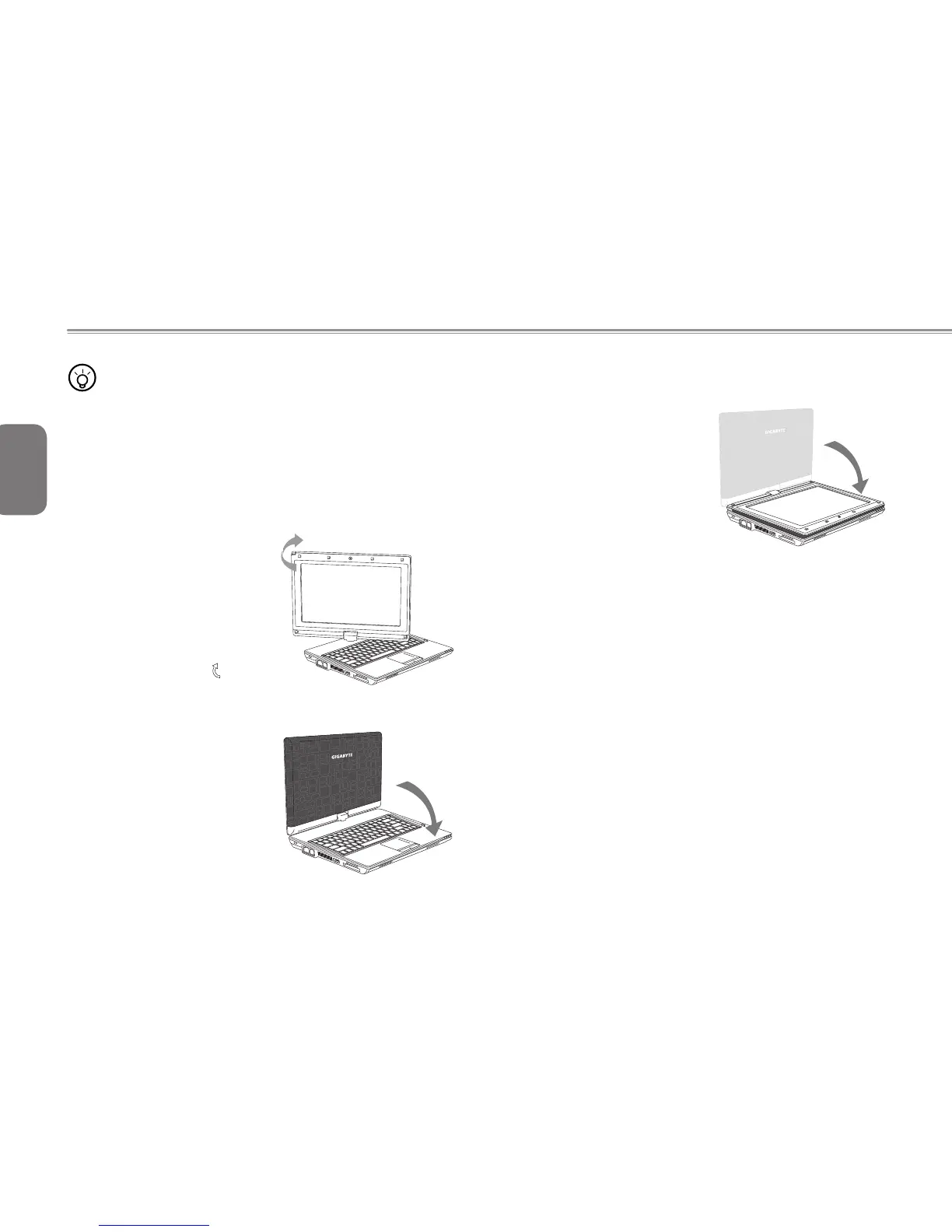
The screen of M912 is convertible to simulate a Tablet PC. Follow
the steps to use this function.
1. Open the lid (the screen display)
of M912.
2. On the top center above the
keyboard is the pivot connecting
the display panel to the bottom
case. There is a sign " "
3. F ol l ow the sig n to tur n th e
screen clockwise up to 180
degree so that the screen is
facing out.
4. Lay the turned screen down into
the flat position. The keyboard
will be covered by the display.
Use the stylus or simply touch
the screen to operate M912 as
a Tablet PC.
5. When done with Tablet PC,
reverse the above instruction
(erect the screen to 90 degree,
turn counterclockwise to 180
degree) to set M912 back to
original position.
* Attention: Please note that the screen can only rotate at 180
degree clockwise. Be sure to turn the screen according to the sign.
Forcing the screen to turn at the wrong angle will cause serious
damage to M912.
1.18 Operating Temperature
Operating Temperature : 10ºC to 35ºC



 To Next Page