English
M912 Netbook USER’S MANUAL
2120
QuickBoot Mode
Allows the system to skip certain tests while booting. This will
decrease the time needed to boot the system.
Extended Memory Testing
Determines which type of tests will be performed on extended
memory (above 1M).
IGD – LCD Panel Type
Select the LCD Panel used by the Internal Graphics Device by
selecting the appropriate setup item.
Keyboard Language
Set propriety language for your keyboard.
Root Port ASPM Support
Control ASPM support for all the enabled Root Ports. Auto = will set
APMC to the highest common supported ASPM between the Port
and Endpoint.
ASPM Latency Checking
Enabled: Enables ASPM latency checking when enabling ASPM.
Note: Does not check below switches. Disabled: ASPM latencies
are ignored when enabling ASPM.
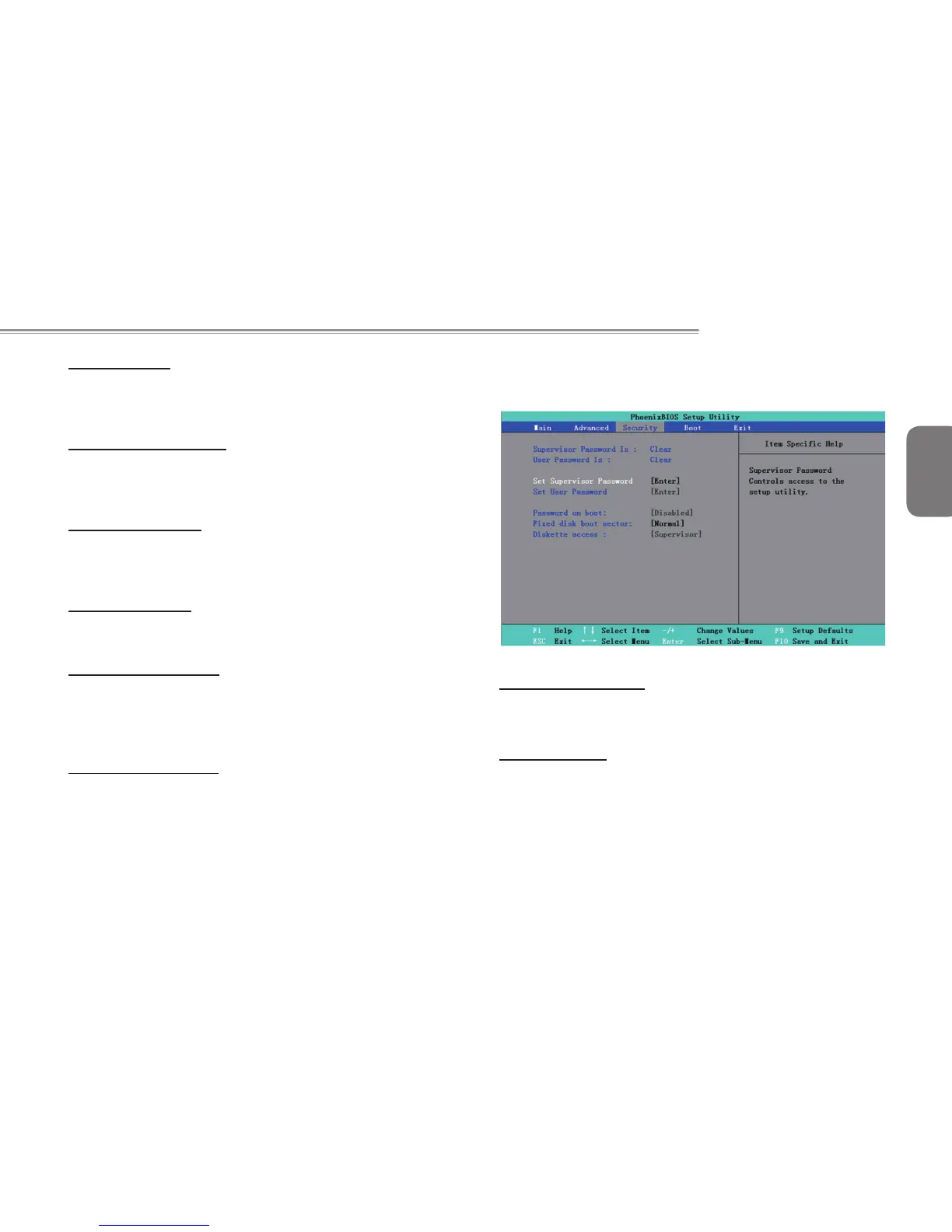
3.3 Security
T h e S e c u r i t y s c r e e n c o n t a i n s p a r a m e t e r s t h a t h e l p
safeguard and protect your Netbook from unauthorized use.
Supervisor Password Is
Shows that your Netbook computer is under controlled by
Supervisor Password or not.
User Password Is
Shows that your Netbook computer is under controlled by User
Password or not.



 To Next Page