Gigaset C575-C575A / LUG_Kombi CH en / A31008-M2907-F101-1-2X19 / applications_1.fm / 4/27/20
Template Module, Version 2, 20.02.2020
Protection against unwanted calls
45
Protection against unwanted calls
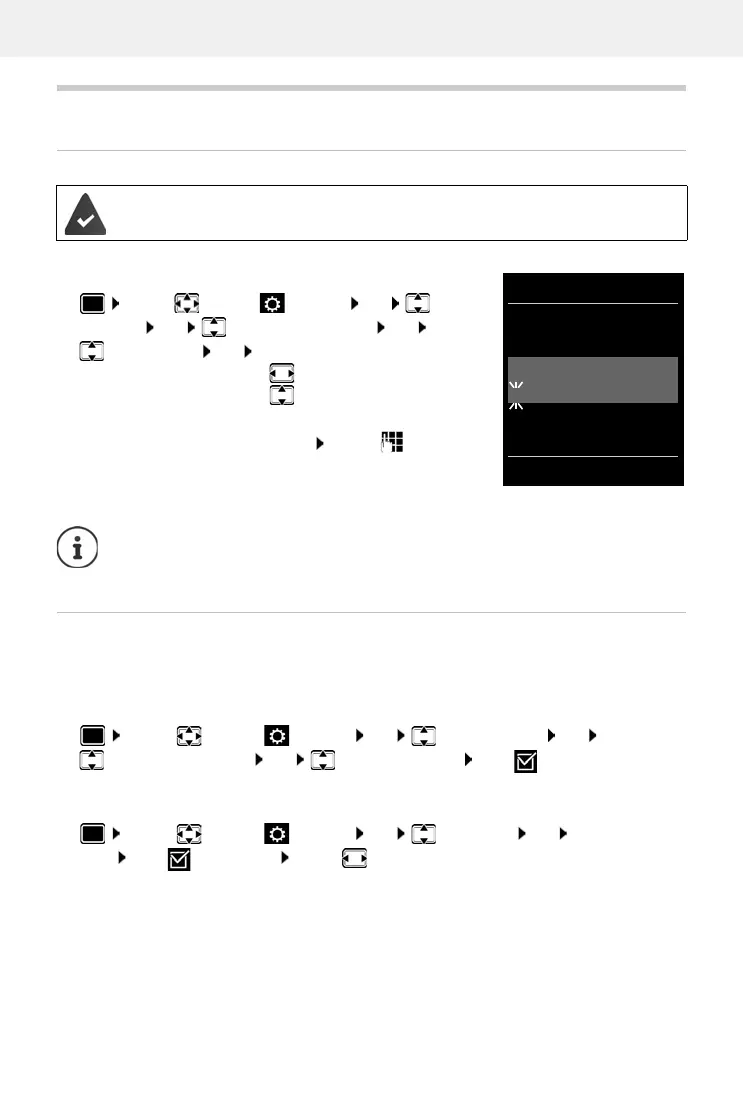
Time control for external calls
Enter a time period during which the handset should suspend
ringing to indicate external calls e.g. during the night.
Protection from anonymous callers
The handset will not ring if callers' numbers are not revealed. This setting can be applied to only
one or to all registered handsets.
For one handset
For all handsets
Date and time have been set.
¤ . . . use to select Settings OK Audio
Settings OK Ringtones (Handset) OK
Time Control OK . . . then
Switch on/off:
¤ use to select On or Off
Enter time:
¤ use to switch between
Suspend ring. from and Suspend
ring. until . . . use to enter
start and end in 4-digit format
Save:
¤ Save
The time control only applies to the handset f
or which the setting is configured.
The telephone will continue to ring for numbers that ha
ve been assigned to a VIP
group in the directory.
¤ . . . use to select Settings OK Audio Settings OK
Ringtones (Handset) OK Anon. Calls Silent Edit ( = activated) . . . the
call is only signalled on the display
¤ . . . use to select Settings OK Telephony OK Anonymous
Calls Edit ( = activated) . . . use to select Protection Mode:
No Protection Anonymous calls are indicated in the same way as identified numbers.
Silent Call The telephone will not ring and the incoming call will only appear in
the display.
Block Call The telephone will not ring and the incoming call will not appear in
the display. The caller will hear the busy tone.
Save settings: Save
Time Control
For external calls:
On
Suspend ring. from:
22:00
Suspend ring. until:
07:00
Back Save
Example










 To Next Page