Gigaset C575-C575A / LUG_Kombi CH en / A31008-M2907-F101-1-2X19 / starting-A_Kombi.fm / 4/27/20
Template Module, Version 2, 20.02.2020
Handset
9
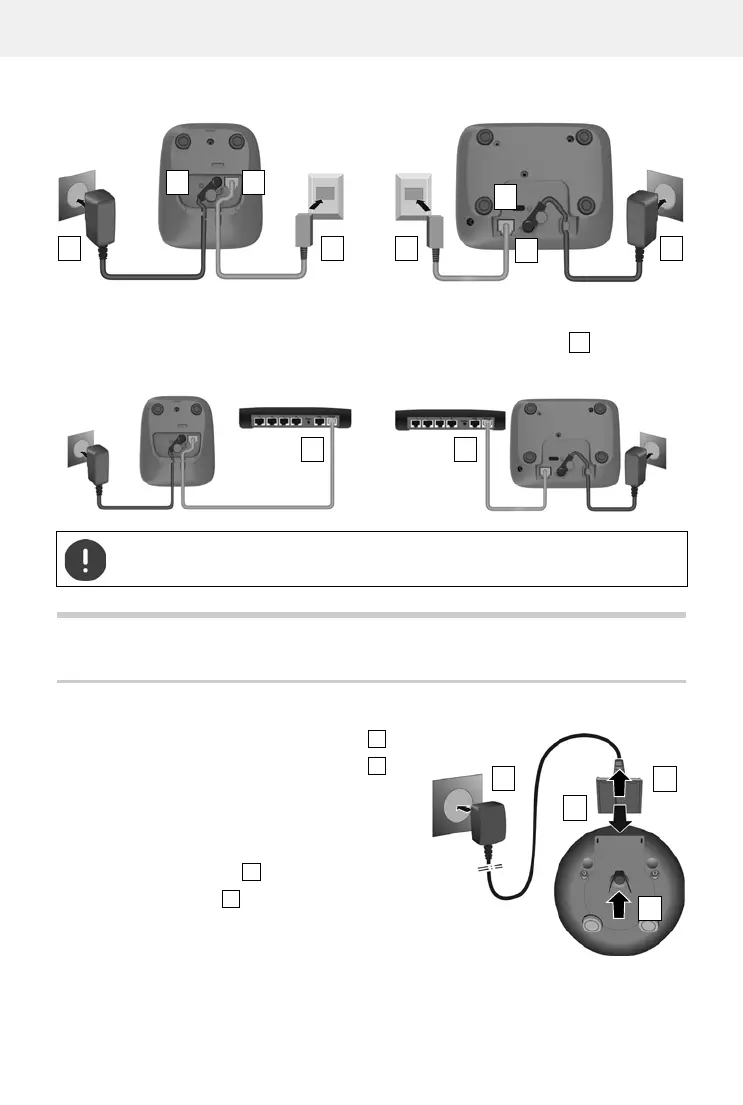
If connecting to a router:
¤ Plug the phone cable into the telephone connection socket on the router .
Handset
Connecting the charging cradle (if included in the delivery)
¤ Connect the flat plug of the power adapter .
¤ Plug the mains unit into your power socket .
To remove the plug from the charging cradle again:
¤ Disconnect the power adapter from the mains
power supply.
¤ Press the release button .
¤ Remove the flat plug .
3
2 1
4 4
2
1
3
Device without answer machine Device with answer machine
5 5
Device without answer machine Device with answer machine
The network cable must always be connected in order to function, as the phone will
not operate without a power supply.










 To Next Page