4
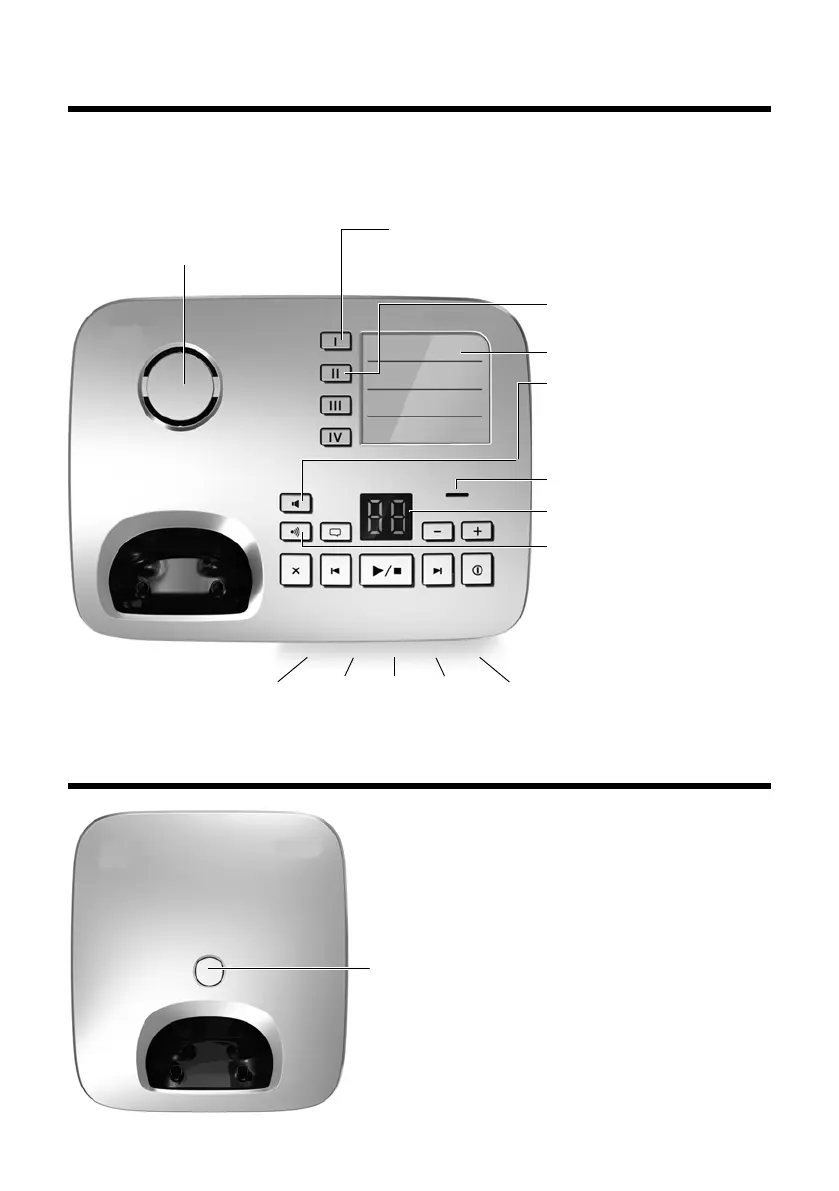
Overview of Gigaset E500A base
Gigaset E500/E500 A / GreatBritain / A31008-M2206-L101-2-7619 / overview.fm / 21.03.2011
Version 4, 16.09.2005
Overview of Gigaset E500A base
You can use the keys on the base to operate the integrated answering
machine (Gigaset E500A only), search for handsets ("paging"
¢ page 58) and
register handsets to the base
¢ page 57.
Overview of Gigaset E500 base
Loudspeaker
Flashes: incoming call
(can be deactivated, ¢ page 64)
Direct dialling keys II to
IV (¢ page 38)
Tab (¢ page 17)
Handsfree key:
accept/end call;
flashes: incoming call
Microphone
Display
Registration/paging
key:
– Search for handsets
(press briefly, "paging",
page 58)
–Register handsets
(press and hold,
page 57).
Direct dialling key I
(¢ page 38) /
SOS key with emergency LED (¢ page 45)
Registration/paging key
–Press briefly: search for handsets (paging)
¢ page 58.
–Press and hold: register handsets and DECT
devices ¢ page 57.



 To Next Page