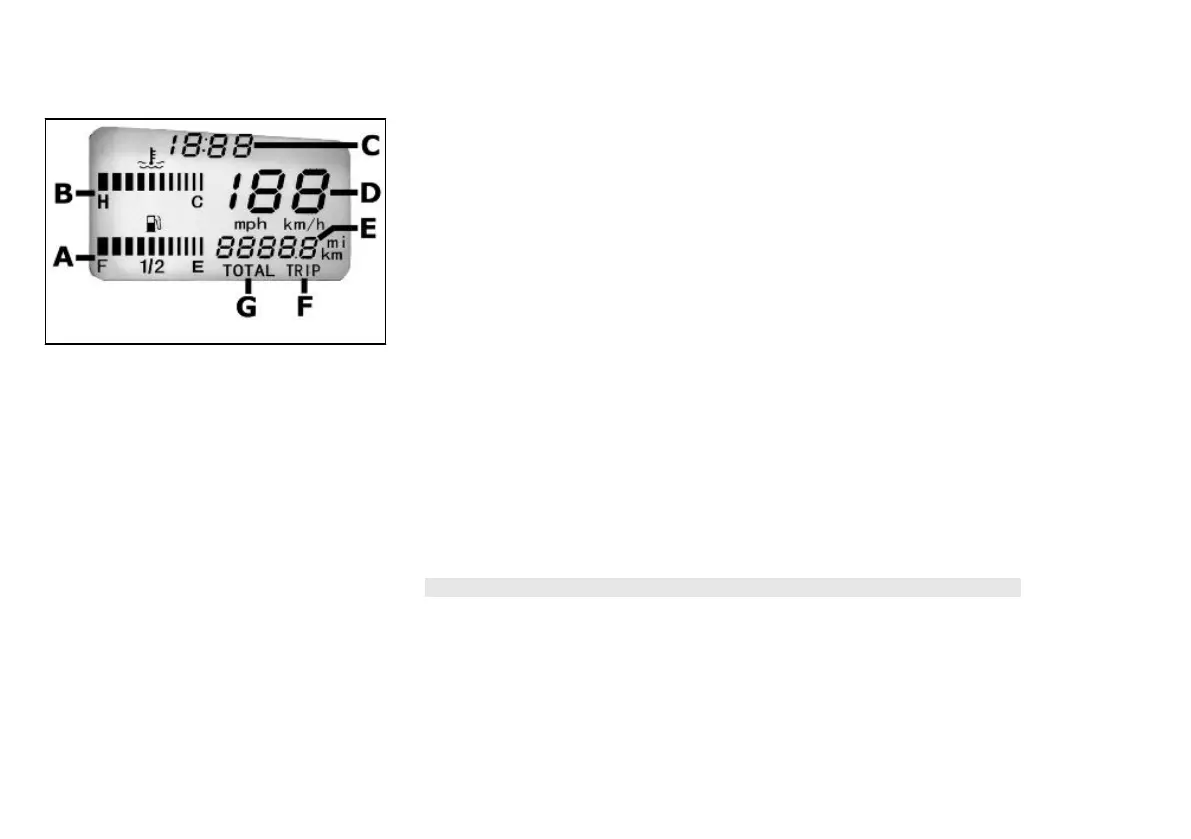
P= Coolant temperature gauge
S= Fuel gauge;
01_03
Digital lcd display (01_03)
A= Fuel level gauge;
B= Coolant temperature gauge;
C= Digital clock;
D= Speedometer;
E= Odometer;
F= Partial odometer gauge;
G= Total odometer gauge;
Setting the total and trip odometers
Pushing the "MODE" button for less than a second obtains, respectively, the functions
of:
1. TOTAL - The word "TOTAL" appears and Km/h or mph. The value corre-
sponds to the total distance travelled by the vehicle and it is not adjustable.
2. PARTIAL- The word "TRIP" appears and Km/h or mph. The value can be
changed by pressing and holding the "SET" button for longer than three sec-
onds.
N.B.
IT IS POSSIBLE TO CHANGE THE DISPLAY FROM KILOMETRES (km/h) TO
MILES (mph) BY PRESSING THE "MODE" AND "CLOCK" BUTTONS AT THE
SAME TIME AND HOLDING THEM FOR LONGER THAN THREE SECONDS AF-
TER PUTTING THE KEY SWITCH IN THE «ON» POSITION.
ON THE DISPLAY THE WORD "SET" WILL APPEAR FOR ONE SECOND
11



 To Next Page