Gill Instruments Ltd
_____________________________________________________________________________________________________________
__________________________________________________________________________________________________
MaxiMet Page 76 Issue 3
Doc. No. 1957-PS-021 May 2018
6.5. Configuring MaxiMet for Modbus
6.5.1 MaxiMet Supported Modbus Specification
Modbus RTU or ASCII
Baud Rate 9600 or 19200 Baud
COMMS RS232 point to point only, RS485 2 wire networkable
Modbus Parameters
Read Holding Registers function code is 0x03
Diagnostics 0x08
Get Comm event counter 0x0B
Report slave/server ID 0x11
Requires: MaxiMet
MetSet Software
1. Connect a MaxiMet to a PC COM port (default communication is RS232).
2. Open Gill MetSet Software.
3. Click on Connect and Read to reach the editing pages as shown below.
Configuration
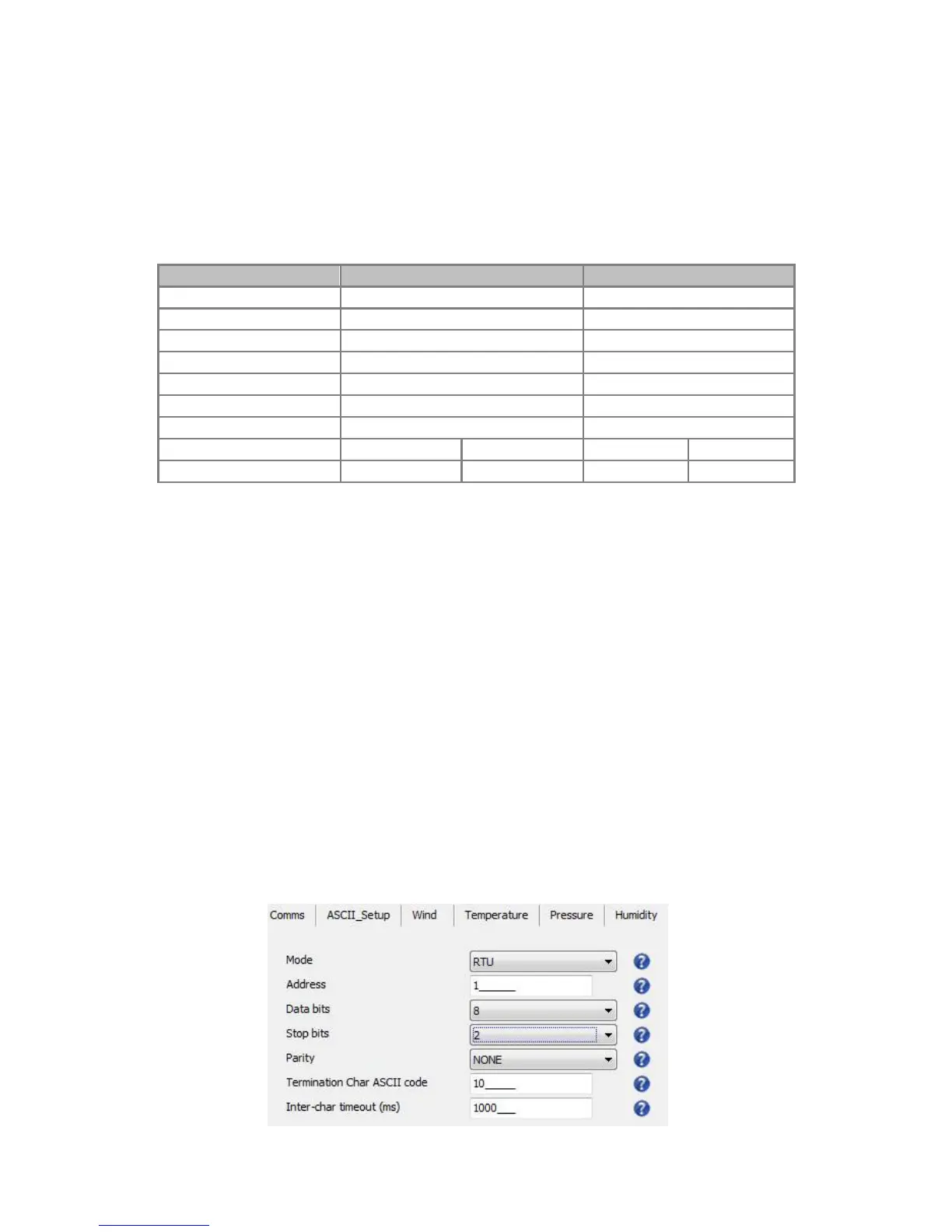
1. Select the Modbus page
Mode: Choose between RTU and ASCII, in this case RTU
Address: Choose a MaxiMet address number between 1 to 247
Data Bits: Choose 7 for Modbus ASCII and 8 for Modbus RTU
Stop Bits: Choose 1 for Even/Odd Parity or 2 for No Parity (None)
Parity: Choose Even/Odd or None
Termination Char ASCII code: Choose between 0-255
Inter Char Timeout (ms): Choose 500ms - 10000ms


 To Next Page