Home
GL-INET
Gateway
Brume
Page 65
GL-INET Brume - Page 65
168 pages
Manual
Save Page as PDF
To Next Page
To Next Page
To Previous Page
To Previous Page
Loading...
Page
61
|
164
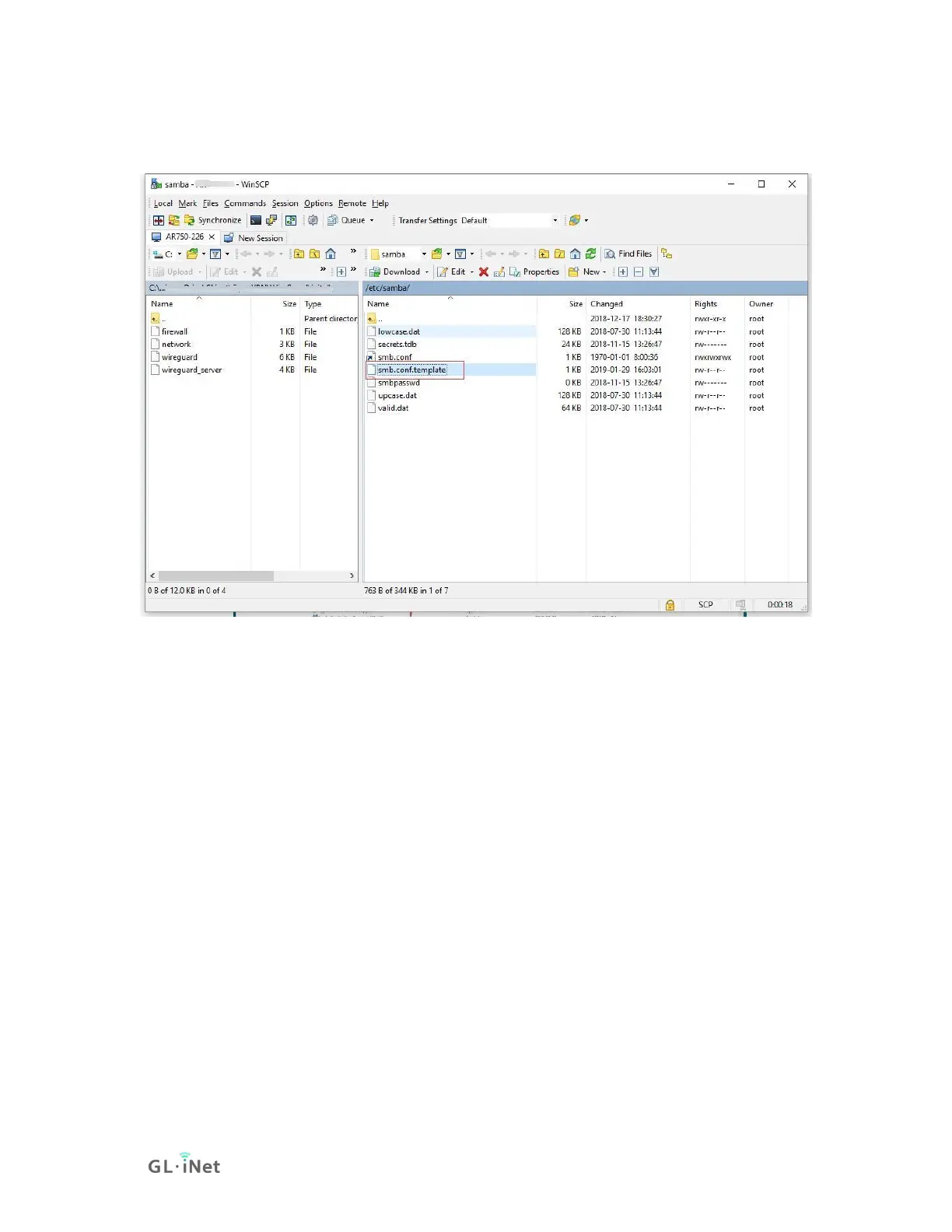
3.0 firmware supports SMB2, and if you need SMB3, use
WinSCP to router
,
edit
/etc/samba/smb.co
nf.template
.
Change the "max protocol = SMB2" to
"min protocol = SMB1"
"max protocol = SMB3", then
save
and
exit
WinSCP.
64
66
Table of Contents
Main Page
Table of Contents
2
Getting Started with Gl.inet Brume
5
Power on
6
Connect
7
Connect Via LAN
7
Connect Via USB Type-C Cable
8
Access the Web Admin Panel
15
Internet
18
Cable
19
Dhcp
20
Static
20
Pppoe
21
Repeater
22
USB 3G/4G Modem
23
Compatible Modems
25
Tethering
26
Easytether
27
Wireless
27
G Wifi
27
Dongle
28
Clients
31
Upgrade
33
Online Upgrade
34
Upload Firmware
34
Official Openwrt/Lede Firmware
35
Compile Your Own Firmware
35
Auto Upgrade
35
Firewall
36
Port Forwards
36
Open Ports on Router
37
Dmz
38
Vpn
38
Openvpn
38
Openvpn Client
38
Openvpn Server
43
Wireguard
46
Wireguard Client
46
Wireguard Providers
49
Wireguard Server
50
Wireguard App Support
53
Visit Client's LAN Subnet
53
VPN Policies
54
Settings
54
Add VPN Policy
55
Clear DNS Cache
57
Applications
57
Plug-Ins
57
Internet Kill Switch
58
Setup
59
File Sharing
61
Router Settings
61
Access the Storage Device
62
Windows
62
Mac os
67
Linux
74
Chromeos or Chromiumos (Neverware Cloudready and Others)
74
Android
75
DLNA Server
79
Install Plug-Ins
79
Use the DLNA Server in Gl.inet Routers
80
Ddns
88
Cloud
95
Introduction
95
Setup
96
Manage Your Devices
104
Site to Site
110
Batch Setting
119
Template Management
122
Task List
124
Goodcloud and VPN
125
Disable
126
Tor
129
More Settings
139
Admin Password
140
Lan Ip
140
Time Zone
141
MAC Clone
142
Custom DNS Server
143
Button Settings
144
Network Mode
145
Revert Firmware
146
Advanced
147
Troubleshooting
148
LED Indicators
148
LED Customization
149
Repair or Reset
150
Debrick Via Uboot
151
Change WAN to LAN
154
Captive Portal
156
Gl.inet App
158
Access Web Panel
160
Check Connection/Router's IP Address
160
Your IP Address Is Incorrect
160
Your IP Address Is Correct
160
Extensible Authentication Protocol (EAP)
161
Introduction
161
Connect Via Web Panel
162
Connect Via Luci
165
Goodcloud Issues
167
How to Fix if My Device Show "Deactivated
167
Related product manuals
GL-INET Collie
48 pages
GL-INET GL-X750V2C4
2 pages
GL-INET GL-MV1000
168 pages



 To Next Page