EasyManua.ls Logo

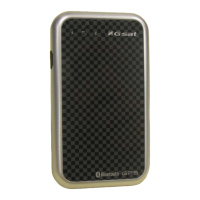
Globalsat BT-368 - User Manual

Globalsat BT-368
14 pages
Print Icon
To Next Page IconTo Next Page
Loading...
Copyright © 2007, Globalsat Technology Corporation
Page 1 of 14
1
Globalsat Bluetooth GPS Receiver
BT-368 User Manual
Version 1.0
Globalsat Technology Corporation Headquarters (Far East Century Park)
16F., No. 186, Jian-Yi Road, Chung-Ho City, Taipei Hsien 235, Taiwan
Tel: 886-2-8226-3799/ Fax: 886-2-8226-3899
E-mail : service@globalsat.com.tw
Website: www.globalsat.com.tw

Questions and Answers

  • C
    Casey GarciaAug 8, 2025
    What to do if my Globalsat BT-368 cannot be positioned?
    • M
      Melinda CoxAug 8, 2025
      If your Globalsat GPS is having trouble positioning, first check if the GPS status LED is flashing normally. Also, ensure that the battery has sufficient power; if not, recharge the device. If the GPS still cannot be positioned after a long time, use GPSinfo software to perform a Cold Start, and then move the GPS to an open area to allow it to position itself.
  • J
    Jason NealAug 22, 2025
    How to fix Globalsat BT-368 Bluetooth when it is unable to be connected?
    • S
      Shannon JohnsonAug 22, 2025
      If the Bluetooth on your Globalsat GPS is not connecting, start by checking if the Bluetooth status LED is flashing normally. Next, make sure the device has enough battery power; if it's low, recharge it. Finally, verify that the other Bluetooth device you are trying to connect to is enabled.

Summary

Product Information

Product Description

Details the BT-368's performance, chipset, antenna, and battery life.

Product Features

Lists key features like SIRF StarIII chipset, parallel channels, Bluetooth, and LED indicators.

Product Specifications

Provides technical details on GPS, Bluetooth, physical dimensions, and environmental ranges.

Hardware Description

Hardware Overview

Identifies physical components of the BT-368, including USB connector, LEDs, and power button.

LED Behaviors

Explains the meaning of different LED states for Bluetooth, GPS, and power status.

Power Button and USB Connector

Describes the function of the power button and the USB charge connector.

Package Contents

Getting Start

Charging Battery

Instructions for charging the BT-368 battery before initial use.

Power On and GPS Fix

Steps to turn on the device and acquire a GPS signal.

Bluetooth Connection

Guide to connecting the BT-368 to Bluetooth-enabled devices.

Navigation Software

Instructions for starting navigation software after connection.

Troubleshooting

Connect BT-368 to Pocket PC

Detailed walkthrough on pairing the BT-368 with a Pocket PC.

Bluetooth Connection Failure

Troubleshooting steps for when the Bluetooth link cannot be established.

GPS Positioning Issues

Solutions for problems related to the GPS receiver not finding a location.

FCC Notices

Globalsat BT-368 Specifications

General IconGeneral
BrandGlobalsat
ModelBT-368
CategoryGPS
LanguageEnglish

Related product manuals