Need help?
Do you have a question about the Glyph Blackbox PRO RAID and is the answer not in the manual?
Provides Glyph USA address, phone numbers, fax, website, and email contacts for sales and support.
Explains RAID 0 mode for increased performance, data splitting across drives, and potential data loss.
Details RAID 1 for data redundancy, real-time backup, and reduced capacity.
Describes CLEAR mode, using drives independently, and mounting them separately.
Explains BIG mode for combining drives into a single logical unit, writing sequentially.
Instructions for changing RAID modes (0, 1, JBOD, SPAN) using unit pins and the SET button.
Guides for formatting the drive on Mac (Disk Utility) and Windows (Disk Management).
Steps for initiating a warranty claim, including contacting technical service and obtaining an RMA.
Provides phone, email, and web resources for technical assistance and product support.
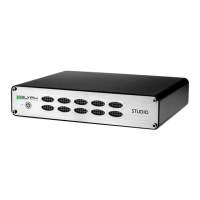
The Glyph Blackbox PRO RAID is a tabletop external storage enclosure designed for professional use, offering versatile data management and high-performance capabilities. This device is engineered to provide robust and reliable storage solutions for users requiring speed, redundancy, or expanded capacity for their digital assets.
At its core, the Blackbox PRO RAID functions as an external enclosure housing two hard disk drives, which can be configured to operate as a single logical volume or as independent drives, depending on the chosen RAID mode. The device supports four distinct drive modes: RAID 0 (striping), RAID 1 (mirroring), CLEAR (JBOD – just a bunch of disks), and BIG (spanning). Each mode caters to different user needs, balancing performance, data redundancy, and storage capacity.
RAID 0, the default shipping mode, is designed for maximum performance and data throughput. In this mode, data is split across both drives in segments and written simultaneously, effectively doubling the read and write speeds compared to a single drive. This is ideal for applications requiring very fast data transfer, such as video editing, large file transfers, or high-speed data acquisition. However, it's crucial to note that RAID 0 offers no data redundancy; if one drive fails, data on both drives can be corrupted, making regular backups essential.
For users prioritizing data safety and redundancy, RAID 1 (mirroring) is the preferred mode. In RAID 1, the same data is written to both hard drives concurrently, creating a real-time backup. If one drive experiences a failure, the data remains accessible on the other drive, ensuring continuity and minimizing data loss. While this mode provides excellent data protection, it effectively halves the total storage capacity, as one drive is used entirely for mirroring the other. For example, an 8TB Blackbox PRO RAID configured in RAID 1 will appear as a single 4TB drive to the computer.
The CLEAR (JBOD) mode allows both hard drives to be used independently. In this configuration, each drive mounts individually to the computer, giving the user the flexibility to choose which drive to save data on. This mode is suitable for users who want to manage their drives separately without any RAID overhead or specific data distribution patterns.
Finally, the BIG (spanning) mode combines multiple hard drives into a single, larger logical unit. Unlike striping, spanning writes data sequentially to the first physical drive until it reaches its full capacity, and then continues writing to the second physical disk. This mode maximizes storage capacity by concatenating the drives, but it does not offer performance benefits or data redundancy. If one drive fails in a spanned volume, data on both drives may become inaccessible.
The Blackbox PRO RAID connects to a computer via a USB-C 3.1 (Gen2) port, ensuring high-speed data transfer rates of up to 550 MB/s. It is also compatible with USB 3.0. For enhanced connectivity, some versions of the Blackbox PRO RAID include an optional hub with additional ports, such as CFast 2.0, SD (UHS-II) card slots, and a USB Type-A (10Gb) port. The Thunderbolt 3 version further expands connectivity with two Thunderbolt 3 ports for daisy-chaining capabilities, alongside the CFast 2.0, SD card slot, and USB Type-A port on the hub.
Setting up the Blackbox PRO RAID involves a straightforward process. Upon connecting the device, users should verify that their computer recognizes and mounts the Blackbox PRO RAID. For Windows users, formatting instructions are provided, typically involving Disk Management to initialize the disk, create a new simple volume, and format it, usually with NTFS. Mac users will find the device pre-formatted for Mac, but instructions are available for reformatting or partitioning using Disk Utility, typically using "Mac OS Extended (Journaled)" format.
Changing the RAID mode is a key feature that allows users to adapt the device to their evolving needs. This process is initiated by aligning pins on the back of the unit according to a diagram that indicates the different RAID-mode settings (RAID 0, RAID 1, BIG, or CLEAR). After setting the pins, pressing and holding the "SET" button for four seconds will reconfigure the device. It's crucial to back up all data before changing the RAID mode, as this procedure will erase any data previously stored on the Blackbox PRO RAID.
The device features a front panel bi-color LED that provides visual feedback on its status. A solid blue light indicates that the power is on, while a flashing blue light signifies disk activity. In the event of an error condition with the internal drives, the LED will flash or display a solid red (or fuchsia) color, alerting the user to potential issues.
Compatibility is broad, with the Blackbox PRO RAID formatted for MAC by default and compatible with Windows (via reformat), as well as modern Unix-based systems, Linux, or BSD. Users with older 32-bit operating systems, such as Windows XP 32-bit, need to be aware of volume size limitations. These systems use Master Boot Record (MBR), which does not support volumes larger than 2.2TB. For larger capacities, the array must be formatted using GUID Partition Table (GPT), which is supported by Windows XP 64-bit Edition and above, and Mac OS X 10.4 and above. If using older 32-bit systems, the total capacity in RAID 0 must be less than 2.2TB (or less than 4TB in RAID 1, mirrored to 2TB).
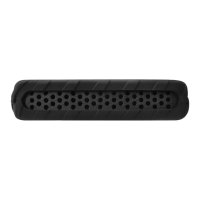
The Blackbox PRO RAID is designed for reliability, but proper care and maintenance are important for its longevity and data integrity. The device comes with a rugged removable cover, which helps protect the enclosure during transport and use.
Regular data backup is strongly emphasized, especially for RAID 0 configurations, where data redundancy is absent. The manual explicitly states, "MAKE SURE TO BACKUP YOUR DATA OFTEN!" This advice is critical for all RAID modes, as no storage solution is entirely immune to failure.
In terms of support, Glyph Technologies provides comprehensive warranty information and technical assistance. The product includes a 3-year hardware warranty, a 2-year free basic data recovery attempt (though success is not guaranteed), and a 1-year advance replacement policy within the continental U.S. (if technical support cannot resolve the issue via phone).
The warranty covers material and mechanical defects, but it does not cover damage caused by misuse, modification, alteration, tampering, unsuitable operating environment, improper care, or failures caused by other products.
Should a user encounter an issue, the warranty procedure involves contacting Glyph Technical Service to obtain a Return Merchandise Authorization (RMA) number. The device should then be carefully packed and shipped to the address provided by the service representative, with the RMA number clearly labeled on the box. Only the Blackbox PRO RAID unit itself should be sent, without any cables.
Glyph offers various contact methods for technical support, including toll-free and international phone numbers, email, and a support website. Users are advised to gather specific information before contacting support, such as the Blackbox PRO RAID serial number (located on the bottom of the unit) and details about their operating system (e.g., Windows 11, Mac Ventura 13.2.1). This preparation helps streamline the support process and ensures efficient troubleshooting.
 General
| Power Supply | External Power Adapter |
|---|---|
| RAID Levels/Modes | RAID 0, RAID 1, JBOD, SPAN |
| Drive Type/Compatibility | 2.5" and 3.5" SATA Hard Drives |
| Cooling | Fan |
| Weight | 1.3 kg |
| Operating System Compatibility | macOS, Windows |
| Drive Bays | 2 |

 To Next Page