Need help?
Do you have a question about the GME AIST120 and is the answer not in the manual?
Important messages for safety, installation, and product usage.
Information on position source accuracy, compass safe distance, and RF emissions.
Explanation of the Automatic Identification System (AIS) and its various types.
Description of the two categories of information transmitted by an AIS transceiver.
Specific legal requirements for AIS configuration for US customers.
Lists and illustrates the items included with the AIS transceiver purchase.
Details the contents of the software CD, including proAIS2 and drivers.
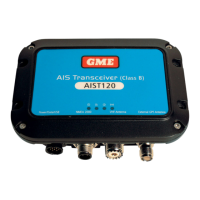
Overview of the transceiver unit, its indicators, and key features.
Description of the cable's function, connections, and importance.
Guidance on familiarizing yourself with system elements before attempting installation.
Lists the various electrical connection types available on the AIS transceiver.
Diagram illustrating a typical configuration for installing the AIS transceiver.
Details essential components like VHF antenna, cables, and optional GPS antenna.
Instructions on connecting the AIS transceiver to a chart plotter for data display.
How to connect the AIS transceiver to a PC or Mac using the USB port.
Step-by-step instructions for physically installing the AIS transceiver unit.
Diagram showing the physical dimensions of the AIS transceiver unit.
Illustration and guidance on how to mount the AIS transceiver unit.
Detailed instructions for mounting an optional external GPS antenna.
Diagram illustrating the mounting of the GPS antenna.
Diagram showing the location of the GPS antenna connector on the transceiver.
Instructions for connecting the VHF antenna to the AIS transceiver.
Diagram showing the VHF antenna connector location on the unit.
Details on connecting the accessory cable for power, switch, and data.
Explanation of the color coding of wires in the accessory cable for connection.
Instructions for connecting an external switch for silent mode control.
Diagram illustrating the connection of an external switch.
How to connect to NMEA0183 devices like chart plotters and sensors.
Diagram showing NMEA0183 data port connections and functions.
How to connect the transceiver to an NMEA2000 network.
Instructions for installing USB drivers and connecting to a PC/Mac.
Instructions for connecting the AIS transceiver to a suitable power source.
Diagram illustrating the power supply connection to the unit.
Describes initial power-on behavior and the meaning of indicator lights.
Table detailing the meaning of different indicator light combinations.
Outlines the two primary methods for configuring the AIS transceiver.
Overview of the proAIS2 software for configuration, monitoring, and diagnostics.
Step-by-step instructions for installing the proAIS2 software on a PC/Mac.
Details required information for configuring the transceiver via proAIS2.
How to use the AIS transceiver after configuration and initial setup.
Explanation of the 'silent mode' function and its effect on transmissions.
Guidance on using proAIS2 for monitoring transceiver performance and diagnostics.
Diagram showing the location of indicator lights on the AIS transceiver unit.
Detailed explanation of indicator light states and their meanings.
Table listing common issues with the AIS transceiver and their potential remedies.
Lists key technical parameters and specifications of the AIS transceiver.
Detailed technical specifications for the VHF transceiver component.
Explanation of consumer rights under Australian Consumer Law.
Details the warranty provided against defects in materials and workmanship.
Lists specific conditions and circumstances excluded from warranty coverage.
Specifies the duration of the warranty period for the product.
 General
| Brand | GME |
|---|---|
| Model | AIST120 |
| Category | Transceiver |
| Language | English |

 To Next Page