T X 3 5 0 0 I N S T R U C T I O N M A N U A L PAG E 5
the symbol is displayed. When the squelch is closed the
receiver remains quiet while there are no signals present but
any incoming signals will override the squelch and be heard in
the speaker.
To open the squelch
Briefly press the SQL key. A low beep will be heard and the
symbol will be displayed. If there are no signals present you
will hear the receiver’s background noise.
To close the squelch
Briefly press the SQL key. A high beep will be heard. If there
are no signals present the
symbol will disappear and the
receiver will become quiet again.
Adjusting the squelch level
The TX3500’s default squelch sensitivity level has been factory
set to provide optimum performance under most operating
conditions. If required, the sensitivity level can be adjusted to
suit changing conditions.
To adjust the squelch sensitivity, briefly press the Channel
knob. The channel display will show the current squelch
setting in values from 1 - 9. A squelch setting of -1 allows the
squelch to open on very weak signals whereas a setting of
-9 requires much stronger signals to overcome the squelch.
Rotate the Channel knob to change the squelch setting.
Press the Channel knob to accept the setting and return
to normal operation.
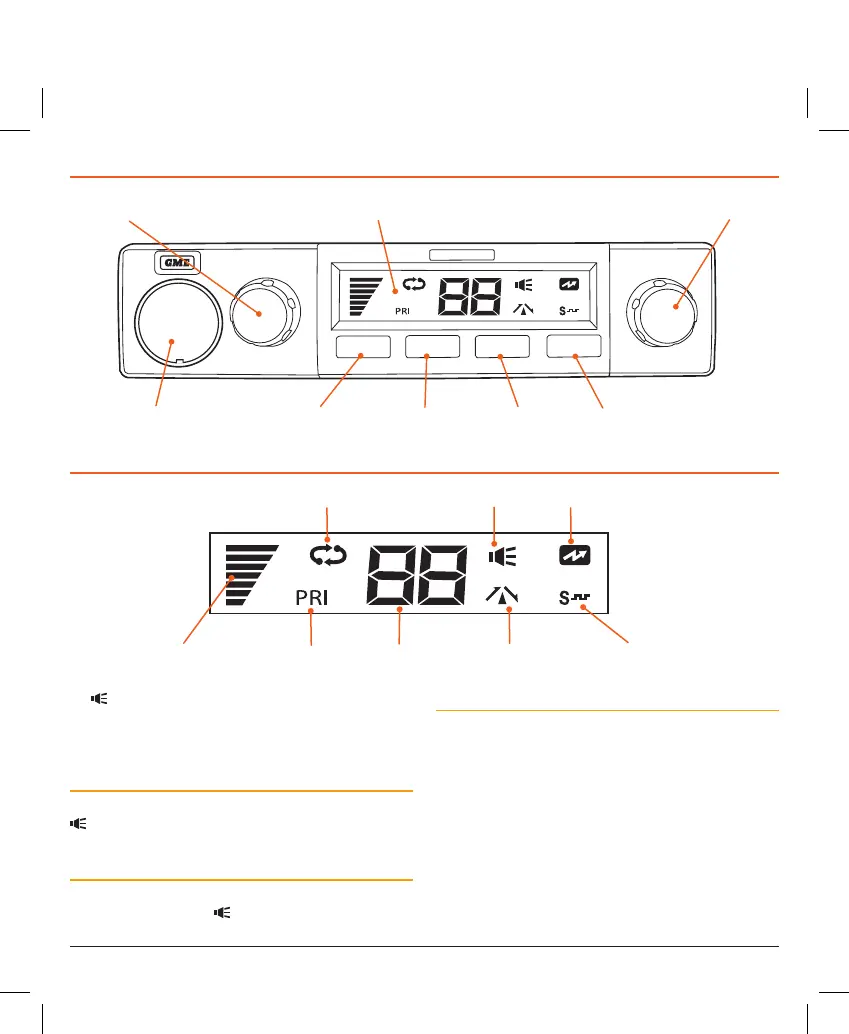
PRI
SCAN
DUP
SQL
VOLUMECHANNEL
Channel Selector
LCD (Liquid Crystal Display)
Volume Selector
Microphone Port Priority Key Scan Key Duplex Key
Squelch Key
Channel Display
Scan Icon Busy Icon Transmit Icon
Signal Meter Priority Icon Duplex Icon CTCSS/DCS Icon
LCD PANEL
FRONT PANEL CONTROLS



 To Next Page