EasyManua.ls Logo

GME TX650 - Control Descriptions; Power Button; Push-to-Talk (PTT) Button

GME TX650
20 pages
Print Icon
To Next Page IconTo Next Page
To Previous Page IconTo Previous Page
Loading...
PAGE 6 INSTRUCTION MANUAL TX650
CONTROL DESCRIPTIONS
POWER BUTTON
Press and hold the P
OWER button for about 2 seconds. You will hear a
confirmation tone to indicate the radio is on. To turn the radio off, press and hold
the POWER button for about 2 seconds.
PUSH-TO-TALK (PTT) BUTTON
Press and hold this button to speak (transmit). Release the button to listen
(receive).
You can only communicate with other UHF CB radios when their
channel and CTCSS code settings are the same as yours.

3!6%
$50
#4#
$7 ()
21
161514131211
3 4 5 7 8 9
10
6
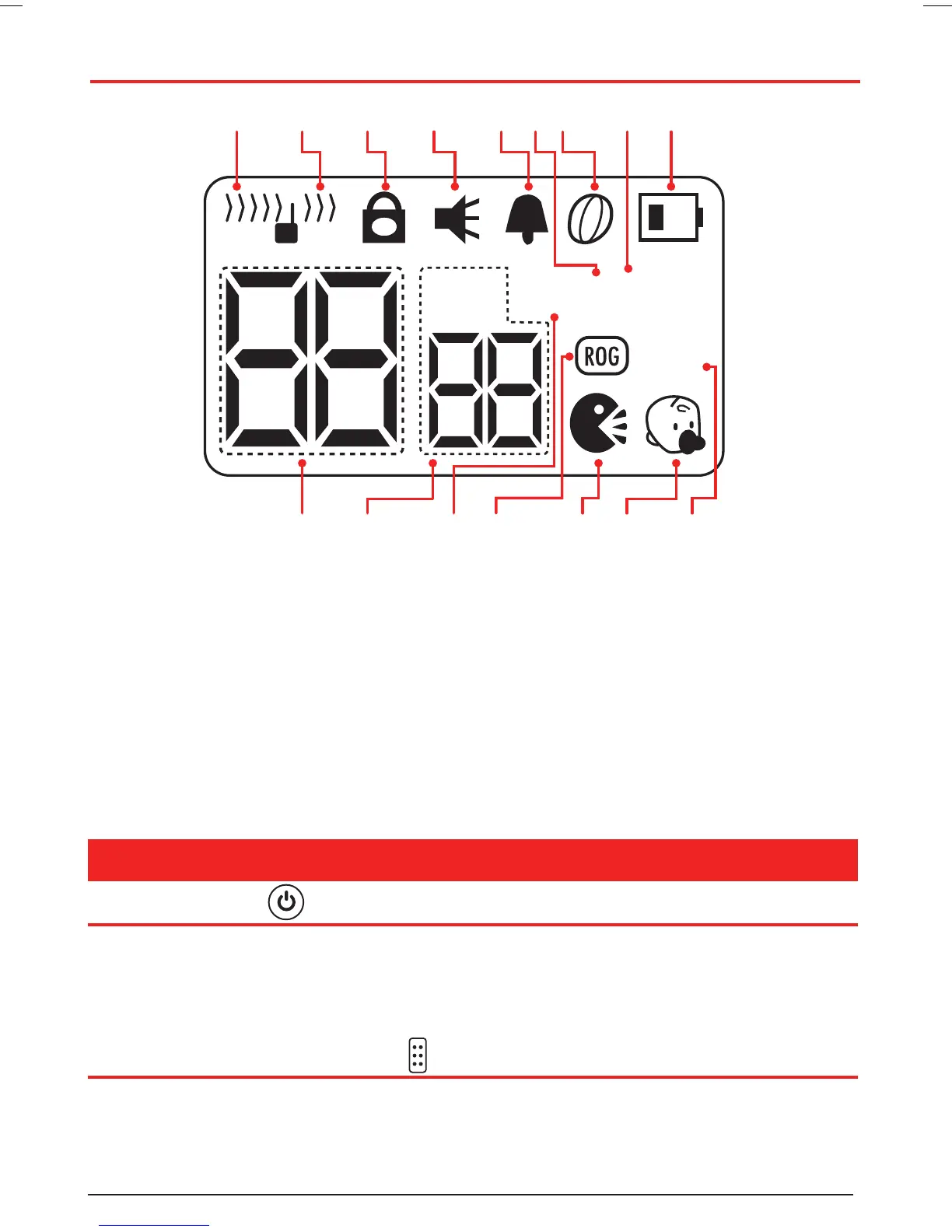
1. Receiving/Busy Icon
2. Transmit Icon
3. Lock Icon
4. Monitor Icon
5. Key Tone Icon
6. Hi Transmit Power Icon
7. Scan Icon
8. Power Save Icon
9. Battery Warning Icon
10. Channel Display
11. CTCSS Code Icon/Display
12. Dual Watch Icon
13. Roger Beep Icon
14. VOX Icon
15. Room Monitor Icon
16. Duplex Icon
LCD DISPLAY

Related product manuals