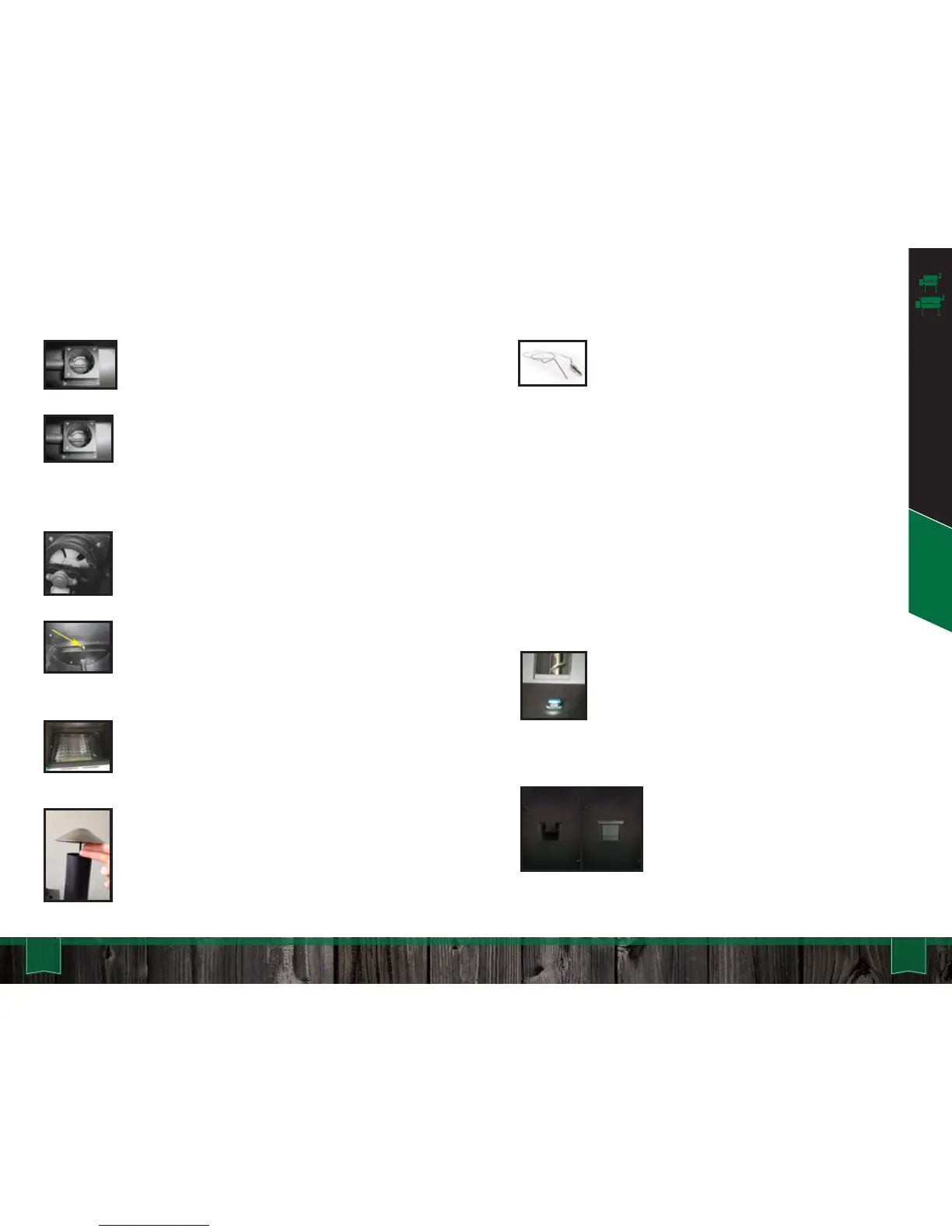
Firebox: This sits in the bottom of the grill, and
pellets arrive into it via an auger tube attached to
its left side. Also called a burn pot.
Igniter: You will find the igniter in the firebox. It
should protrude about 1.5-2” into the firebox. You
can adjust this by loosening the set screw located
to the left of the firebox on the igniter tube.
However, this should rarely be necessary. Also
called a hot rod.
Combustion Fan: This fan angles up toward the
firebox (burn pot) from underneath your grill. The
speed of this fan will vary during normal operation.
Thermal Sensor: This device sends data to the
computer ten times per second. The computer
then averages these readings over slightly longer
periods of time and adjusts the air and pellet flow
to maintain an accurate temperature in the cavity.
Grease tray: This slopes downhill from left to
right and carries the drippings from your food into
the grease bucket for easy disposal. Make sure
the half-moon cutout is on the left side.
Low Pellet Alarm: Inside the hopper you will
find a low pellet alarm. When the level of
pellets falls below this sensor, an alarm
sounds to let you know that you need to fill the
hopper back up. Once this alarm goes off,
you should add pellets to prevent fuel
shortage and resultant temperature drops.
Chimney Cap (Rain Cap): Always leave this
open. Your grill needs to draft. In the winter, a two
fingers opening (see Assembly section) is
appropriate. In the summer, crank it all the way
open.
Meat Probe: Your new Green Mountain pellet
grill has a meat probe included as standard
equipment. To use this feature, just plug the
connector into the receptacle on the front of
the control panel. Lift the stainless flap on the
left side of the grill and push the probe through the hole.
Then, insert the probe into the center of the food you are
cooking.
When you press the “FOOD” button on the control panel, it will
display the temperature of whatever the probe touches, but
this process takes a minute or two to stabilize. To return to
the grill temperature display, simply press the “FOOD” button
again.
If you do not have the probe installed in the control panel,
then your digital display will read “NO FD” (no food) when you
press the “FOOD” button.
21 22Daniel Boone & Jim Bowie - Operation
Daniel Boone & Jim Bowie Quick Start
KEY COMPONENTS
Pellet Dump: Please make certain that
the stainless steel pellet dump slider is in
place before filling the hopper with pellets.



 To Next Page