Need help?
Do you have a question about the GMG Daniel Boone and is the answer not in the manual?
Details the limited warranty covering defects in workmanship and materials.
Specifies problems not covered by the warranty, such as abuse or misuse.
Outlines specific legal rights granted by the warranty and disclaims implied warranties.
States the company's non-liability for incidental or consequential damages.
Provides contact information to exercise rights under the warranty.
Provides essential safety precautions for grill usage, including outdoor use and clearance.
Specifies approved fuel types and prohibits the use of non-pelletized fuels or accelerants.
Details safety measures during operation, including supervision and hot parts.
Highlights safety considerations when using the remote control or cell phone application.
Safety guidelines related to cleaning, maintenance, and unplugging the grill.
Alerts users to the dangers of carbon monoxide poisoning and proper ventilation.
Information on creosote formation and safety procedures in case of a creosote fire.
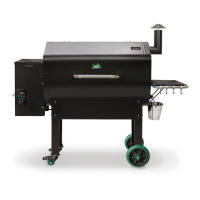
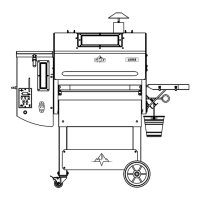
Identifies and briefly describes essential grill components like the pellet hopper and firebox.
Explains the process of how a pellet grill functions from pellet feeding to temperature control.
Provides guidance on assembling the grill, potentially referencing an included DVD.
Lists the specific tools required for assembling the Daniel Boone or Jim Bowie grill.
Outlines the general steps involved in the grill assembly process.
Details the initial steps for unpacking the grill from its box.
Step-by-step instructions for attaching the grill's legs.
Instructions for correctly installing the grill's chimney.
Guide on how to reverse the grill's handle for proper installation.
Instructions for inserting various parts like the heat shield and grease tray.
Explains what to expect during the grill's startup sequence and initial temperature display.
Instructions on how to set the desired cooking temperature after startup.
Details the necessary burn-in process for the first-time use of the grill.
Provides an estimate of how long it takes the grill to reach the set temperature.
Outlines the correct procedure for shutting down the grill using the 'FAN' mode.
Key safety warnings to adhere to when operating the grill.
Advisories against using softwood or heating pellets due to potential harm.
Recommendations for storing pellets properly to prevent moisture damage.
Advice on using a grill cover to protect the unit, especially in adverse weather.
Reminder to unplug the grill before performing any electrical component operations.
Description of the controller as a state-of-the-art computer for temperature regulation.
Importance of keeping the hopper lid closed to maintain air pressure and prevent burn-back.
Explanation of the firebox where pellets burn and the igniter's function.
Description of the combustion fan and the thermal sensor's role in temperature control.
Functionality of the grease tray for drippings and the chimney cap for draft.
Usage of the meat probe and the function of the low pellet alarm.
Ensuring the pellet dump slider is in place before filling the hopper.
Method to use if the grill experiences a power failure during operation.
Proper procedure for shutting down the grill, cooling the firebox and clearing ash.
Advice on adjusting grill temperature for optimal cooking performance.
Explanation of the 'OFF' status on the digital readout as a safety feature.
List of common error codes displayed on the grill's digital readout.
Procedure for charging the firebox with pellets, especially for new grills or after running out.
Warning about how weather can affect pellets, turning them into sawdust.
Importance of keeping the grill level for proper grease flow and sensor accuracy.
How to contact technical support for any problems or part replacements.
Crucial warning against working on the grill while it is plugged in.
Information on where to find 'How To' videos for troubleshooting and service tips.
Chart detailing the functions of the controller based on display states.
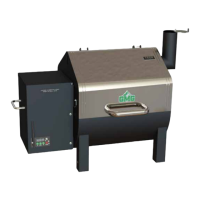
Guidance for assembling the Davy Crockett grill, possibly referencing an included DVD.
Lists the necessary tools required for putting the Davy Crockett grill together.
Provides a summary of the main steps involved in assembling the Davy Crockett grill.
Detailed instructions for installing the legs on the Davy Crockett grill.
Step-by-step guide for mounting the chimney onto the grill.
Instructions on reversing the handle, including thermal isolation washer placement.
Guide for inserting the heat shield, grease tray, and grates correctly.
Explains the three different ways to power the Davy Crockett grill.
Advises to always open the rain cap fully when operating the grill.
Procedure for starting the Davy Crockett grill and setting the initial temperature.
Instructions on how to use the meat probe with the Davy Crockett grill.
Correct procedure for turning off the Davy Crockett grill, including fan mode.
Guidance for power failures and what to do if you run out of pellets.
Steps for cleaning grease, ash, and residues from the grill.
Chart detailing the controller's display states and their associated functions.
List of error codes specific to the Davy Crockett model and their meanings.
Fundamental tips for successful pellet grilling, including hopper monitoring and preheating.
Advice on marinating food and using spritz for enhanced flavor.
Techniques for spritzing meats and the grill's versatility for various cooking tasks.
Importance of keeping the lid closed and precautions against grease fires.
Tips on achieving smoke flavor and the importance of resting meat after cooking.
Basic guidelines and a cooking chart for users new to pellet grilling.
Descriptions and suggested uses for various GMG dry rubs for different meats.
Descriptions and suggested uses for various GMG sauces for different dishes.
Recommended internal temperatures for various cuts of beef, lamb, venison, and duck.
Recommended internal temperatures for pork, raw hams, and veal.
Recommended temperatures for pork ribs, pork shoulders, beef briskets, and beef ribs.
Recommended internal temperatures for chicken and turkey, including stuffed poultry.
Recommended USDA minimum temperatures for ground meats, burgers, and sausages.
Recommended internal temperatures for various types of fish.
Steps to diagnose why the grill does not power on.
Troubleshooting steps for when the grill fails to reach the set temperature.
Diagnosing causes of inconsistent or erratic temperature readings on the display.
Addressing issues where smoke is escaping from the pellet hopper.
Troubleshooting the low pellet alarm that beeps continuously.
Steps to resolve issues where pellets are not being fed into the firebox.
Diagnosing and fixing the cause of soot appearing on food during grilling.
Lists various warnings related to app functionality and grill status.
Alert for an open circuit in the grill requiring immediate unplugging.
Notification indicating the low pellet alarm has been triggered.
Warnings regarding motor or fan malfunctions requiring immediate attention.
Alert for low voltage detected on the Davy Crockett grill.
Instructions on how to find the grill's WiFi password for iOS connection.
Steps for connecting an iOS device to the grill's WiFi network.
Instructions on how to find the grill's WiFi password for Android connection.
Steps for connecting an Android device to the grill's WiFi network.
Overview of the home screen, displaying grilling parameters like temperature and timers.
Description of the control screen's ability to manage grill on/off, temperature, and timers.
Procedure for establishing a connection between the app and the grill.
How to turn the grill on and off remotely using the app.
Details on activating the fan mode remotely for cooling down the firebox.
Instructions on how to set the desired grill temperature using the app interface.
A tip for more precise temperature control using the app's keyboard screen.
How to track the internal temperature of food using the GMG Food Probe.
Instructions for setting alerts for when the food reaches a target temperature.
Guide on how to use the stopwatch feature within the app for timing cooks.
Instructions for setting, starting, and pausing the timer function in the app.
Steps to access the Profiles section of the app.
Process for creating a new cooking profile, including naming it.
How to add individual steps, based on time or temperature, to a profile.
Explanation of profile steps that activate based on elapsed time.
How to create profile steps that are triggered by food probe temperature.
Options for the final step of a profile: Keep Warm or Turn Off.
A tip for bypassing startup mode if the grill enters Fan Mode unexpectedly.
Instructions on how to select and start a previously created profile.
Steps to modify existing profiles, including changing temperature and time settings.
Procedure for removing unwanted profiles from the app.
Access contact information, mission statement, and app version.
Option to calibrate the grill's temperature controller.
Links or contacts for accessing app and grill support.
Managing app notifications and accessing WiFi network settings.
Instructions for updating the grill's firmware system.
How to check the current version of the grill's firmware.
Procedure to reset the grill's system to default factory settings.
Conditions needed for updating the grill's firmware, including WiFi connection.
Ensuring the grill is on and not cooking before attempting a firmware update.
Steps to start the firmware update process via the app.
Selecting the WiFi network and entering the password for the update.
What the LCD panel displays during the firmware download and installation.
Common reasons why a firmware update might fail and how to address them.
Connecting the app to a single grill via its default WiFi network.
Steps to access the WiFi settings within the app.
Choosing the home WiFi network from a dropdown menu on Android.
Manually typing the home WiFi network name for iOS devices.
Requirement to be within 20 feet of the home router for initial update.
Inputting the password for the selected home WiFi network.
Advice for when the app reports 'No grills detected' during connection.
Ensuring the phone or tablet is connected to the home WiFi after the grill connects.
The app searching for available grills on the local network.
How the app checks for previously connected grills to speed up future connections.
Process of switching the grill from Broadcast to Client mode for home network connection.
Confirmation message indicating the grill is connected over local WiFi.
Explains Server Mode allows remote monitoring and control outside the home WiFi network.
Lists the actions that can be performed remotely in Server Mode.
Types of notifications users receive when using Server Mode.
Requirement for the grill to be connected to the local home WiFi network first.
Steps to navigate app settings and activate Server Mode.
Prompt to enter home WiFi username and password for server connection.
Message indicating successful connection of the grill to the GMG Server.
How the home screen reflects the last known grill temperature and connection status.
Using the Refresh button to check the last connection date and time.
Important tips for using Server Mode, including firmware version and app updates.
Steps to exit Server Mode and return to standard WiFi connection.
Enables control of multiple grills separately via the app.
Instructions for connecting to and managing multiple grills.
Process of searching for and connecting to multiple grills.
How grills are identified in Multi-Grill Mode, typically by serial number.
Contact details for app-related troubleshooting and service tips.
Contact information for grill-specific troubleshooting and service tips.
General contact details for Green Mountain Grill LLC.
Description of form-fitting grill covers for Daniel Boone and Davy Crockett models.
Accessories for expanding cooking capabilities and keeping items warm.
Accessories for winter use and carrying the Davy Crockett grill.
Front shelves for convenience and a rib rack for cooking multiple racks of ribs.
Non-stick cooking mats (G-Mats) and heavy-duty protective mitts.
Accessories like a spotlight, apron, and premium headwear.
Information about using a smartphone to control the grill via the custom app.
Stylish utensils designed for grilling with GMG products.
A mellow blend of oak, hickory, and maple for subtle flavor and long burn.
A bold blend of cherry, beech, and pecan for sweet aroma and character.
An aromatic blend of oak, hickory, and mesquite for intense smoke and flavor.
A balanced blend ideal for camping, RVing, and tailgating.
Rub formulated for beef, enhancing its natural flavor.
A rub adding zest and charm to ribs, roasts, and vegetables.
A savory rub designed to enhance the taste of fowl.
A versatile rub that enhances anything grilled.
A robust spice blend perfect for pork ribs, butts, and loins.
A rub inspired by Mexican flavors for meats, tacos, and enchiladas.
Exotic ingredients seasoned for perfectly tasting fish and seafood.
A piquant rub designed to enrich the flavor of venison, bear, or bison.
A sweet and spicy sauce from the Rooftop Barbeque team.
A bold BBQ sauce with bourbon flavor, ideal for slow-cooking.
A plum-based sauce adding an Asian flavor to various dishes.
A sweet and spicy sauce that complements wings, ribs, and pulled pork.
A classic sauce that seasons meats with traditional Western style.
A decadent sauce with fruit and fire for a zesty, slightly spicy kick.
 General
| Type | Pellet Grill |
|---|---|
| Temperature Range | 150°F to 550°F |
| Fuel Type | Wood Pellets |
| Hopper Capacity | 18 lbs |
| Warranty | 3 years |


 To Next Page