53 54
App User Guide
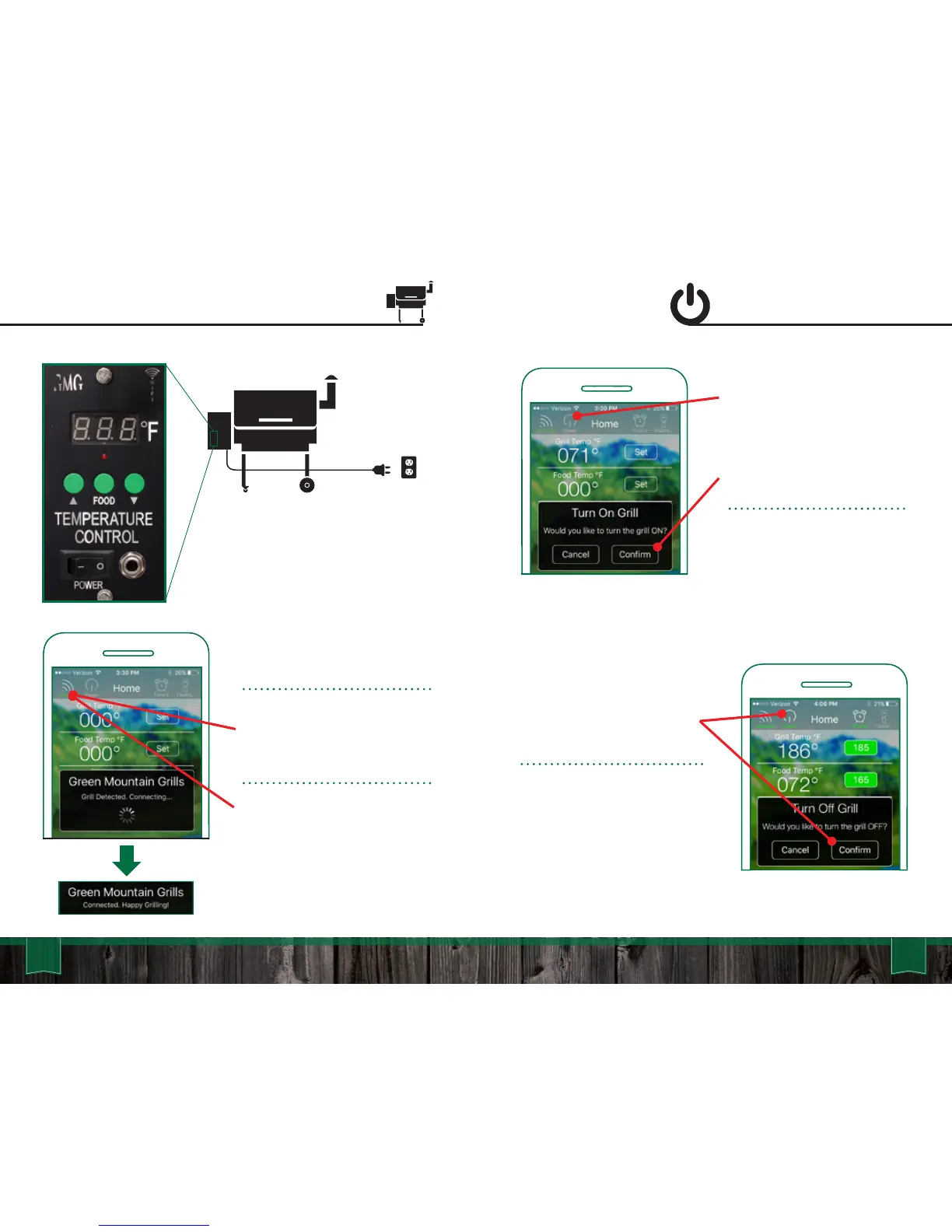
Connecting to the Grill Grill On/Off
OFF: Tap the “Power” button
icon and press “Confirm” on
the pop up screen to turn the
grill off. The grill will then
cycle into “Fan Mode”.
FAN MODE: This will cool
down the firebox and when it
has reached a cool temp the
grill’s digital control board will
display “off”.
POWER:
First, confirm the grill is plugged
in and the power switch (Daniel
Boone and Jim Bowie) on the
front of the grill is set to “on”.
Once the grill has power, ensure
your smartphone connects to
the grill’s WiFi network “GMG_”.
With the application launched
press the “connect” button. The
app will detect if there is a grill
near by.
DISCONNECTING:
To Disconnect the app from the
grill simply press the “Connect”
button again.
ON: First make sure you are
connected to the grill. Once
you verify you have power tap
the “Power” button. A pop up
screen will display. Press the
“Confirm” button to turn the
grill on.
This will start the grill and it
will begin it’s 1 > 2 > 3 startup
sequence.



 To Next Page