61 62
App User Guide
Creating Steps Creating Steps
1
2
3
1
2
3
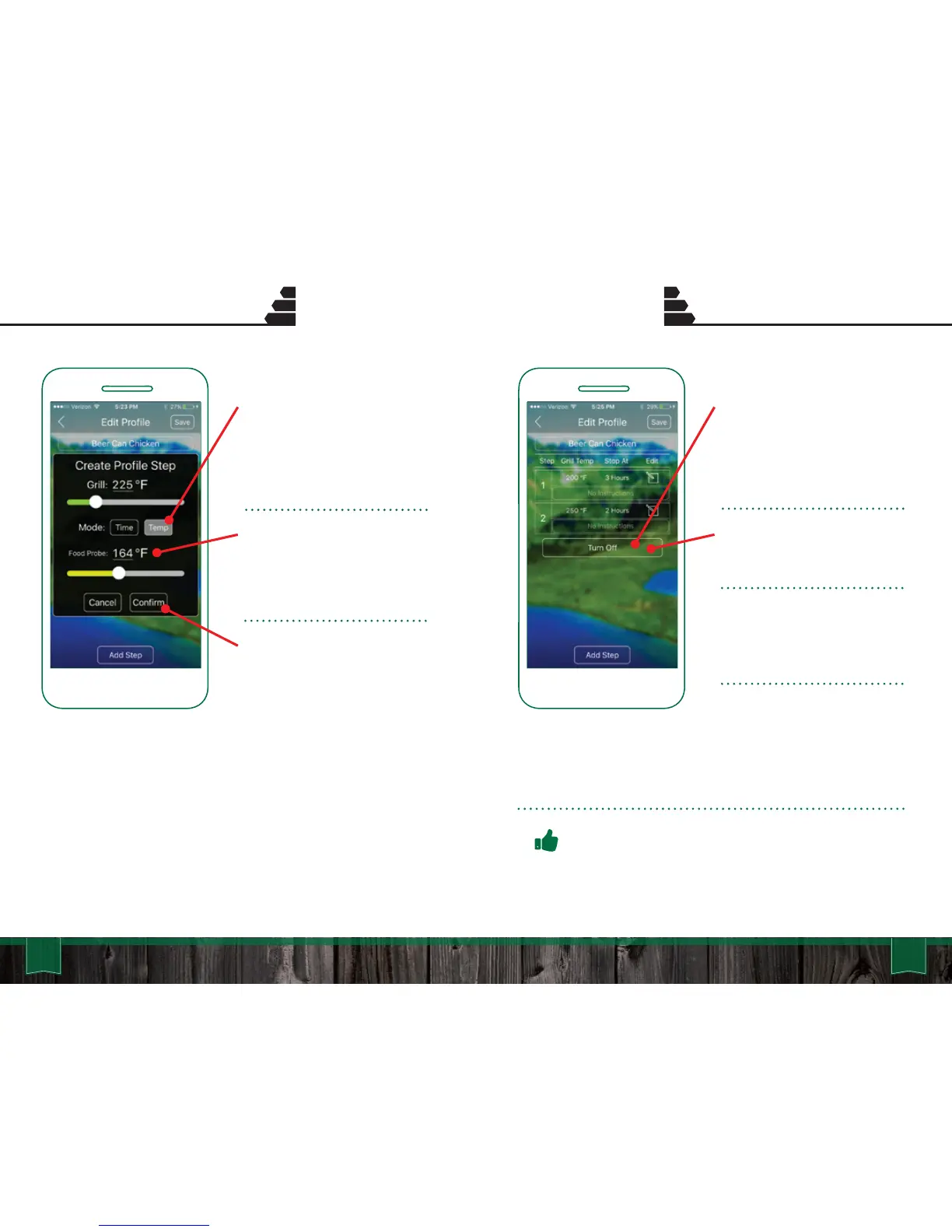
TEMP TRIGGERED:
Using your GMG Food Probe,
you can trigger a Profile Step
based on the internal temp of a
food item.
When the Food Probe reaches
the set temp, the next Step in
the Profile will activate (i.e.
lower or raise grill temp when
internal temp is reached).
Press “Confirm” to save the
new Profile Step.
END STEP:
For the End Step the grill will
automatically initiate a “Keep
Warm” setting or “Turn Off” Fan
Mode.
To switch between the two
settings simply tap the current
button.
Keep Warm: This setting will
set the grill temp to 150°F and
stay there until the grill is
turned off.
Turn Off: This mode will
immediately initiate Fan Mode.
* Novice users are recommended to
use the Keep Warm setting.
Pro Tip: If your grill goes into Fan Mode and food is not
ready, hold the “Up” arrow on the front of the grill for
approximately 5 seconds to bypass “Start Up” mode.



 To Next Page