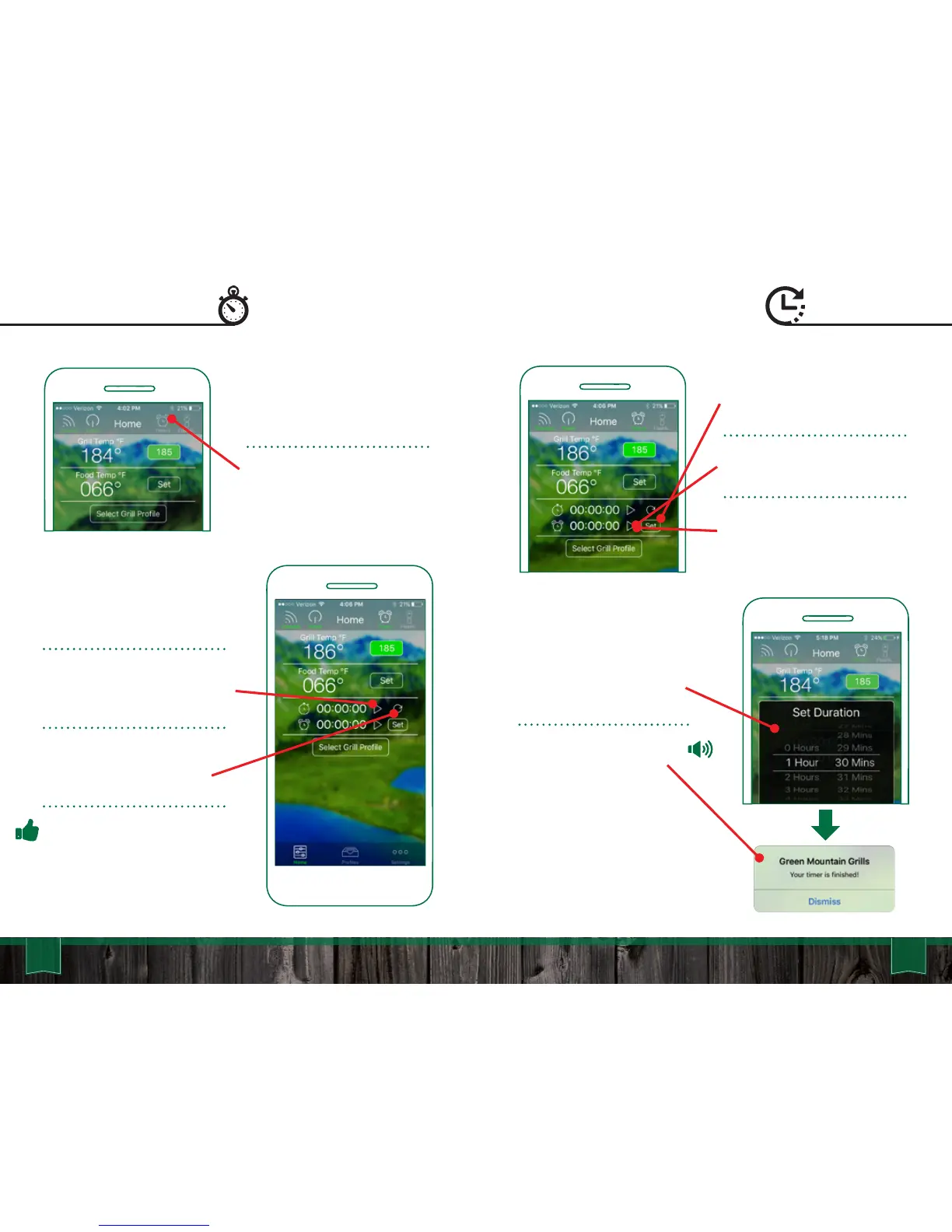
To set a timer, press the “Set”
button next to the Timer.
Begin the Timer by tapping the
“Play” icon.
To pause press the “Pause”
icon while the Timer is running.
57 58
App User Guide
Stop Watch Timer
Start the Stop Watch by
pressing the “Play” icon.
To pause the Stop Watch press
the “Pause” icon while the Stop
Watch is running.
To reset the Stop Watch to
00:00:00, press the “Reset”
icon.
Pro Tip: Use the Stop Watch
when experimenting with cook
times as it will help you when
building Food Profiles.
The Stop Watch is found on
the “Home Screen”
Activate the “Timers” icon in
the top right of screen. This will
drop down the Stop Watch and
Timer controls.
A Timer box will pop up. Select
the hours and minutes. Tap
“Confirm” to set the Timer.
An audible alarm will sound
when the timer runs out.



 To Next Page