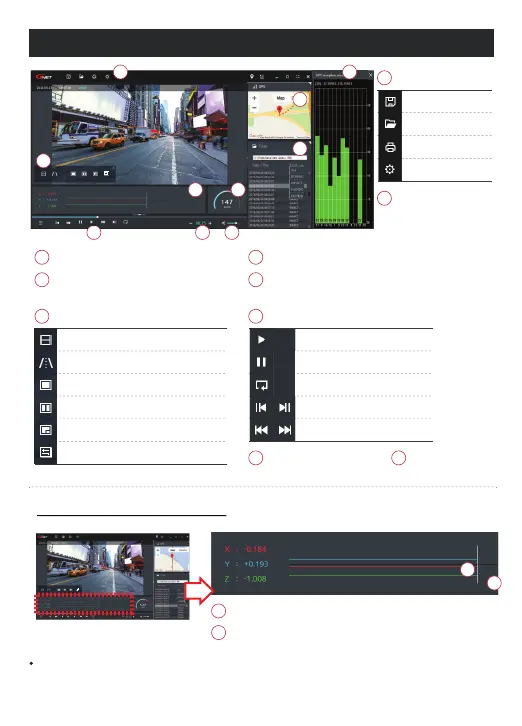
PLAYER MENU NAME
When you play the video, three-dimensional coordinate system information (G-sensor data) on the X-axis(progress direction),
Y-axis (left-right), and Z-axis (height) of the image currently being played at the G-sensor data location is output.
How to check G-sensor data
The location of the image currently being played
Numerical values and graphs of three-dimensional
coordinate system information (G-sensor data)
Tool Box
Google Map
Playlists and Information Display
G-sensor (acceleration) graph
GPS reception window
Save
Open Folder
Print
Setting
It can be used only when an external GPS
is connected.
When GPS and internet are
connected, it will work normally.
Speedometer
It can be used only when an external GPS is connected
<Magnification of G-sensor data>
7JEFPDPOUSPMQPQVQ
Thumbnail
Draw a lane
View a video
Split View
PIP View
Toggle (change) color
1MBZBSFDPSEFEWJEFP
"EKVTUQMBZCBDLTQFFE
4PVOEDPOUSPM
forward play
Pause
Repeat event video
Previous, Next Event
play frame by frame



 To Next Page