INSTALLATION
2
1
3
Once the bracket is secure, ensure that the memory card has been inserted. Proceed
to peel the cover from the double sided tape on the bracket.
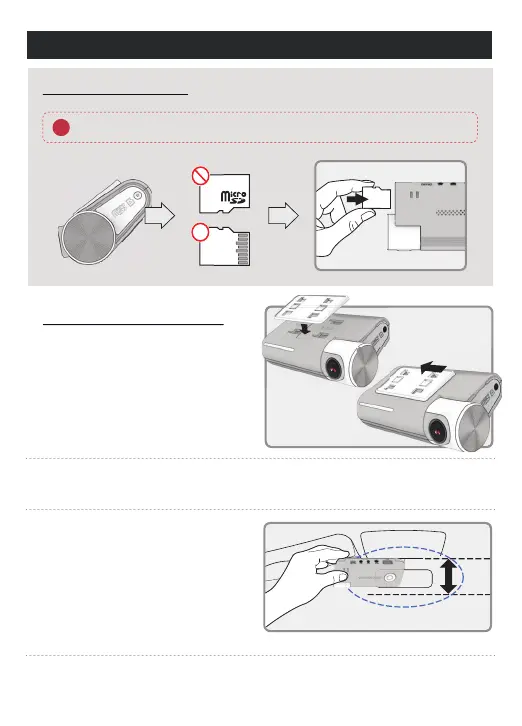
HOW TO INSTALL DASHCAM
Assemble the front camera with
the provided bracket in the order
displayed. Make sure bracket is
hooked correctly. Push and align it
until a sound is heard. (ⴘ,ⴙ).
Inserting Memory Card
1MFBTFCFGVMMZBXBSFPGUIFPSJFOUBUJPOPGUIF.JDSP4%.FNPSZ$BSE
Install the front camera onto the front
windshield of the vehicle making sure
the angle and location is properly
aligned.
ⴙ
ⴘ
Depending on the vehicle, the front angle may be dierent. It is recommend to hold a
dash cam vertically based on a regular passenger car.
4
TIP: The adhesive is extremely sticky.
Avoid touching the adhesive to the
windshield until the mount is properly
positioned and aligned.



 To Next Page