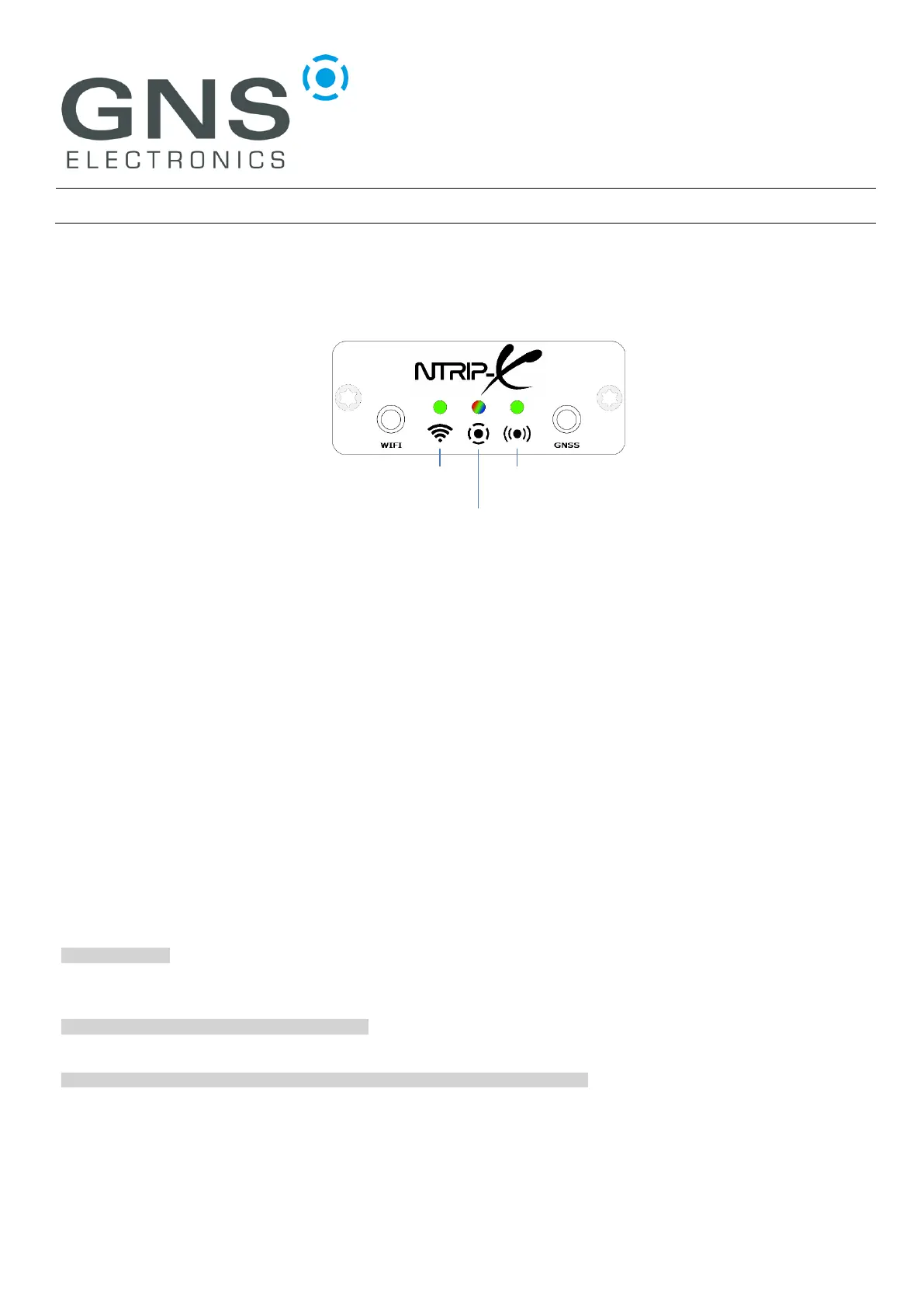
1 LED DESCRIPTION
1.1 Wi-Fi LED (green)
The Wi-Fi LED lights up whenever the NTRIP-X device is connected to an access point. Its
intensity varies with the reception quality and can be used to find the optimum position for the
Wi-Fi antenna, just place it where the LED shines brightest.
Please note that the NTRIP-X can also work as an access point for initial configuration.
Connections where the NTRIP-X acts as access point are not reflected by the Wi-Fi LED.
1.2 GNSS LED (green)
The GNSS LED is active while the GNSS receiver has a position fix.
1.3 Status LED (RGB)
The status LED is full color and displays the status of several internal modules as a succession of
blink-codes in different colors. Each sequence starts with “white” and continues with colors according
to modules currently active. Colors and blink-codes are detailed in the table below, here are some
typical ones:
white – white - …
All modules but the Wi-Fi access point (AP) disabled. This is the state after factory reset, you can
connect to the internal AP and configure the device.
white – blue (double) - white – blue (double) - …
The device is successfully connected to a Wi-Fi network. No other modules active.
white – blue (double) – green (double) - white – blue (double) – green (double) - …
The device is successfully connected to a Wi-Fi network and to an NTRIP-Server.


 To Next Page