3.3 Securing the device
3.3.1 Securing the Access Point
It is highly advisable to disable the built-in Access Point (AP) after the device has been successfully
connected to a Wi-Fi network. Configuring via WPS will do this automatically but if Wi-Fi has been
configured manually via the web interface, the AP will remain active to allow re-configuration in case
the supplied SSID/password is wrong.
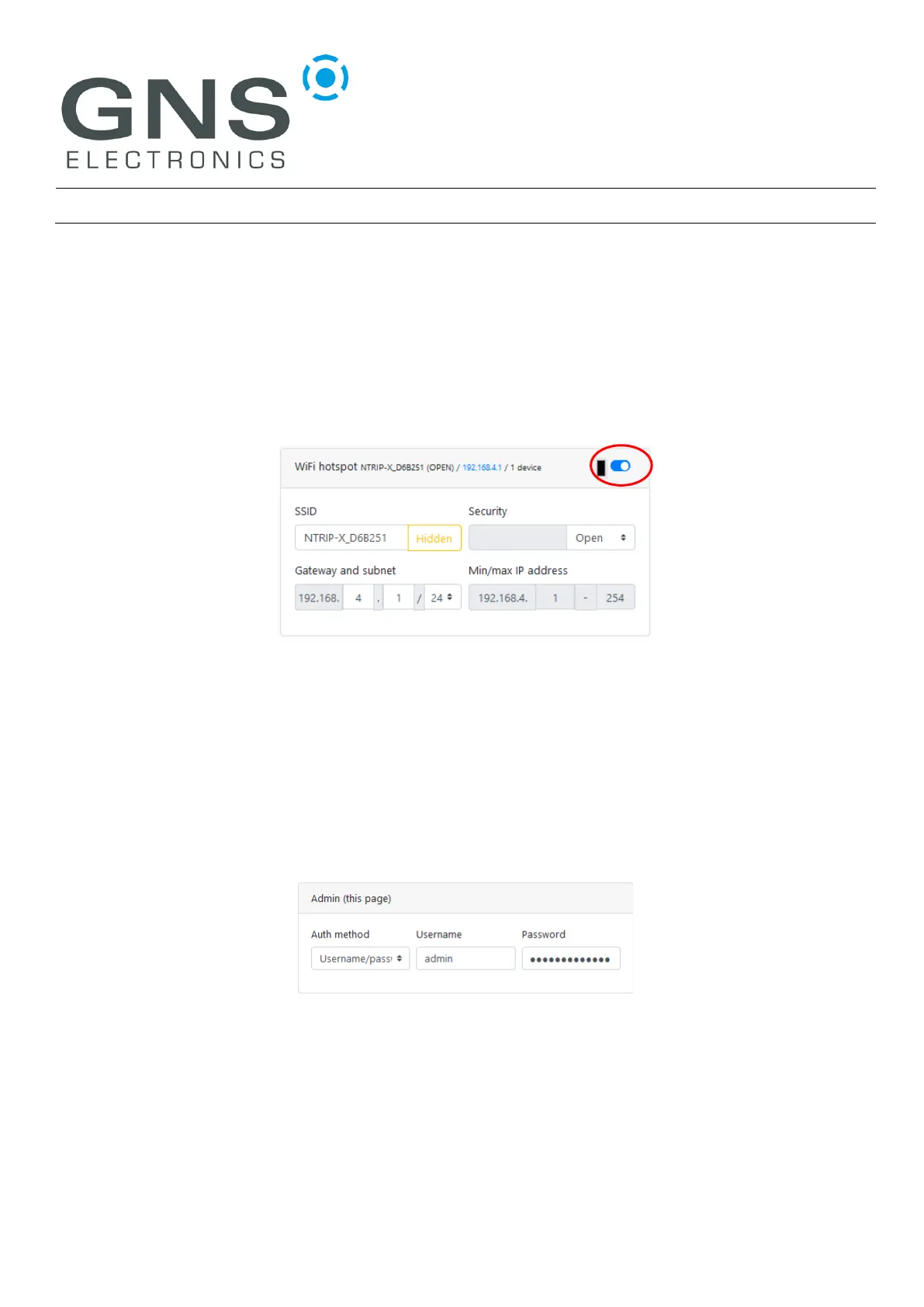
To disable the AP, log into the NTRIP-X under its new IP address and disable the module by clicking on
the switch located in the upper right corner of the WiFi hotspot configuration:
The ‘Submit’ Button needs to be pressed to activate the changes.
If for some reason the AP should remain active, the security should be adjusted to WPA/2-PSK and a
sufficiently complex password should be supplied. The ‘Submit’ Button needs to be pressed to activate
the changes.
3.3.2 Securing the web interface
Depending on the nature of the network, it may be sensible to secure access to the configuration web
interface. This is accomplished by changing the Admin module’s Auth Method to Username/Password
and entering a username and sufficiently complex password.
The ‘Submit’ Button needs to be pressed to activate the changes.
If the password gets lost, the only way to recover the device is to execute a factory reset!


 To Next Page