3.2.2 Using the internal Wi-Fi Access Point to connect to a Wi-Fi network
Make sure that the NTRIP-X is not yet configured (status LED blinks slowly only white). Otherwise
execute a factory reset as described in §2.1.
Using a smartphone, tablet or notebook, scan for available Wi-Fi networks and connect to the one
named NTRIP-XXXX (where XXXX is a unique number). Open a browser and navigate to
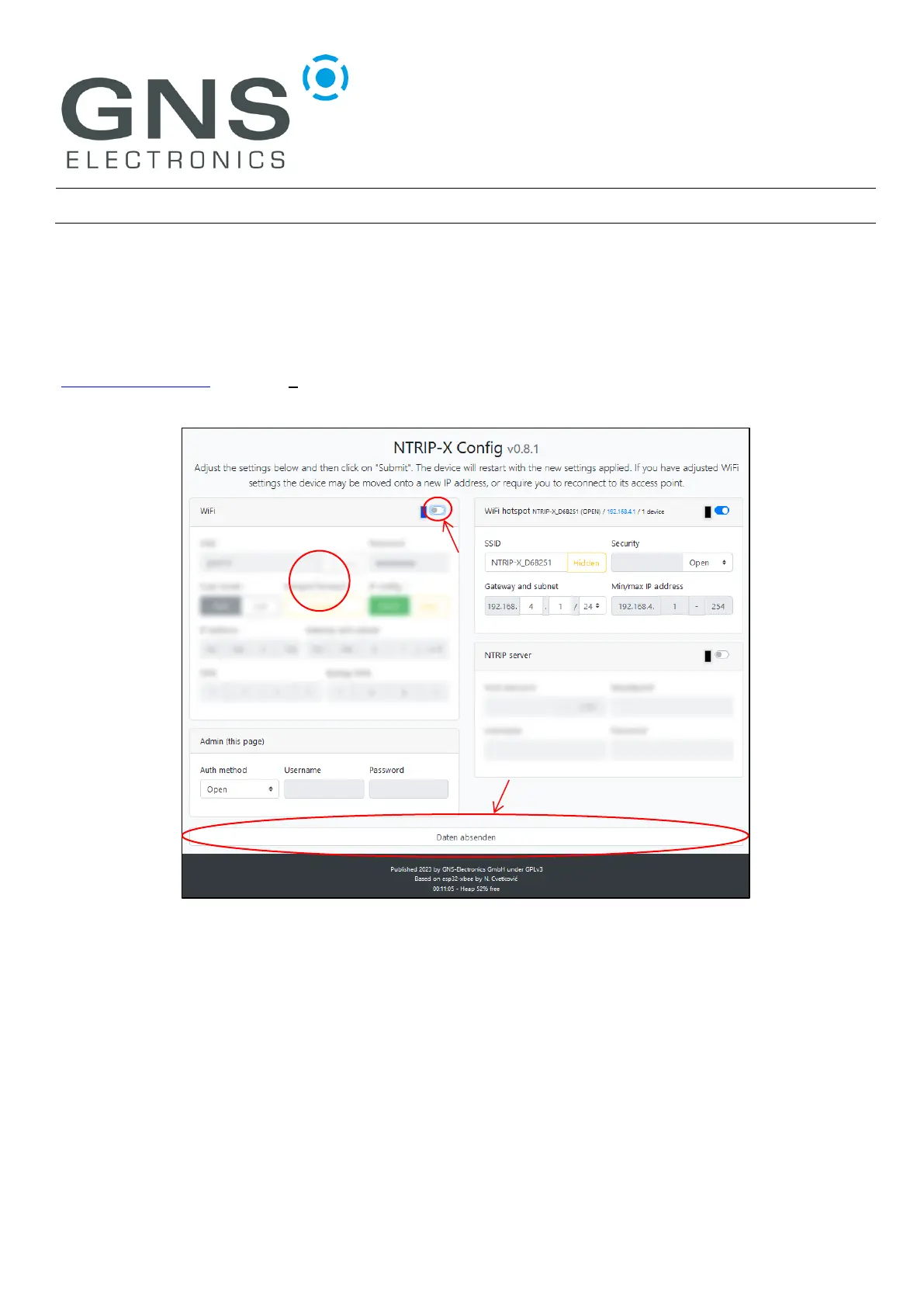
http://192.168.4.1 (not https://) where you should be greeted by the configuration page:
On a smartphone you might be presented with a one-column view of the same configuration page. In
this case you will need to scroll down to locate the settings for specific modules and the ‘Submit’
Button.
Now enable the Wi-Fi module by clicking on the switch marked ‘1’ in the screenshot above. This will
un-blur the Wi-Fi configuration under ‘2’. Fill-in SSID and Password in the now visible fields and press
the ‘Submit’ button marked ‘3’.
The device will reboot, and the status LED will eventually indicate the Wi-Fi connection (blue double
blink). Please note that the internal AP will not be disabled automatically, so continue with
Securing the device.


 To Next Page