Gocycle
®
Owner’s Manual for GS, August 2018
© Karbon Kinetics Limited. All Rights Reserved. 30
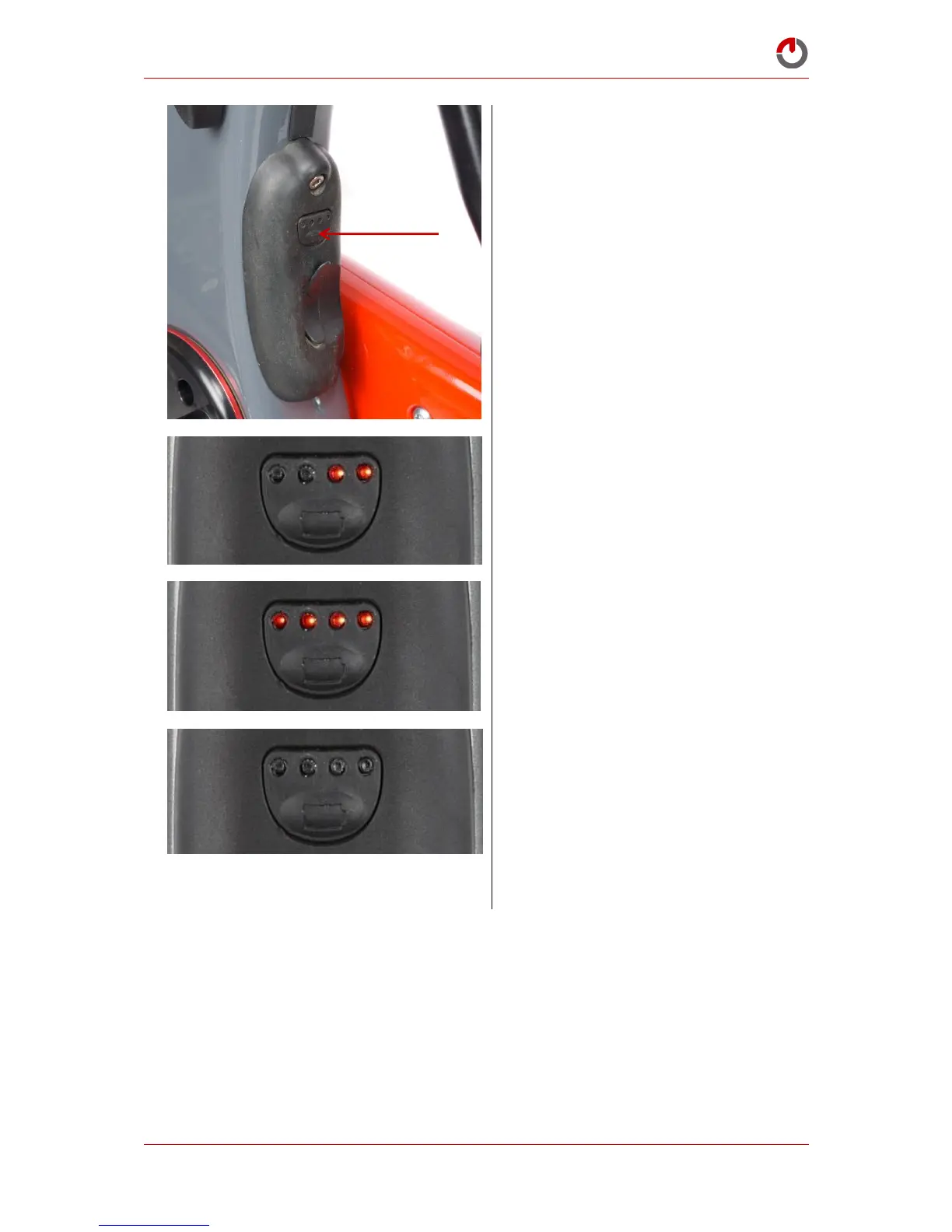
To manually enter sleep mode, press and
hold the button until the right LEDs (3,4)
begin to flash
LEDs (3,4) will continue to flash whilst the
battery enters Sleep Mode
All LEDs (1,2,3,4) will flash to confirm that
the battery has entered Sleep Mode
The LEDs will then remain off and will not
illuminate when the button is pressed
momentarily to show fuel level.
5.3.4 Automatic Sleep Mode
The battery will enter Sleep Mode automatically if not in use for 5 hours. Check that the battery is in
Operation Mode before attempting to ride. If the Gocycle is plugged into the charger and the charger is
charging, it will never enter Sleep Mode. If your Gocycle G3 or GS is inactive for over 30 hours it will
enter Deep Sleep Mode. In this mode, the battery will not accept charge unless the Gocycle is turned
on. The battery will not turn on if the charger is still plugged in.



 To Next Page