Wireless Remote Control
With 433 MHz wireless system, this product has remote grouping and control function.
Up to 6 groups of video lights can be controlled. 16 channels are available with strong
anti-interference capability.
● Please set the channels and groups of video light to the same as those of remote
control before usage.
● When using the White Version, please set the color temperature of the remote control
as 5600K constantly;
● When using the Yellow Version, please set the color temperature of the remote control
as 3300K constantly;
Adjusting Channel/Group of the Video Light
● Press the CH/GRP button and the group icon blinks. Turn the select dial to choose a
group ID (A to F).
● Press the CH/GRP button twice and the channel icon blinks. Turn the select dial to
choose a channel ID (1 to 16).
Adjusting Channel/Group of the Remote Control
● Press the CH/GRP button and the group icon blinks. Press the”-““+” button to choose
a group ID (A to F).
● Press the CH/GRP button twice and the channel icon blinks. Press the”-““+” button to
choose a channel ID (1 to 16).
Adjusting Light Brightness/Color Temperature with the Remote Control
● Press the”-““+” button to adjust the light brightness.
● Press the SET button of the remote control once and the color temperature icon blinks.
Press the”-““+” button to adjust the color temperature.
Other Operation Tips:
● Pressing the ON/OFF button on the remote control can turn on/off all the video light
groups.
● Pressing the “SET” button on the remote control for 2 seconds can turn on/off the
current video light group.
● Please remove the battery if the light will not be used for an extended period of time.
When there are some abnormal situations in the inner video light, the relevant
LCD signs will blink as warnings. For example:
1. When the fan stops working due to fault, signs will blink to alarm.
2. When heatsink’ temperature is over 70 Celsius degrees, the temperature
on the LCD panel will blink and the video light will stop working.
3. When the battery level is low, the battery icon will blink and the video light
will stop working.
Battery
Features
1. This Video light uses Li-ion polymer battery(can be in common use with AD600 series
lithium battery) which has long runtime. The available charge-and-discharge times are
500.
2. It is reliably safe. The inner circuit is against overcharge, overdischarge, overcurrent,
and short circuit.
3. Take only 4 hours to fully charge the battery by using the standard battery charger.
Cautions
Do not short circuit.
Do not expose to rain or immerse into water. This battery is not water proof.
Keep out of reach of children.
No over 24 hours' continuous charging.
Store in dry, cool, ventilated places.
Do not put aside or into fire.
Dead batteries should be disposed according to local regulations.
If the battery had ceased using for over 3 months, please make a full recharge.
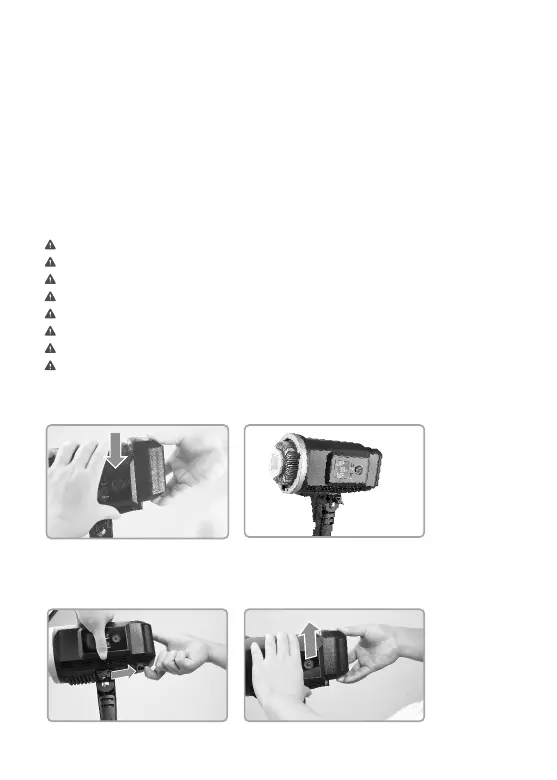
Loading and Unloading the Battery Pack
Loading:
Push down the battery pack
2 until it is locked.
Match the battery's groove
1 with the main battery
compartment's ridge.
Push the battery pack
2 upward to unload it.
Push the Battery Locking
1 Ring to the right.
Unloading:


 To Next Page
 Loading...