Need help?
Do you have a question about the Godox SLB60W and is the answer not in the manual?
Details the key features and specifications of the SL Series video lights.
Provides essential safety guidelines for using the video light to prevent hazards.
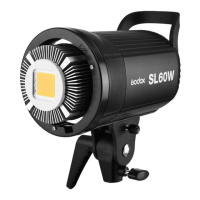
Identifies and lists the various parts of the SL Series video light's main body.
Details and lists the components of the Godox RC-A5 remote control.
Lists and illustrates the standard accessories provided with the video light.
Instructions on how to connect and turn the video light on and off.
Guide on how to control and adjust the light output intensity.
Information on temperature monitoring and control functions.
Details the 433 MHz wireless system for grouping and control.
Instructions for setting channels and groups on the video light and remote.
How to adjust light brightness and color temperature using the remote.
Provides extra tips for using the remote and device functions.
Highlights battery features, safety warnings, and charging information.
Step-by-step guide on how to install and remove the battery pack.
Explains how to interpret the battery level indicators on the LCD panel.
Presents detailed technical specifications for both White and Yellow versions.
Provides technical specifications for the RC-A5 remote control.
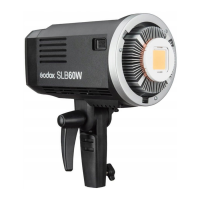
The Godox SL Series Video Light, specifically the SLB60 model, is a professional lighting solution designed for product shooting, photojournalism, and video recording. It is engineered to provide a stable light source and even illumination, ensuring high-quality photographic and videographic results. The SLB60 comes in two versions: a White Version with a color temperature of 5600K and a Yellow Version with a color temperature of 3300K, offering flexibility to suit different lighting needs and creative preferences.
The core function of the Godox SLB60 is to emit powerful and consistent light for various professional applications. It utilizes a 60W LED bulb, guaranteeing high brightness output. The device is designed to render colors accurately, boasting a color rendering index (CRI) of over 93, which ensures that subjects appear authentic and true to life under its illumination. This high CRI is crucial for professional work where color fidelity is paramount.
A key feature of the SLB60 is its wireless control capability. It incorporates a 433MHz wireless grouping system, allowing users to adjust light brightness remotely. This system supports up to 6 groups and 16 channels, providing robust anti-interference capabilities and enabling precise control over multiple lights in complex setups. This wireless functionality streamlines the workflow, especially in dynamic shooting environments where quick adjustments are necessary.
The SLB60 is powered by a lithium battery pack, which is interchangeable with those used in the Godox AD600 series, offering convenience and compatibility within the Godox ecosystem. For indoor use, the light can also be powered by an optional AD-AC power source. The battery system is designed for reliability and safety, featuring protection against overcharge, overdischarge, overcurrent, and short circuits. A full charge typically takes about 4 hours using the standard battery charger.
The device features a large-sized LCD panel that displays essential information such as battery level, channel, group, light brightness, and temperature. This clear display ensures that users can monitor the light's status at a glance. All settings made on the device are automatically saved, preventing the need for re-configuration after power cycles.
Operating the SLB60 is straightforward and intuitive. To turn the light on or off, users simply long-press the ON/OFF button for one second. The LCD panel immediately displays the current operational information.
Light brightness adjustment is achieved by turning the select dial, which allows for precise control over the light output. The brightness is adjustable within a range of 10% to 100%, providing ample flexibility for different lighting requirements.
For remote control, the SLB60 can be paired with the Godox RC-A5 remote control. Before use, it is essential to set the channels and groups on both the video light and the remote control to match. This involves pressing the CH/GRP button on either device, waiting for the group or channel icon to blink, and then using the select dial (on the video light) or the “-” and “+” buttons (on the remote control) to choose the desired ID. The remote control also allows for adjusting light brightness and color temperature. Pressing the “-” or “+” buttons directly adjusts brightness, while pressing the SET button once makes the color temperature icon blink, allowing for adjustment using the “-” or “+” buttons.
The remote control offers additional operational tips: pressing its ON/OFF button can turn all video light groups on or off, and pressing the SET button for two seconds can toggle the current video light group on or off.
The Godox SLB60 is equipped with several features designed to ensure its longevity and safe operation. It includes a temperature control function to prevent overheating. If the product overheats, it will automatically cease operation and resume once it has cooled down, thanks to its built-in overtemperature protection. This mechanism safeguards the internal components from heat-related damage.
For enhanced heat dissipation, the light incorporates a red copper heatsink and a built-in fan. This active cooling system is crucial for maintaining optimal operating temperatures, especially during prolonged use at high power settings.
A specialized protective cover is included to shield the LED beads from physical damage, dust, and other environmental factors, thereby extending the lifespan of the light source.
The device also provides temperature indication on its LCD panel. Users can switch between Celsius and Fahrenheit by pressing the SET button for two seconds. Furthermore, the temperature icon will blink if the fan stops working due to a fault, or if the heatsink's temperature exceeds 70 degrees Celsius, at which point the video light will stop working as a safety measure. Users can also set a desired temperature range (40°~60°) for the fan to operate within by quickly double-clicking the SET button and turning the select dial.
Battery management is also integrated into the device. The LCD panel displays the battery level, indicating when a recharge is needed. If the battery level is low, the battery icon will blink, and the video light will automatically power off in one minute, prompting the user to recharge the battery within 10 days to maintain its health. For extended storage, it is recommended to remove the battery if the light will not be used for a long period. If a battery has been unused for over 3 months, a full recharge is advised.
To ensure safety and prevent damage, users are cautioned against placing the device in high temperatures or high humidity, handling it with wet hands, immersing it in water, or exposing it to rain. Disassembly or modification of the product is also discouraged; any repairs should be handled by an authorized service center.
 General
| Type | LED Video Light |
|---|---|
| Power Output | 60W |
| CRI | ≥96 |
| Wireless Control | Yes |
| Channels | 16 |
| Mount | Bowens Mount |
| Mount Type | Bowens S-Type |
| Color Temperature | 5600K |
| TLCI | ≥97 |
| Brightness | 10%-100% |
| Input Voltage | AC 100-240V |
| Power Source | DC13~16.8V |
| Cooling System | Fan Cooling |
| Control Interface | LCD Display |
| DMX Control | No |
| Remote Control | Yes |
| Wireless Grouping | Yes |

 To Next Page