- 21 - - 22 -
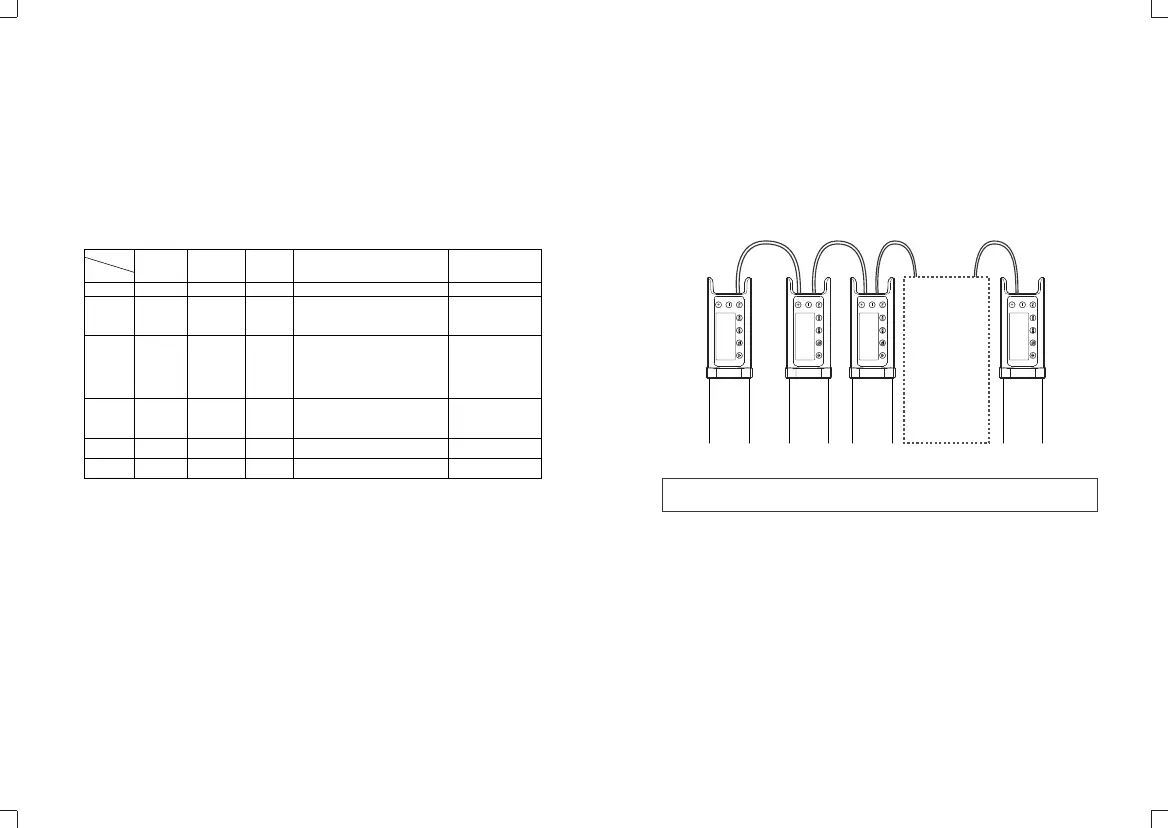
4.4 DMX LEAD and FOLLOW mode
4.4.1. Set one of the LED lights to LEAD mode.
4.4.2. Set other lights to FOLLOW modes.
4.4.3. Connect the lights with RJ45 cable.
4.4.4. The lights in FOLLOW modes will automatically synchronize the light
in LEAD mode.
Note: When using LEAD and FOLLOW modes through DMX port, the quantity
of lights in FOLLOW modes cannot be over 18.
4.3 DMX Control Modes
4.3.1. Set the light to FOLLOW mode and press FN button to choose ADD.
4.3.2. Press the "+" or "-" button to set 512 ADDs from 001 to 512. Now the
indicator will display blue.
4.3.3. After set ADD, connect one end of the DMX cable to DMX output port of
control center and the other end to DMX input port of the light.
4.3.4. The statistics sent by the control center are as follows:
Channel (ADD)
CCT HSI RGBW
FX Filters
0-52 52-103 104-155 156-207 208-255
0-255
Color
Temperature
Selection
0-180
H=180*2
Hue Selection
0-100
Saturation
Setting
0-255
Red Light
0-255
Green Light
0-255
Blue Light
0-255
White Light
0-17: RGB Cycle 18-35:Flash
36-53:Disco 54-71:Lightning
72-89:Broken Bulb 90-107:TV
108-125:Candle 126-143:Fire
144-161:Firework 162-179:Police Car
180-197:Fire Truck 198-215:Ambulance
216-233:Music 234-255:SOS
0-85Special Effect I
86-171Special Effect
172-255Special Effect
0-127: R-GEL
128-255: L-GEL
0-255(L-GEL/R-GEL)
Colored Paper Switch
(Every 13 values refers
to one colored paper)
Mode
0-100
0-100%
Brightness
Adjustment
0-100
0-100%
Brightness
Adjustment
0-100
0-100%
Brightness
Adjustment
0-100
0-100% Brightness Adjustment
0-100
0-100% Brightness
Adjustment
LEAD
FOLLOW 01
FOLLOW 02
FOLLOW ...
FOLLOW 18
n
n+1
n+2
n+3
n+4
n+5


 To Next Page