OWNER’S MANUAL page 12
POWER ADAPTER & SPEED CONTROL
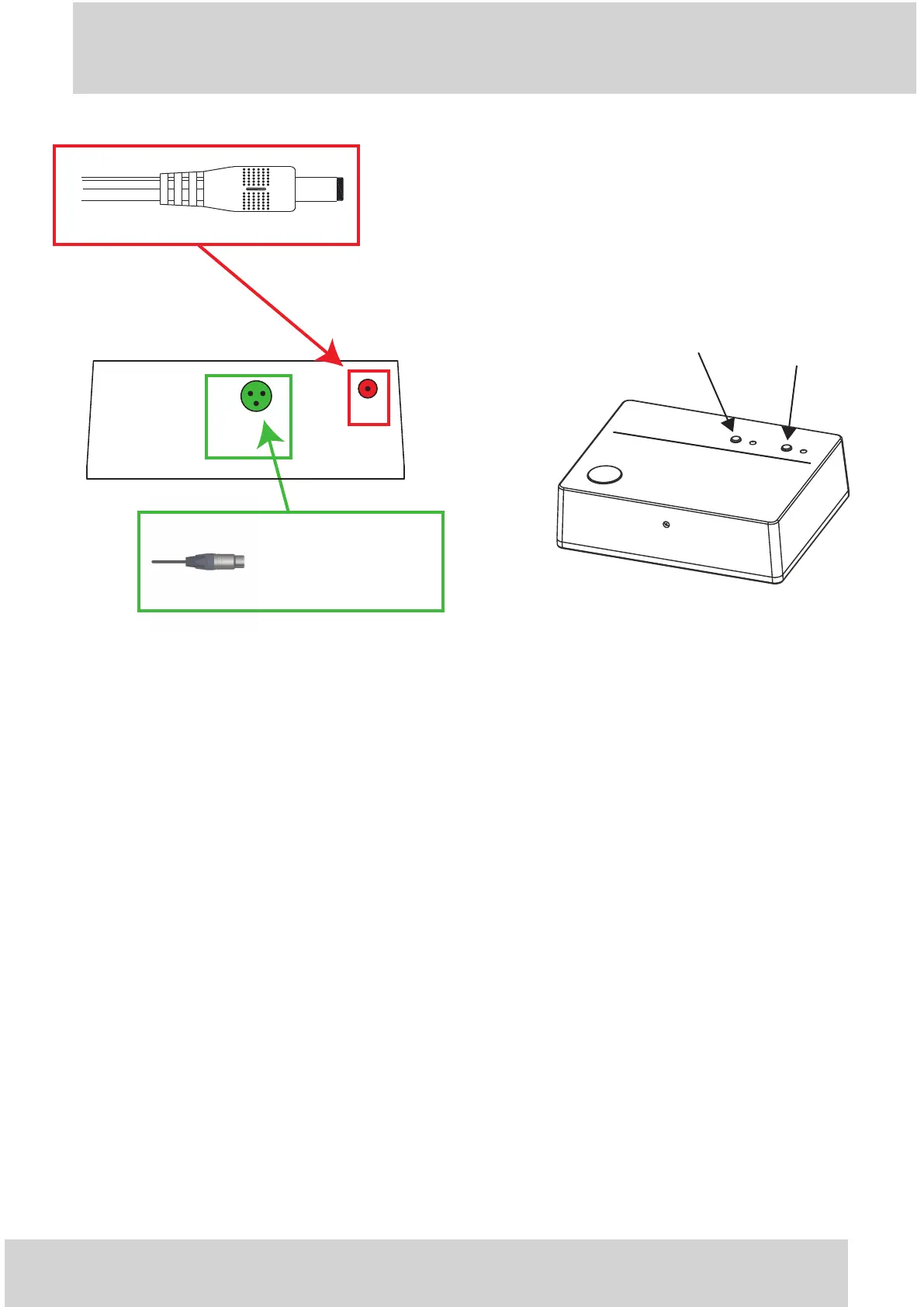
- Connecting the Power Supply Adapter Use exclsuively the
original GOLD NOTE AC adapter to power the turntable to ensure
the correct performance.
PLEASE NOTE WELL: Before plugging the AC adapter plug the
rounded connector indicated here.
33RPM BUTTON
45RPM BUTTON
TURNTABLE SPEED CONTROL ADJUST:
• 33rpm BUTTON Start and Stop the 33⅓r pm speed. Once the 33⅓rpm is playing its red LED light turn on.
• 45rpm BUTTON Start and Stop the 45rpm speed. Once the 45rpm is playing its red LED light turn on.
The Valore 425 also features a fine speed adjust “Pitch Control” allows a very fine adjust of the speed of
the turntable.
PITCH CONTROL MODE
To enter the PITCH CONTROL MODE is necessary to press and hold for 3/4 seconds both 33⅓ and 45
buttons together while the turntable playing 33⅓ or 45rpm. The related red LED light shut down and the
unit is ready to adjust the fine speed with the help of the stroboscope.
• PITCH – pressing in sequence the 33⅓rpm button its LED light flashes fine speed decrease.
• PITCH + pressing in sequence the 45rpm button its LED light flashes fine speed increase.
To get out the PITCH CONTROL MODE press and hold for 3/4 seconds both 33⅓and 45 buttons together,
the LED related to the speed adjusted will show back.
GOLD NOTE
Turntable Speed Control
33rpm
45rpm
insert the mini XLR from
the motor of the
Valore 425 here
DC in
DC out
(motor)
TSC REAR PANEL


 To Next Page