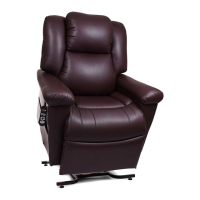
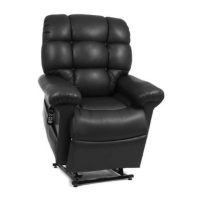
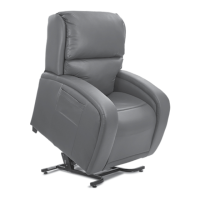
This document is the Owner's Manual and Limited Lifetime Warranty for the Golden Technologies Power Lift & Recline Chair, specifically model PR118.
Function Description:
The Golden Technologies Power Lift & Recline Chair is a medical device designed to assist individuals with sitting down and standing up. It features a power lift mechanism that gently raises the chair to an elevated position, making it easier for the user to transition from sitting to standing. Conversely, it can recline to various comfortable positions, allowing the user to relax. The chair is operated via a hand control with two buttons (S1 for up/lift, S2 for down/recline) and offers a wide range of customizable positions. It also includes a battery backup system to return the chair to a seated position during a power outage and an articulating headrest for personalized comfort.
Important Technical Specifications:
- Power Input: 115-120V 60Hz A.C. outlet.
- Battery Backup: Requires two 9-volt batteries (not included) for emergency use during power failure. These batteries are intended for one-time use to return the chair to a seated position and should be replaced yearly or after each use.
- USB Charging Port: 1AMP USB charging port on the hand control for smart devices (phones, tablets).
- Weight Capacity (Model PR118): 375 lbs. (Exceeding this limit voids the warranty and can cause instability).
- Distance from Wall/Corner (PR118): 17 inches when reclined.
- Electrical Components: Class II Device, intended for indoor use only. No serviceable parts; opening components voids the warranty.
Usage Features:
- Recline: Press and hold the S2 (down) button until the desired reclined position is reached.
- Return to Seated from Recline: Press and hold the S1 (up) button until the chair returns to a closed seated position.
- Lift: Press and hold the S1 (up) button until the desired lift height is reached.
- Return to Seated from Lift: Press and hold the S2 (down) button until the chair returns to the floor seated position.
- Lift from Reclined Position: Press and hold the S1 (up) button; the chair will pass through the seated position and begin to lift.
- Recline from Lift Position: Press and hold the S2 (down) button; the chair will pass through the seated position and begin to recline.
- Stopping at Any Position: The chair can be stopped at any point during lift or recline by releasing the button, allowing for a wide range of comfortable positions. The motor automatically shuts off at fully extended or retracted positions if the button is not released.
- Getting In/Out: Users should raise the chair to a comfortable height for sitting or standing, avoiding "flopping down" into the chair, which can cause damage and injury. Always return the chair to the seated position after use to prevent children, pets, or obstructions from getting under it.
- Articulating Head Rest: Push the top of the back forward to adjust the headrest. It clicks into positions. Continue pushing forward until no clicks are heard to return it to an upright position.
- Smart Tek™ (Power Indication): The hand control has a green indicator light that illuminates when a button is pressed. The transformer and the power cord connecting the motor to the transformer have constant green lights, indicating power flow. These lights help identify electrical disconnects and aid in diagnosing electrical problems.
Maintenance Features:
- Routine Checks: Regular maintenance checks are required. Consult your provider for proper cleaning methods.
- Electrical Components: Keep all electrical components free from moisture and liquid spills. Do not use electrical extension cords. Ensure all electrical products and wires are positioned away from the chair's metal lift frame to prevent crushing and fire hazards.
- Wiring Harnesses: Periodically inspect all wiring harnesses for cuts, damage, fraying, or disconnections. Unplug the chair and contact your provider if damage is found.
- Fasteners: Periodically check all fasteners for tightness, wear, and corrosion. Unplug the chair and contact your provider if issues are present.
- Batteries: Replace the two 9-volt backup batteries after one use or yearly, even if not used.
- Hand Control Routing: Instructions are provided for moving the hand control wire from one side of the chair to the other, involving detaching and reattaching J-Clips and the extension wire.
- Leg Levelers: Adjust the leg levelers on the bottom of the chair to ensure it is level and to prevent high-pile carpets from obstructing footrest operation.
Safety Guidelines:
The manual emphasizes critical safety warnings, mandatory actions, and prohibited actions using specific symbols. Key safety points include:
- Read the manual thoroughly.
- Do not allow children or pets near or to operate the chair. Unplug the hand control and place it out of reach when not in use.
- Avoid flopping into the chair.
- Do not allow anyone to sit on your lap, arm, or footrest while operating the chair to prevent tipping.
- Keep hands and fingers clear of pinch/crush points between the seat cushion and arm, and under the chair.
- Do not retrieve fallen objects from under the chair while it is plugged in.
- Ensure no persons, pets, or obstructions are under or in front of the footrest or behind the chair during operation.
- Do not position yourself, children, or pets too high on the reclined chair to avoid tip-over hazards.
- Do not smoke while operating, sitting, or resting in the chair.
- Avoid electrical shock: Do not immerse electrical components in liquid or spill liquids on them.
- Do not operate while intoxicated or under medications that impair judgment.
- Consult a physician if you have medical conditions limiting physical or mental capacity.
- Discontinue use and contact provider immediately if any problems occur.
- Exceeding weight limits can cause instability.
The chair comes with a Consumer Limited Lifetime and Seven Year Warranty.
- Lift Mechanism, Recline Mechanism, and Chair Frame: Lifetime warranty for the original consumer to repair or replace at Golden's option. Labor is subsidized for three years (six months for Capri, Monarch, and PR118).
- Electrical Parts: Three-year warranty for the original consumer. Labor is subsidized for one year (six months for Capri, Monarch, and PR118).
- Electrical Parts (Fourth Through Seventh Year): Pro-rated warranty with discounts off retail price (35% in year 4, 25% in year 5, 15% in year 6, 5% in year 7). Capri, Monarch, and Monarch Plus are excluded from this pro-rated warranty.
- Terms: Golden will repair/replace defective parts not subjected to misuse, abuse, improper service, transit damage, or unauthorized alterations. Warranty does not cover unnecessary service calls or unsatisfactory power connections. Exceeding weight capacity voids the warranty. Fabric shading is not guaranteed.
- Exclusions: This warranty is the sole and entire warranty, excluding all other warranties, express or implied, including merchantability or fitness for a particular purpose. It does not cover incidental or consequential damages.
- Validity: Valid in all 50 states, Canadian Provinces, and Puerto Rico. All claims must be approved by Golden Technologies.

 Need help?
 General

 To Next Page