5
22K – tone burst for Ku LNB bands switching. If a universal LNB is used, this parameter is
not set, and the receiver itself generates the required command. If you use a circular LNB,
you can change this parameter;
LNB Power – allows you to set one LNB operating polarization – H (18 V) or V (13 V). When
using two polarizations, the value is left – Auto;
Motor Setup – if you have a motorized system, select the type of protocol used, namely
DiSEqC1.2 or USALS. The choice of the protocol is carried out using the right / left buttons.
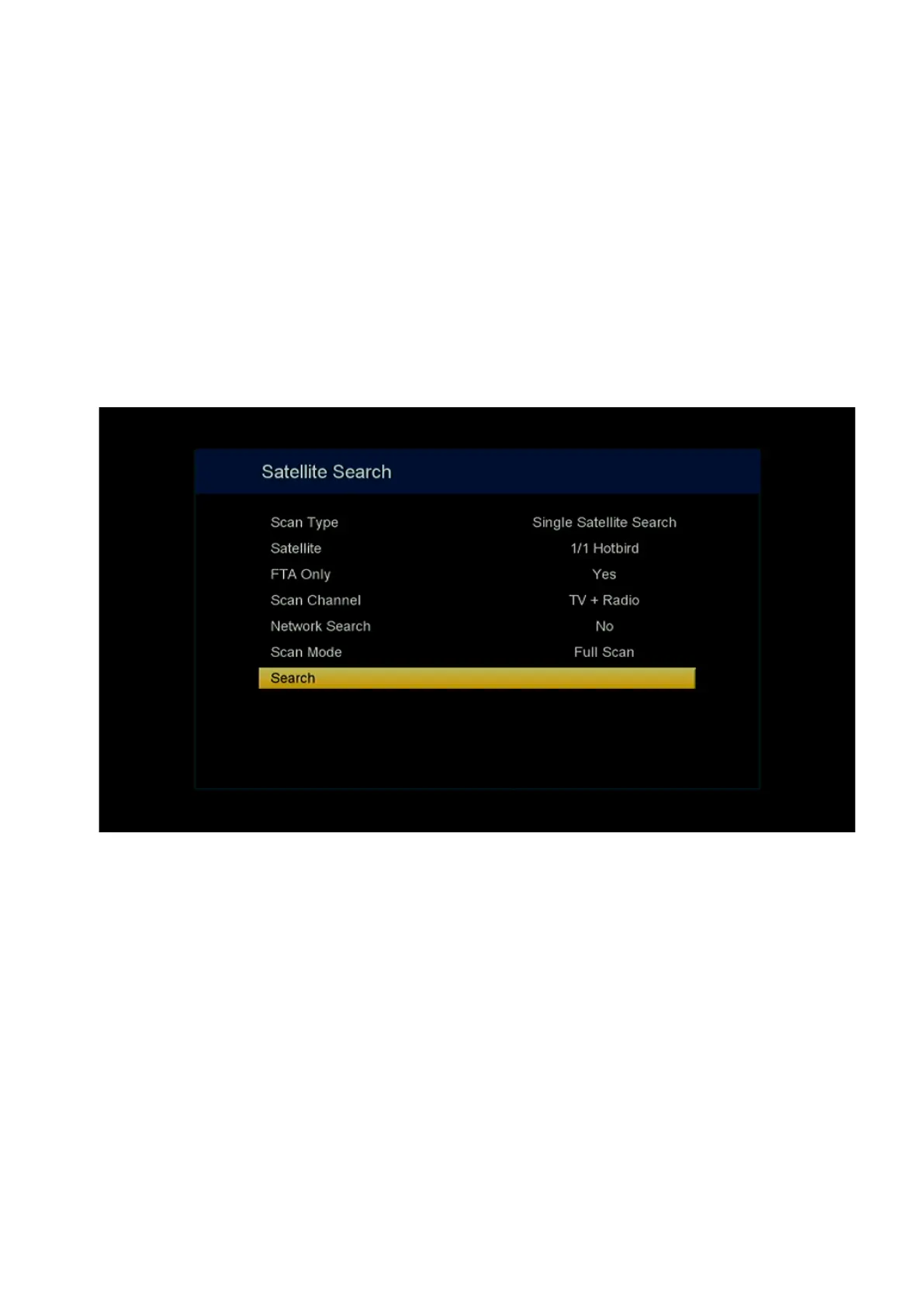
After finishing the LNB settings, press the Blue button to go to the channel scan settings. The
window contains the following parameters:
Scan Type – if you select one satellite in the settings, you will be prompted to search for
channels from this satellite. If several satellites are selected in the settings, you can search
for channels from several satellites;
Satellite – the name of the satellite from which the channel will be scanned is displayed. If
you select several satellites in the settings, and in the scan type – All Satellites Search, you
can select the satellite from which the channels will be scanned;
FTA Only – if you select Yes, the receiver will scan only open unencrypted channels,
otherwise the value No is selected;
Scan Channels – the type of channels to be scanned is selected. You can select separately
TV channels, radio channels and jointly TV channels with radio channels;
Network Search – allows you to search for channels by satellite operator transmitted
parameters if you select Yes;
Scan Mode – Full Scan is used to scan all transponders of the selected satellite or operator.
Blind Scan is used when the receiver itself calculates the unknown parameters of the
transponders and scans the channels using them;
At the end of the settings, the line – Search is selected and the OK button is pressed to go to
direct channel scanning.


 To Next Page