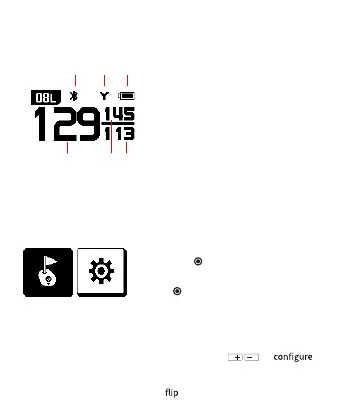
Screen Description
1.
2.
3.
4.
5.
6.
7.
Hole No. / Left(L), Right(R) Green
L or R will appear next to the hole if
available
Bluetooth
Meter/Yard. Default distance shown in
yards
‘M’ icon will appear when switched to
meters
Battery level indicator
Distance to the center of the green
Distance to the back of the green
Distance to the front of the green
Overview of Play Golf Functions
• Turn on the device and select ‘Play Golf’,
then Press
to search the nearest golf
course
• Press
to hear the distance to the center
of the green
- Press once for center of the green, press
and hold for distances to the front and
back of the green
• Select ‘Setting’ via
to
Bluetooth, measurement unit, volume,
left/right green, language, time setting,
and
screen
Play Golf Settings
42 31
5 6 7



 To Next Page