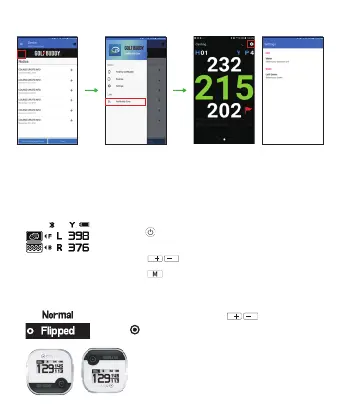
1. Start GOLFBUDDY Smart App when aim V10 is paired with your mobile device
2. Press ‘GOLFBUDDY Cast’ from the menu
3. Casted screen will display on your mobile device
▶ Casting
※ Normal : Default Screen
Flipped : 180° Degree upside down
▶ Flip Screen Mode
• ‘Setting’ → ‘Display’ and use to select, and
press to complete
▶ Target / Hazard Information
•
•
•
Press the button once briefly to view hazard
information on the main screen
Press buttons to view other Hazardsthe
the
Press button to return to the main screen


 To Next Page